How to effectively use console parental controls for age-appropriate game access and screen limits?
Navigating the Digital Playground: Empowering Parents with Console Controls
In today’s digital age, video games are a ubiquitous part of childhood. While gaming offers numerous benefits, from problem-solving skills to social interaction, it’s crucial for parents to ensure their children engage with content appropriate for their age and maintain a healthy balance. Fortunately, modern gaming consoles are equipped with robust parental control features designed to give parents peace of mind. Understanding and effectively utilizing these tools can transform your child’s gaming experience into a safe, controlled, and enriching activity.
This guide will walk you through the essential aspects of console parental controls, helping you set up age-appropriate game access and establish healthy screen limits.

Understanding Console Parental Control Features
While specific menus and options may vary slightly between PlayStation, Xbox, and Nintendo consoles, the core functionalities of parental controls are remarkably similar. They generally allow you to:
- Restrict Game Content by Age Rating: Based on industry standard ratings (e.g., ESRB in North America, PEGI in Europe), you can prevent access to games deemed unsuitable for your child’s age.
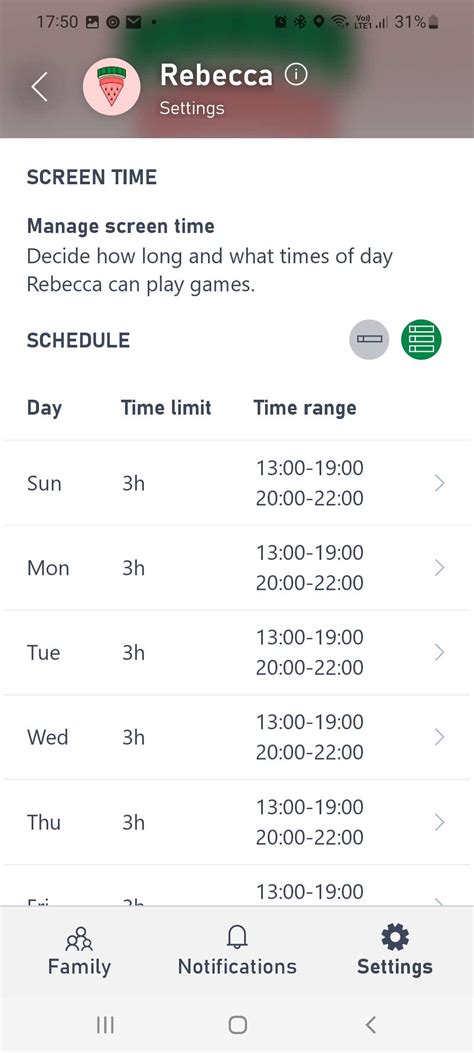
- Manage Screen Time: Set daily or weekly limits on how long your child can play, or specify exact times when the console can be used.
- Control Communication and Social Features: Limit or block online interactions, voice chat, messaging, and friend requests to protect children from inappropriate contact.
- Limit In-Game Purchases: Prevent unauthorized spending by requiring a password for any purchases made through the console’s digital store.
- Web Browser Restrictions: Disable or filter web browsing capabilities available on some consoles.

Setting Up Age-Appropriate Game Access
One of the most critical aspects of parental controls is ensuring your child plays games suited to their developmental stage. Here’s how to approach it:
- Create Individual Child Accounts: Most consoles allow you to set up separate user profiles for each family member. This is essential for applying customized restrictions. Link these child accounts to a family group managed by the parent’s account.
- Set Age Restrictions: Within each child’s account settings, you can specify their birthdate, and the console will automatically suggest an age-appropriate content level based on its rating system. You can often manually adjust this level to be more or less restrictive as needed.
- Understand Rating Systems: Familiarize yourself with the game rating system used in your region (e.g., ESRB, PEGI, CERO). These ratings go beyond just age, often including content descriptors for violence, language, sexual themes, and drug reference.
- Review Game Descriptions: Before allowing a game, always check its full rating description and perhaps watch some gameplay footage to ensure it aligns with your family’s values and your child’s maturity level.
Establishing Healthy Screen Limits
Balanced screen time is vital for a child’s overall well-being. Console parental controls offer sophisticated tools to help manage this:
- Set Daily/Weekly Playtime Limits: Decide on a reasonable amount of time your child can play each day or across a week. The console will automatically log them off or notify them when their time is up.
- Create Play Schedules: Beyond just limits, you can often define specific hours of the day when gaming is permitted. For example, no gaming during school hours or after bedtime.
- Implement Bedtime Restrictions: Ensure gaming stops well before bedtime to promote better sleep hygiene.
- Communicate the Rules: Discuss these limits with your children. Explain the ‘why’ behind the rules – for their health, schoolwork, and other activities. Involving them in the discussion can lead to better compliance.

Tips for Effective Implementation and Ongoing Management
- Open Communication is Key: Don’t just impose rules; explain them. Discuss the benefits of balanced gaming and the reasons for content restrictions.
- Be Consistent: Stick to the limits and rules you’ve set. Inconsistency can undermine their effectiveness.
- Regularly Review Settings: As children grow, their interests and maturity levels change. Revisit and adjust parental control settings periodically.
- Lead by Example: Your own screen habits influence your children. Demonstrate responsible technology use.
- Consider Rewards: Use gaming time as a reward for completed chores or homework, reinforcing positive behavior.
Conclusion
Console parental controls are powerful tools, but they are most effective when used as part of a broader strategy for digital parenting. By actively engaging with these features, communicating openly with your children, and setting clear expectations, you can cultivate a positive, safe, and balanced gaming environment. Empower yourself with these controls to navigate the exciting world of gaming with confidence, ensuring your children enjoy their digital adventures responsibly.