How to reduce battery drain from graphics-intensive mobile games?
Graphics-intensive mobile games offer stunning visuals and immersive experiences, but they often come at a cost: rapid battery drain. Modern smartphones are powerful, yet high-demand applications like these games can quickly deplete your device’s energy. Fortunately, there are several practical steps you can take to extend your playtime without constantly searching for a charger.
Optimize In-Game Graphics Settings
The easiest and most impactful way to reduce battery consumption is to adjust the game’s internal settings. Developers often include options that allow you to balance visual fidelity with performance and battery life. Lowering certain settings might make a minor visual difference, but it can lead to significant energy savings.
Start by looking for settings related to ‘Graphics Quality,’ ‘Resolution,’ or ‘Texture Quality.’ Reducing these from ‘Ultra’ or ‘High’ to ‘Medium’ or ‘Low’ can drastically cut down the GPU’s workload. Similarly, ‘Shadow Quality’ and ‘Anti-aliasing’ are notorious battery hogs; turning them down or off will improve efficiency. Some games also offer a ‘Performance Mode’ or a ‘Battery Saver’ option directly in their settings, which automatically adjusts multiple parameters for optimal power consumption.
Frame rate (FPS) is another crucial setting. While a higher frame rate (e.g., 60fps) provides a smoother experience, it demands more from your processor and GPU. Capping the frame rate to 30fps or a setting like ‘Standard’ can yield considerable battery savings. If the game offers it, disable ‘V-Sync’ if you notice it’s causing your device to work harder than necessary.

Adjust Your Phone’s System Settings
Beyond the game itself, your phone’s operating system settings play a vital role in overall battery consumption. A few tweaks here can make a big difference.
Screen brightness is one of the biggest power consumers. While playing, lower your screen brightness to the lowest comfortable level. Disable ‘Auto-brightness’ as it can sometimes overcompensate. If your phone has a high refresh rate display (e.g., 90Hz or 120Hz), consider switching it to a standard 60Hz while gaming, as the higher rates consume substantially more power.
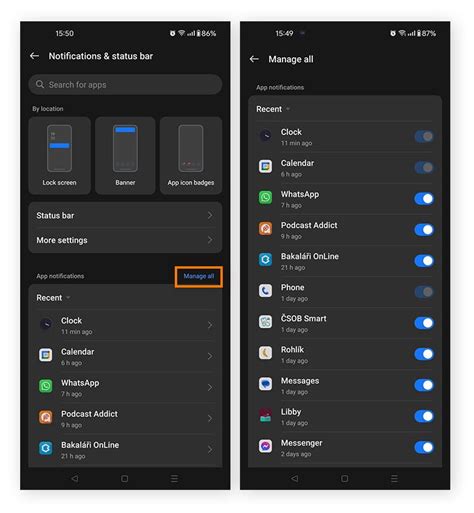
Close any unnecessary background apps before launching your game. Apps running in the background, even if idle, consume resources. Turn off non-essential notifications, as each pop-up or vibration uses a small amount of power. Many smartphones also feature a dedicated ‘Power Saving Mode’ or ‘Battery Saver’ that automatically throttles CPU performance, reduces screen brightness, and limits background activity. Activating this mode before a gaming session can be very effective.

Manage Connectivity and Audio
The way your phone communicates and outputs sound can also impact battery life.
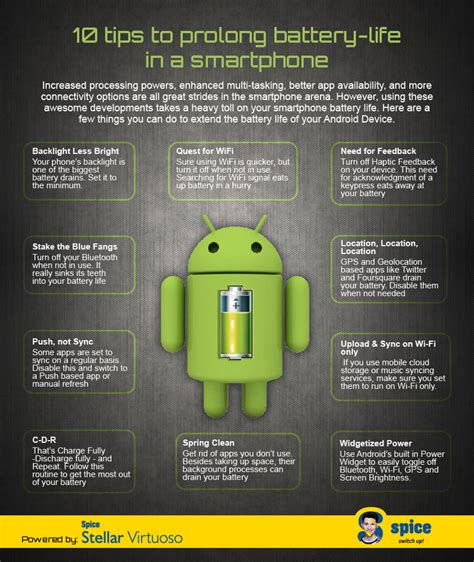
Connectivity options like Wi-Fi, mobile data, Bluetooth, and GPS all draw power. If you’re playing an offline game, consider turning off mobile data and Wi-Fi. For online games, Wi-Fi generally consumes less power than cellular data, so prioritize Wi-Fi whenever possible. Disable Bluetooth if you’re not using a wireless headset or controller, and turn off location services (GPS) unless the game specifically requires it.
When it comes to audio, using headphones (especially wired ones) typically consumes less power than relying on your phone’s external speakers. The speakers require more energy to produce sound, particularly at higher volumes.

Hardware and Usage Habits
Sometimes, the issue isn’t just software; your device’s hardware and your habits also play a part.
Older phones with degraded batteries will naturally experience faster drain. If your phone’s battery health is significantly low, even optimal settings might not provide sufficient playtime. Additionally, overheating is a major contributor to battery drain and can damage your device. Ensure your phone has proper ventilation while gaming – avoid playing under heavy blankets or in direct sunlight. Removing your phone case during extended gaming sessions can also help dissipate heat.
While playing, avoid charging your phone simultaneously, especially with graphics-intensive games. This can generate excessive heat, which is detrimental to battery health and can slow down the charging process, sometimes even causing net discharge. If you must charge while playing, ensure you’re in a cool environment and consider using a lower-wattage charger to minimize heat.

Beyond the Game: General Battery Health Tips
Maintaining overall battery health will also contribute to better performance during gaming. Try to keep your battery level between 20% and 80% to prolong its lifespan. Avoid frequent full discharges to 0% and charging to 100% and leaving it plugged in for extended periods.
Keep your phone’s operating system and all your apps, including games, updated. Updates often include performance optimizations and bug fixes that can improve efficiency and reduce power consumption. Regularly clear cache data for your games and phone, as accumulated junk files can sometimes cause unnecessary processing.
Conclusion
Enjoying graphics-intensive mobile games doesn’t have to mean constantly being tethered to a charger. By strategically optimizing in-game settings, tweaking your phone’s system configurations, managing connectivity, and adopting smarter usage habits, you can significantly reduce battery drain. These adjustments will not only extend your gaming sessions but also contribute to the overall health and longevity of your smartphone’s battery.