





Deciphering ESRB: How to pick age-appropriate games for your kids?

Navigating the Digital Playground: Why ESRB Matters
In today’s digital age, video games are a ubiquitous part of childhood. While they offer immense entertainment and even educational benefits, the sheer volume and variety can make choosing the right game a daunting task for parents. How do you ensure your child isn’t exposed to content beyond their years or what you deem appropriate? The answer lies in understanding the Entertainment Software Rating Board (ESRB) ratings system.
What is the ESRB and How Does It Work?
The ESRB is a self-regulatory organization that assigns age and content ratings to video games and apps in the United States and Canada. Established in 1994, it provides consumers with concise, objective information about game content, helping parents make informed decisions. Essentially, the ESRB acts as a guide, much like movie ratings, to indicate what kind of content a game contains and for what age group it is generally suitable.
Decoding the Age Rating Categories
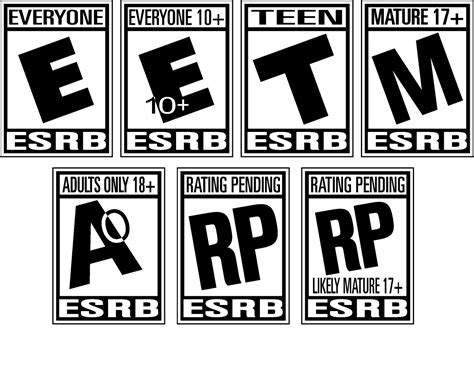
The core of the ESRB system is its age rating categories, prominently displayed on game packaging and digital storefronts. Familiarizing yourself with these is the first step:
- EC (Early Childhood): Generally suitable for ages 3 and up. Contains no material parents would find inappropriate.
- E (Everyone): Generally suitable for ages 6 and up. May contain minimal cartoon, fantasy or mild violence and/or infrequent mild language.
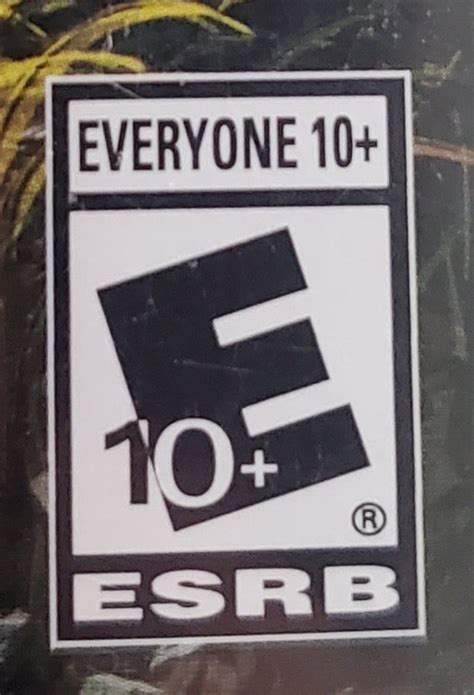
- E10+ (Everyone 10+): Generally suitable for ages 10 and up. May contain more cartoon, fantasy or mild violence, mild language, and/or minimal suggestive themes.
- T (Teen): Generally suitable for ages 13 and up. May contain violence, suggestive themes, crude humor, minimal blood, simulated gambling, and/or infrequent use of strong language.
- M (Mature): Generally suitable for ages 17 and up. May contain intense violence, blood and gore, sexual content, and/or strong language.
- AO (Adults Only 18+): Content suitable only for adults. May include prolonged scenes of intense violence, graphic sexual content, and/or gambling with real currency. This rating is rarely used for commercial video games.
Remember, these are recommendations, not strict rules. A game rated E10+ might still be too intense for a sensitive 10-year-old, while a mature 8-year-old might handle some E10+ content with parental guidance.
Understanding Content Descriptors: The Fine Print
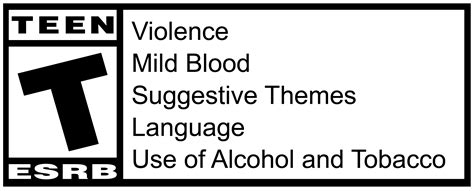
Beyond the age rating, ESRB also provides “Content Descriptors.” These short phrases appear on the back of game boxes or product pages and specify the exact elements that triggered a particular age rating. For example, a “T” rated game might have descriptors like “Fantasy Violence,” “Mild Language,” and “Suggestive Themes.”
Content descriptors are crucial because they offer a nuanced view. Two games with the same “T” rating could be vastly different in content. One might have “Alcohol Reference” and “Crude Humor,” while another has “Blood” and “Violence.” Reading these descriptors allows you to pinpoint specific content that might concern you as a parent, helping you make a more precise choice for your child.
Beyond the Labels: Holistic Parental Guidance
While ESRB ratings are an invaluable tool, they are just one piece of the puzzle. Effective parental guidance extends beyond checking the label. Consider these additional factors:
Your Child’s Maturity and Sensitivity
Every child is unique. What one 12-year-old can handle, another might find disturbing. Pay attention to your child’s emotional maturity, their past reactions to certain content, and their ability to differentiate between fantasy and reality.
Family Values and Personal Preferences
The ESRB provides objective information, but your family’s values are subjective and personal. Some parents might be comfortable with fantasy violence but not suggestive themes, or vice-versa. Use the ratings and descriptors to align game choices with what you believe is appropriate for your household.
Online Interactions and In-Game Purchases
Many modern games have online multiplayer components, allowing interaction with strangers, and often include options for in-game purchases. The ESRB does not rate these interactions. Always monitor your child’s online activities, teach them about online safety, and set clear rules regarding communication with others and spending money in games.

Empowering Tips for Parents
- Always Check the Rating: Make it a habit to check the ESRB rating and content descriptors before purchasing or allowing a new game.
- Play Together: When possible, play games with your children. This gives you firsthand insight into the content and offers opportunities for discussion.
- Monitor Gameplay: Even if you don’t play, observe your child’s gameplay. Listen to the dialogue, watch the action, and see how they react.
- Have Open Conversations: Talk to your children about the games they play. Ask them what they like, what they find challenging, and discuss the content in a non-judgmental way.
- Utilize Parental Controls: Most gaming consoles and digital platforms offer robust parental control settings that allow you to restrict games by ESRB rating, set time limits, and manage purchases.

Conclusion
The ESRB rating system is an indispensable tool for parents navigating the vast world of video games. By understanding its age categories and content descriptors, combined with your knowledge of your child’s maturity and your family’s values, you can confidently select age-appropriate games that provide engaging entertainment while fostering a safe and healthy digital environment. Empower yourself with this knowledge, and make informed choices for your family’s gaming experiences.



