





Switch storage full? Best SD card for digital games?
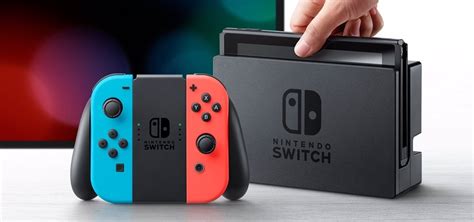
Is Your Nintendo Switch Storage Bursting at the Seams?
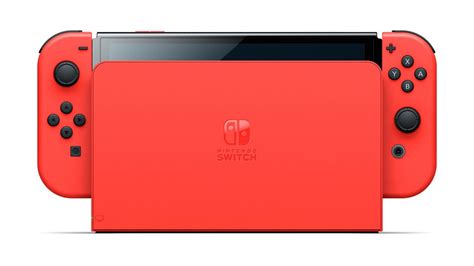
For many Nintendo Switch owners, the joy of a growing digital game library eventually gives way to a familiar frustration: the dreaded “storage full” message. With many AAA titles easily exceeding 10GB, and the Switch’s internal 32GB (or 64GB for OLED models) filling up rapidly, an expandable storage solution isn’t just a luxury – it’s a necessity for any serious gamer. Fortunately, the Switch supports microSD cards, making storage expansion a straightforward process.
But with a dizzying array of options on the market, how do you choose the best SD card for your digital games? This guide will walk you through what to look for and recommend top picks to ensure your gaming adventures are never interrupted by a lack of space.
Why You Need a MicroSD Card for Your Switch
While the Nintendo Switch’s internal storage is fine for a few smaller titles or physical game saves, it’s simply not enough for a substantial digital library. Games like The Legend of Zelda: Tears of the Kingdom, Pokémon Scarlet/Violet, or Mortal Kombat 11 can each take up significant chunks of space. Downloading multiple large titles quickly exhausts the internal memory, forcing you to constantly delete and re-download games – a time-consuming and frustrating cycle.
A microSD card provides seamless, high-capacity storage that integrates perfectly with your Switch. Once inserted, the console treats it as an extension of its own memory, allowing you to download new games directly to the card without a second thought. This means more games, less hassle, and uninterrupted gaming.
Key Factors When Choosing a Switch MicroSD Card
Not all microSD cards are created equal, especially when it comes to gaming. Here’s what you should prioritize:
1. Capacity: How Much Space Do You Need?
- 128GB: A good starting point for casual gamers or those who mostly buy physical games.
- 256GB: The sweet spot for most gamers, offering ample space for a diverse digital library without breaking the bank.
- 512GB: Excellent for avid digital collectors. You’ll likely never worry about space again.
- 1TB: The ultimate choice for serious digital hoovers. While more expensive, it offers maximum peace of mind.
Remember, it’s always better to go a little larger than you think you need. Games only get bigger, and your library will grow.
2. Speed: Read and Write Performance
This is crucial for smooth gaming. Look for:
- UHS-I (Ultra High Speed Phase I): The Switch supports UHS-I cards, with a theoretical maximum speed of 104 MB/s. Don’t bother with expensive UHS-II or UHS-III cards; the Switch can’t utilize their higher speeds.
- Speed Class (U1 or U3): U3 cards offer a minimum sequential write speed of 30 MB/s, while U1 offers 10 MB/s. For games, U3 is preferable for faster load times and smoother performance, though U1 is often sufficient.
- Application Performance Class (A1 or A2): This rating indicates how well a card handles random read/write operations, which are vital for game loading and saving. An A2 rating is ideal for gaming as it provides better random performance than A1, leading to quicker game launches and reduced loading screens.
In summary, aim for a UHS-I U3 A2 rated microSD card for the best performance on your Switch.
3. Brand Reliability
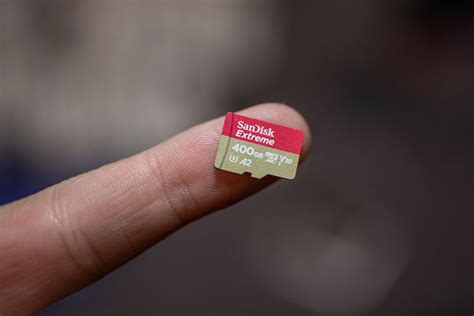
Stick with reputable brands like SanDisk, Samsung, or Lexar. These brands are known for their quality, durability, and robust warranty support. Counterfeit cards are a real problem, so always buy from trusted retailers.
Top Recommended MicroSD Cards for Nintendo Switch
Based on the criteria above, here are some of the best microSD cards that offer excellent performance and value for your Nintendo Switch:
1. SanDisk microSDXC for Nintendo Switch
- Why it’s great: Officially licensed by Nintendo, these cards are specifically optimized for the Switch. They offer excellent U3 A1/A2 performance (depending on the specific model and capacity) and come in iconic Nintendo designs.
- Capacities: Available from 64GB up to 1TB.
- Ideal for: Anyone who wants a guaranteed compatible and high-performing card, often found at competitive prices.
2. Samsung EVO Select / EVO Plus microSDXC
- Why it’s great: Samsung’s EVO line offers fantastic value, consistently delivering U3 A2 performance. They are reliable, fast, and often more affordable than the official SanDisk cards.
- Capacities: Widely available from 64GB to 512GB (and sometimes 1TB).
- Ideal for: Gamers seeking top-tier performance and reliability without the premium for official licensing.
3. Lexar Play MicroSDXC
- Why it’s great: Designed with mobile gaming in mind, Lexar Play cards boast U3 A2 ratings, ensuring excellent random read/write speeds. They are a solid alternative if you find good deals.
- Capacities: Typically found from 128GB to 1TB.
- Ideal for: Gamers looking for a dedicated gaming-focused card from a reputable brand.
![40 Free Comparison Chart Templates [Excel] - TemplateArchive](/images/aHR0cHM6Ly90czMubW0uYmluZy5uZXQvdGg/aWQ9T0lQLjBWWkV3X1FsQy1wTTBOZk96OHZvdXdIYURMJnBpZD0xNS4x.webp)
How to Install and Manage Your Switch MicroSD Card
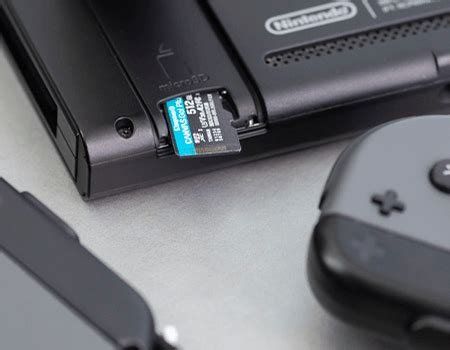
Installing a microSD card is simple: just open the kickstand on the back of your Switch and slide the card into the slot. The Switch will automatically detect it.
To manage your data:
- Go to System Settings > Data Management.
- You can archive or delete software, and even move data between the system memory and the microSD card (though typically, new downloads will prioritize the card once installed).
Always power off your Switch before inserting or removing a microSD card to prevent data corruption.
Conclusion: Expand Your Horizons, Not Your Frustration
Don’t let limited storage dictate your gaming choices. Investing in a high-quality microSD card for your Nintendo Switch is one of the best upgrades you can make. By choosing a reputable brand with sufficient capacity and an A2 U3 rating, you’ll ensure smooth performance, quick loading times, and enough space to enjoy every digital adventure Nintendo throws your way. Say goodbye to the storage full message and hello to an ever-expanding library of games!



