





Best microSD for Switch games to handle large AAA and small indie titles?

Unlocking Your Nintendo Switch’s Full Potential with the Right microSD Card
The Nintendo Switch, an incredibly versatile console, offers a vast library spanning from graphically demanding AAA blockbusters to charming, bite-sized indie titles. While its internal storage of 32GB (or 64GB for the OLED model) is a start, it quickly becomes insufficient as you download more games, especially digital ones. To truly enjoy your Switch without constant storage anxiety, investing in a high-quality microSD card is essential. But what makes a microSD card ‘best’ for the Switch, and how do you choose one that handles both massive AAA titles and smaller indie gems with ease?
Key Factors to Consider: Capacity, Speed, and Reliability
Choosing the ideal microSD card isn’t just about picking the largest one. Several factors play a crucial role in ensuring a smooth and enjoyable gaming experience.
1. Capacity: How Much Storage Do You Really Need?
Game sizes vary wildly. A major AAA title like The Legend of Zelda: Tears of the Kingdom can demand over 18GB, while many indie games might be a few hundred megabytes or less. Your playstyle dictates your ideal capacity:
- 128GB – 256GB: Good for casual players with a mix of physical cartridges and digital indie games, or a few smaller AAA titles. It offers a decent balance of cost and space.
- 512GB: This is often the sweet spot for most dedicated Switch gamers. It provides ample room for a significant library of AAA and indie titles, allowing you to download new releases without constantly deleting old ones.
- 1TB: For collectors, digital-only enthusiasts, or those who simply want to future-proof their console. A 1TB card virtually eliminates storage concerns, letting you download almost anything. While more expensive, it offers ultimate peace of mind.
2. Speed: The Unsung Hero of Performance
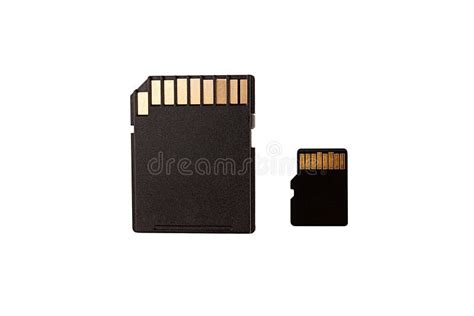
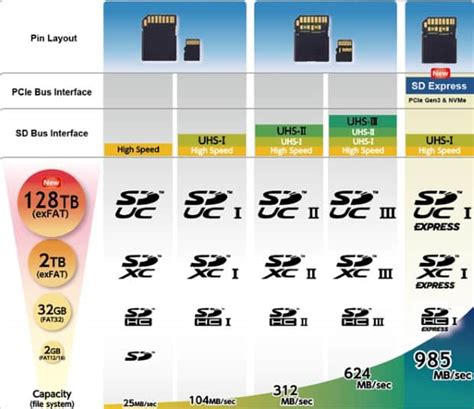
Beyond raw capacity, the speed of your microSD card significantly impacts game loading times, installation, and even overall system responsiveness. The Nintendo Switch supports UHS-I (Ultra High Speed Phase I) cards, meaning any faster UHS-II or UHS-III cards won’t provide additional benefits and are often an unnecessary expense. Look for these specific ratings:
- UHS Speed Class 3 (U3): This is highly recommended. U3 cards guarantee a minimum write speed of 30 MB/s, which is crucial for faster game installations and smoother performance compared to U1 (10 MB/s) cards.
- Video Speed Class V30: Often found alongside U3, V30 also denotes a minimum write speed of 30 MB/s, designed for high-resolution video but beneficial for games too.
- Application Performance Class A1 or A2: While primarily designed for Android apps, A1 and A2 ratings indicate superior random read and write performance, which can slightly improve game loading times and overall system fluidity on the Switch. A2 offers better performance than A1, but both are excellent.
Prioritize cards with at least a U3 rating, and ideally A1 or A2, to ensure your games load quickly and your Switch runs optimally.
3. Reliability: Stick to Trusted Brands
When it comes to valuable game data, reliability is paramount. Stick to reputable brands known for quality and durability. Companies like SanDisk, Samsung, PNY, and Lexar consistently produce high-performance, durable microSD cards that are well-suited for the Nintendo Switch. Avoid unbranded or suspiciously cheap cards, as they often have slower speeds, lower capacities than advertised, and a higher failure rate.
Recommendations for Your Nintendo Switch
Based on the factors above, here’s what to look for when shopping for your Switch microSD card:
- For Balanced Gamers (AAA & Indie): A 512GB SanDisk Ultra or Samsung EVO Select (UHS-I U3 A1/A2) offers the best value and performance for most players.
- For Power Users & Digital Collectors: A 1TB card from a trusted brand like SanDisk or Samsung will provide virtually limitless storage for years to come.
- For Budget-Conscious Players: A 256GB card with U3 and A1/A2 ratings is a solid choice that balances cost and functionality, especially if you also own physical cartridges.

Installation and Management Tips
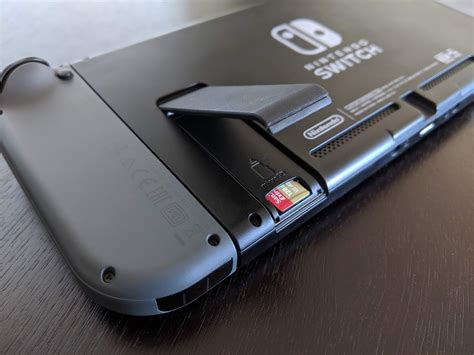
Once you have your microSD card, installation is simple: power off your Switch, open the kickstand, and slide the card into the slot. The Switch will automatically recognize it. For managing your games, you can easily move existing titles between internal storage and the microSD card via the system settings. Remember to regularly check for sales on larger capacity cards, as prices fluctuate.
Conclusion: Optimize Your Switch Experience
A well-chosen microSD card transforms your Nintendo Switch experience, eliminating the frustration of constant game deletions and ensuring quick loading times for every title, big or small. By prioritizing capacity based on your gaming habits, demanding U3 and A1/A2 speed ratings, and opting for reliable brands, you can confidently download and enjoy the vast and varied world of Switch gaming without compromise.


