





How to choose age-appropriate games using ESRB effectively?
In today’s digital age, video games are a ubiquitous part of childhood. While they offer immense entertainment and even educational benefits, the sheer volume and variety can make it daunting for parents to ensure their children are playing age-appropriate content. Fortunately, the Entertainment Software Rating Board (ESRB) provides a robust, easy-to-understand system designed specifically for this purpose. Understanding and effectively utilizing the ESRB rating system is crucial for making informed gaming choices for your family.

What is the ESRB and How Does It Work?
The ESRB is a self-regulatory organization that assigns age and content ratings to video games and apps in the U.S. and Canada. Its primary goal is to help consumers, especially parents, make informed decisions about the games they purchase. Every game submitted to the ESRB is reviewed by trained raters who consider multiple factors, including the intensity of violence, language, sexual content, and other potentially objectionable material.
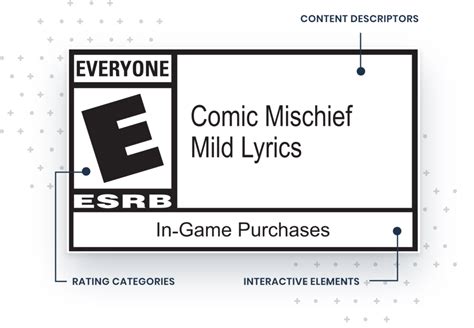
The system comprises three key components:
- Rating Categories: Suggests the appropriate age group for players.
- Content Descriptors: Details specific elements within the game that triggered the rating (e.g., “Fantasy Violence,” “Strong Language”).
- Interactive Elements: Informs about interactive features such as in-game purchases, user-generated content, or location sharing.
Deciphering ESRB Rating Categories
The first and most prominent element you’ll see on a game box or digital storefront is the rating category. Here’s a quick guide:
- E (Everyone): Content is generally suitable for all ages. May contain minimal cartoon, fantasy or mild violence and/or infrequent use of mild language.
- E10+ (Everyone 10+): Content is generally suitable for ages 10 and up. May contain more cartoon, fantasy or mild violence, mild language, and/or minimal suggestive themes.
- T (Teen): Content is generally suitable for ages 13 and up. May contain violence, suggestive themes, crude humor, minimal blood, simulated gambling, and/or infrequent use of strong language.
- M (Mature 17+): Content is generally suitable for ages 17 and up. May contain intense violence, blood and gore, sexual content, and/or strong language.
- A (Adults Only 18+): Content is only suitable for adults 18 and up. This rating means the game may include prolonged scenes of intense violence, graphic sexual content, and/or gambling with real currency. These games are rarely found in mainstream retail.
- RP (Rating Pending): This indicates that the game has been submitted to the ESRB and is awaiting a final rating.
Going Deeper with Content Descriptors
While the age rating provides a good starting point, the content descriptors offer a more nuanced understanding of why a game received its specific rating. These small icons and phrases are usually found on the back of the game box or on the game’s product page online. For instance, an “E10+” game might have “Fantasy Violence” and “Mild Language,” while an “M” rated game could list “Blood and Gore,” “Intense Violence,” and “Sexual Themes.” Always check these descriptors to understand the specific elements that might concern you as a parent, even if the age rating seems acceptable at first glance.

Understanding Interactive Elements
Beyond content, the ESRB also provides “Interactive Elements” notices. These inform parents about features that could impact privacy or lead to unexpected costs. Look for icons like:
- In-Game Purchases: Indicates that the game offers optional digital purchases (e.g., loot boxes, new characters, cosmetic items).
- Users Interact: Means the game allows players to interact or communicate with each other (e.g., chat, voice communication).
- Shares Location: Informs if the game can share a user’s location with other users or external services.
These elements are crucial for understanding the full scope of a game’s impact on your child, from potential spending to online interactions.
Effective Strategies for Parents
Simply glancing at the ESRB rating is a good start, but effective use involves a more comprehensive approach:
- Read Beyond the Rating: Always check the Content Descriptors and Interactive Elements. Two games with the same “T” rating might have very different types of content.
- Watch Gameplay Videos: YouTube and Twitch are great resources. Watching a few minutes of gameplay can give you a clear idea of the game’s visuals, dialogue, and overall tone.
- Read Reviews: Look for reviews from reputable gaming sites, but also seek out parent reviews for their unique perspective.
- Play Together: If possible, play the game with your child or at least observe them playing. This firsthand experience is invaluable.
- Communicate with Your Child: Talk to your children about what they are playing and why certain content might be inappropriate. Teach them critical thinking skills regarding media.
Conclusion
The ESRB rating system is an invaluable tool for parents navigating the complex world of video games. By taking a few extra moments to understand not just the age category but also the detailed content descriptors and interactive elements, you can confidently choose games that are truly age-appropriate and align with your family’s values. Empower yourself with this knowledge to ensure a safer and more enjoyable gaming experience for your children.



