How can parents use game ratings for age-appropriate choices & online safety?
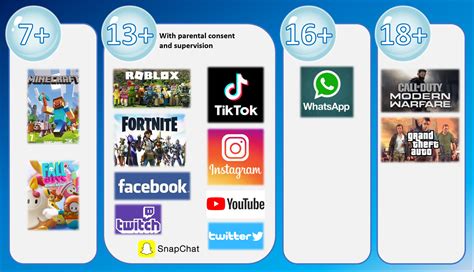
Navigating the Digital Playground: Your Guide to Game Ratings
The world of video games offers incredible entertainment and educational opportunities for children. However, for many parents, it can also feel like a complex and sometimes intimidating landscape. With an overwhelming number of titles available, ensuring your child plays games that are not only fun but also age-appropriate and safe can be a significant challenge. Fortunately, game rating systems provide a crucial tool to help parents make informed decisions.
Understanding these ratings goes beyond just knowing a number or a letter; it involves deciphering the content descriptors, evaluating your child’s maturity, and actively engaging in their gaming experience. By leveraging these systems effectively, parents can foster a healthy and safe gaming environment for their children.

Decoding Game Rating Systems: ESRB, PEGI, and More
Globally, various organizations are responsible for rating video games. The most prominent in North America is the Entertainment Software Rating Board (ESRB), while in Europe, it’s the Pan European Game Information (PEGI) system. Other regions may have their own specific bodies, such as CERO in Japan or the ACB in Australia.
Age Ratings Explained:
- ESRB: E (Everyone), E10+ (Everyone 10+), T (Teen), M (Mature 17+), AO (Adults Only 18+).
- PEGI: 3, 7, 12, 16, 18.
These age recommendations serve as a general guideline, indicating the minimum age at which the content is deemed suitable. They are designed to give parents a quick overview of whether a game’s themes, violence, language, or other elements are appropriate for a specific age group.
Content Descriptors: The Fine Print
Beyond the age rating, content descriptors are perhaps the most valuable part of any rating system. These small icons or text phrases detail specific elements present in the game that triggered the age rating. Examples include:
- Violence: Fantasy Violence, Animated Blood, Realistic Violence.
- Language: Mild Language, Strong Language, Sexual Themes.
- Other: Alcohol Reference, Drug Reference, Gambling, Users Interact (very important for online safety), In-Game Purchases.
These descriptors allow parents to understand precisely why a game received its rating, helping them determine if a particular aspect might be unsuitable for their child, regardless of the overall age recommendation.
Making Age-Appropriate Choices for Your Child
While game ratings are invaluable, they are a starting point, not a definitive rulebook. Your child’s individual maturity, sensitivity, and understanding play a significant role. Here’s how to use ratings effectively:
- Go Beyond the Number: Always look at the content descriptors. A ‘T’ for Teen game might be perfectly fine, but if it has ‘Strong Language’ and you prefer your child not be exposed to it, then it might not be the right choice.
- Research Further: Don’t rely solely on the box art. Watch trailers, read reviews from reputable gaming sites (and parent reviews!), and even watch gameplay videos on platforms like YouTube. This provides a much clearer picture of the actual content.
- Know Your Child: A sensitive 10-year-old might be overwhelmed by content rated ‘E10+’ that a more resilient 8-year-old could handle. Trust your judgment about what your child is ready for.
- Involve Them (Appropriately): For older children, involve them in the selection process. Discuss why certain games are off-limits and explain the ratings. This fosters understanding and responsibility.
Leveraging Ratings for Online Safety and Interaction
Online gaming introduces a new layer of complexity, and game ratings are crucial here too. Many games now feature multiplayer components, allowing interaction with other players globally. This is where the ‘Users Interact’ descriptor becomes vital.
Understanding Online Risks:
- Communication: Online games often include voice or text chat, exposing children to strangers and potentially inappropriate language or content.
- Cyberbullying: Children can be targets or perpetrators of bullying in online gaming communities.
- In-Game Purchases: Ratings and descriptors often flag games with optional in-game purchases, which can lead to unexpected spending.
Practical Steps for Online Safety:
- Check for ‘Users Interact’: If a game has this descriptor, be aware that your child will be able to communicate with others online.
- Utilize Parental Controls: Most gaming consoles (PlayStation, Xbox, Nintendo Switch) and PC gaming platforms (Steam, Epic Games Store) offer robust parental control settings. These allow you to restrict access to online features, set time limits, block certain games by rating, and manage spending.
- Educate Your Child: Talk to your child about the importance of not sharing personal information online, being respectful to others, and what to do if they encounter anything inappropriate or uncomfortable (e.g., blocking users, reporting, telling a trusted adult).
- Monitor and Participate: Occasionally watch your child play, especially online games. Play with them! This gives you insight into who they are interacting with and the content of their conversations.

Beyond the Ratings: A Holistic Approach to Gaming
While ratings are a foundational tool, they are part of a broader strategy for healthy gaming habits. Consider these additional measures:
- Set Clear Boundaries: Establish rules around screen time, game content, and when and where gaming is allowed. Consistency is key.
- Balance with Other Activities: Encourage a variety of interests, including outdoor play, reading, creative arts, and social interactions outside of gaming.
- Play Together: Join your child in their favorite games. This can be a fantastic bonding experience and helps you understand the appeal and content firsthand.
- Keep Communication Open: Encourage your child to talk to you about their gaming experiences, friends they make online, and any challenges they face.

Conclusion
Video game ratings are an indispensable resource for parents navigating the vast world of digital entertainment. By understanding the age recommendations and, crucially, the content descriptors provided by systems like ESRB and PEGI, you can make informed decisions about age-appropriate choices. Furthermore, leveraging these ratings in conjunction with parental control settings and open communication is vital for ensuring your child’s online safety.
Active parental involvement, research, and ongoing dialogue are key to fostering a positive and secure gaming experience that enriches your child’s life without exposing them to undue risks. Remember, you are the best judge of what is right for your child.