Best MicroSD for Nintendo Switch to expand game storage efficiently?
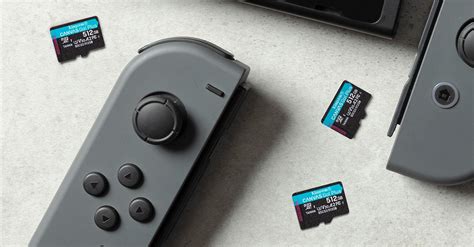
The Nintendo Switch, a phenomenal hybrid console, offers endless hours of entertainment, but its internal storage capacity can quickly become a bottleneck for avid gamers. With only 32GB (or 64GB for the OLED model) of internal memory, a significant portion of which is reserved for the system, digital game downloads and updates can fill up this space in no time. This is where a high-quality microSD card becomes an essential upgrade, transforming your gaming experience by providing vast additional space.
Why Your Nintendo Switch Needs a MicroSD Card
Many popular Switch titles can range from 5GB to over 20GB. When you opt for digital downloads from the eShop, or even if you prefer physical cartridges, game updates and DLC still consume internal storage. Without sufficient space, you’ll constantly find yourself deleting games to make room for new ones, a frustrating and time-consuming process. A microSD card alleviates this problem, allowing you to build an extensive digital library without compromise.
Key Factors When Choosing a MicroSD Card
Not all microSD cards are created equal. To ensure efficient storage expansion and optimal game performance, there are specific features to look for:
Speed Matters: UHS-I and A2 Rating
The Nintendo Switch supports UHS-I (Ultra High Speed-I) compatible microSD cards, with a maximum data transfer rate of 100 MB/s. While faster UHS-II cards exist, the Switch cannot fully utilize their increased speeds, so investing in them offers no practical benefit and is often more expensive. Focus on:
- UHS Speed Class 3 (U3): This indicates a minimum sequential write speed of 30 MB/s, crucial for recording video and faster game installs/updates. While U1 (10 MB/s) is acceptable, U3 is preferable.
- Application Performance Class A2: An A2 rating ensures better random read/write speeds, which significantly impacts loading times for applications and games. While A1 is the minimum, A2 cards provide a smoother, more responsive gaming experience.
Capacity: How Much Space Do You Really Need?
MicroSD cards for the Switch come in various capacities, from 64GB all the way up to 2TB. Consider your gaming habits:
- 128GB – 256GB: Good for casual gamers with a moderate digital library.
- 400GB – 512GB: Ideal for most gamers who download regularly and want to keep many titles installed. This is often the sweet spot for price-to-performance.
- 1TB: Best for hardcore digital collectors who want virtually unlimited space for years to come, without ever thinking about deleting games.
Top MicroSD Card Recommendations for Nintendo Switch
Based on performance, reliability, and value, here are our top picks:
1. SanDisk microSDXC for Nintendo Switch
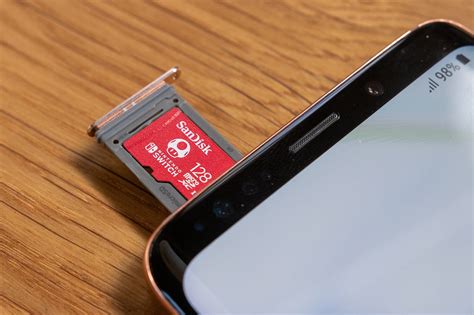
SanDisk offers officially licensed Nintendo Switch microSD cards, easily identifiable by their iconic red and white branding and a Nintendo logo (often featuring Mario or a Triforce). These cards are specifically designed for the Switch, ensuring optimal compatibility and performance (UHS-I U3 A1, sometimes A2 depending on the model). They come in various capacities, from 64GB to 1TB, making them a safe and reliable choice.
2. SanDisk Extreme / Extreme Pro MicroSDXC
If you prefer a non-licensed card with excellent performance, the SanDisk Extreme series is a fantastic option. These cards typically offer UHS-I U3 and A2 ratings, delivering fast read/write speeds that often meet or exceed the Switch’s capabilities. They are highly durable and reliable, making them a popular choice among power users.
3. Samsung EVO Select / EVO Plus MicroSDXC
Samsung’s EVO Select and EVO Plus lines are highly regarded for their consistent performance and competitive pricing. These cards are typically UHS-I U3 and A2 rated, providing excellent read and write speeds. They are a great value alternative to SanDisk, offering similar performance and reliability.
4. Lexar PLAY MicroSDXC
The Lexar PLAY series is another strong contender, specifically designed for mobile gaming devices. These cards boast UHS-I U3 and A2 ratings, optimized for fast loading and seamless gameplay. They offer good capacities and reliable performance at a reasonable price point.
Installing Your New MicroSD Card
Installing your new microSD card is straightforward:
- Turn off your Nintendo Switch completely.
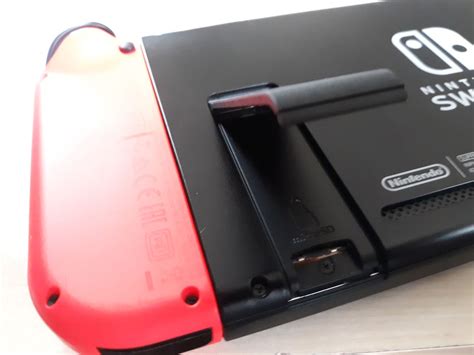
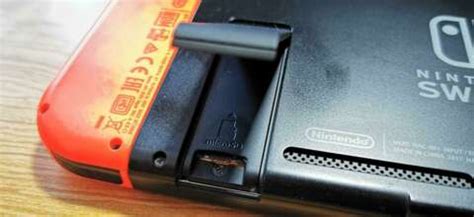
- Open the kickstand on the back of the console to reveal the microSD card slot.
- Insert the microSD card into the slot with the label facing the same direction as the console screen, pushing until it clicks into place.
- Close the kickstand and power on your Switch.
- The Switch will automatically detect and format the card if necessary, or prompt you to do so.
Once installed, new game downloads and screenshots will automatically save to the microSD card. You can also move existing data from the internal memory to the card through the system settings.
Maximizing Your Switch Storage: Tips and Tricks
- Archive Software: Instead of deleting games entirely, use the ‘Archive Software’ option in the data management settings. This deletes the game data but keeps the icon and save data, allowing you to redownload it easily later.
- Manage Screenshots/Videos: These can quickly add up. Periodically offload them to a computer or cloud storage.
- Prioritize Downloads: If you have limited space, consider which games you’ll actively play and download them first.
Conclusion
Investing in the best microSD card for your Nintendo Switch is one of the most impactful upgrades you can make. By choosing a card with adequate speed (UHS-I U3 A2) and capacity, you’ll unlock a world of seamless digital gaming, eliminating storage anxieties and allowing you to focus on what truly matters: playing your favorite games without interruption. Whether you opt for an officially licensed SanDisk card or a reliable alternative like Samsung or Lexar, you’ll be well-equipped to efficiently expand your Switch’s game library and enjoy countless adventures.