





What are age-appropriate game ratings & how to pick safe games for my child?
In today’s digital landscape, video games are an integral part of many children’s lives. While they offer numerous benefits, from problem-solving skills to social interaction, ensuring the content is appropriate for your child’s age and maturity level is a paramount concern for parents. Understanding game rating systems and adopting proactive strategies can empower you to make informed decisions.
Understanding Game Rating Systems
Game ratings serve as a valuable guide, providing an indication of the content within a game. These systems are designed to help parents determine if a game is suitable for their children based on its themes, language, violence, and other potentially sensitive material.
ESRB (Entertainment Software Rating Board)
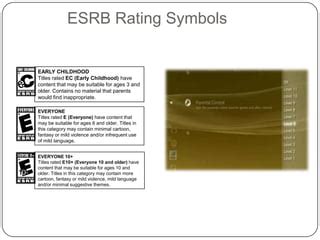
Predominantly used in North America, the ESRB system assigns ratings that suggest appropriate age groups and content descriptors that detail specific elements found in the game. These ratings range from ‘E’ for Everyone to ‘M’ for Mature, and even ‘AO’ for Adults Only.
- E (Everyone): Content is generally suitable for all ages. May contain minimal cartoon, fantasy or mild violence and/or infrequent mild language.
- E10+ (Everyone 10+): Content is generally suitable for ages 10 and up. May contain more cartoon, fantasy or mild violence, mild language, and/or minimal suggestive themes.
- T (Teen): Content is generally suitable for ages 13 and up. May contain violence, suggestive themes, crude humor, minimal blood, simulated gambling, and/or infrequent use of strong language.
- M (Mature): Content is generally suitable for ages 17 and up. May contain intense violence, blood and gore, sexual content, and/or strong language.
- AO (Adults Only): Content should only be played by adults ages 18 and up. May include prolonged scenes of intense violence, graphic sexual content, and/or gambling with real currency.
Beyond the letters, look for content descriptors like ‘Fantasy Violence’, ‘Mild Language’, ‘Blood’, or ‘Sexual Themes’ to get a clearer picture of what to expect.
PEGI (Pan European Game Information)
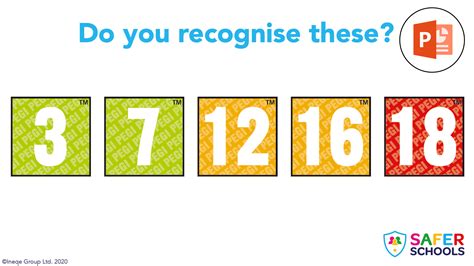
PEGI is the most widely used rating system across Europe. It uses age labels (3, 7, 12, 16, 18) and content descriptors, similar to ESRB, but with its own distinct icons.
- PEGI 3: Game content is considered suitable for all age groups.
- PEGI 7: Game content that would otherwise be rated PEGI 3 but contains some non-realistic violence (e.g. cartoon violence).
- PEGI 12: Games that show violence in a fantasy context or non-realistic violence towards human-like characters, or contain mild sexual innuendo or bad language.
- PEGI 16: Realistic-looking violence or sexual activity.
- PEGI 18: The adult classification is applied when the level of violence reaches a stage where it becomes a depiction of gross violence, or contains elements of specific types of violence or sexual activity.
Content descriptors for PEGI include ‘Violence’, ‘Bad Language’, ‘Fear’, ‘Sex’, ‘Drugs’, ‘Gambling’, ‘Discrimination’, and ‘In-Game Purchases’.
How to Pick Safe Games for Your Child
While rating systems are an excellent starting point, they are just one tool in your parental toolkit. A holistic approach ensures your child’s gaming experiences are not only safe but also positive and enriching.
Beyond the Rating: Do Your Homework
The rating provides a general overview, but you can dive deeper. Watch gameplay videos on platforms like YouTube, read reviews from reputable gaming websites, or check out common concerns on parent-focused forums. Sometimes a game might be rated ‘E10+’ but contain themes or complexities your specific child isn’t ready for.

Consider Your Child’s Maturity and Sensitivity
Every child is unique. A ‘T’ for Teen game might be perfectly fine for one 13-year-old, while another might find its themes or intensity overwhelming. Gauge your child’s individual maturity, their ability to distinguish reality from fiction, and their emotional sensitivity when making a choice.
Play Together and Monitor Gameplay
The best way to understand a game is to experience it. Play alongside your child, especially when introducing a new title. This allows you to observe their reactions, answer questions, and discuss any content that might be concerning. If playing together isn’t possible, ensure the gaming takes place in a common area where you can periodically monitor what’s happening on screen.

Utilize Parental Controls
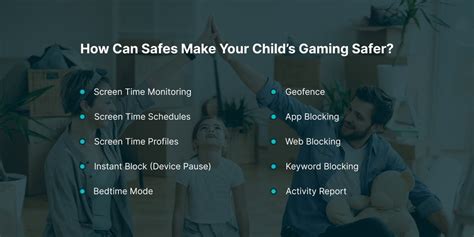
Most gaming consoles, PCs, and even mobile devices offer robust parental control settings. These allow you to set age restrictions, limit play time, manage communication features, prevent in-game purchases, and block specific content. Take the time to set these up and periodically review them as your child grows.
Encourage Open Communication
Foster an environment where your child feels comfortable talking to you about their gaming experiences. Ask them about the games they play, what they enjoy, and if anything makes them feel uncomfortable. Open dialogue allows you to address concerns and guide them effectively without resorting to outright bans, which can sometimes backfire.

Conclusion: Empowering Parental Choices
Picking safe and age-appropriate games for your child doesn’t have to be a guessing game. By understanding rating systems like ESRB and PEGI, conducting further research, considering your child’s individual needs, engaging with their gaming, and utilizing available parental controls, you can confidently navigate the digital entertainment world. Your active involvement is key to ensuring that video games remain a positive and enriching part of their development.

