





How to use game age ratings & parental controls for child safety?

Why Age Ratings and Parental Controls Matter for Gaming Safety
In today’s digital world, video games are a ubiquitous part of childhood. While gaming offers numerous benefits, from enhancing problem-solving skills to fostering creativity, it also presents potential risks if not managed properly. Exposure to inappropriate content, excessive screen time, and interactions with strangers are common concerns for parents. This is where understanding and implementing game age ratings and robust parental controls become crucial tools in safeguarding your child’s online and gaming experience.
Understanding Game Age Ratings
Age ratings are designed to give parents and consumers an indication of the content within a video game, helping them make informed decisions about whether a game is appropriate for their child’s age and maturity level. These ratings are not recommendations about how difficult a game is, but rather about its content.

Key Rating Systems Explained
- ESRB (Entertainment Software Rating Board): Primarily used in North America, ratings include EC (Early Childhood), E (Everyone), E10+ (Everyone 10+), T (Teen), M (Mature 17+), and AO (Adults Only 18+).
- PEGI (Pan European Game Information): Used across Europe, ratings include PEGI 3, PEGI 7, PEGI 12, PEGI 16, and PEGI 18.
- Other systems include CERO (Japan), ACB (Australia), and GRAC (South Korea), each with their own age categories.
Deciphering Content Descriptors
Beyond the age rating number or letter, look for content descriptors. These small icons or text provide more specific information about why a game received its rating, detailing elements such as violence, strong language, sexual themes, drug use, gambling, and online interactivity. Always check these descriptors for a complete picture of the game’s content.
The Power of Parental Controls
Parental controls are software features that allow parents to manage and restrict their children’s access to digital content and online activities. When it comes to gaming, these controls offer a granular level of customization to ensure a safe and balanced play environment.

Types of Parental Control Tools
- Console-Specific Controls: PlayStation, Xbox, and Nintendo consoles all have built-in parental settings allowing you to restrict games by age rating, manage screen time, control online interactions, and limit purchases.
- PC Operating System Controls: Windows Family Safety and macOS Screen Time offer features to manage app usage, set time limits, and filter web content.
- Mobile Device Controls: iOS Screen Time and Android Family Link provide comprehensive tools for managing app downloads, purchases, screen time, and content restrictions on smartphones and tablets.
- In-Game and Platform Controls: Many individual games and gaming platforms (like Steam or Epic Games) have their own in-built settings to control chat features, multiplayer access, and content filters.
- Router-Level Controls: Some home routers allow you to set internet filters and time limits for specific devices connected to your home network.
Setting Up Parental Controls: A Step-by-Step Guide
Implementing parental controls effectively requires a systematic approach. Here’s a general guide to help you get started:
- Identify All Devices and Platforms: List every device your child uses for gaming (consoles, PCs, tablets, phones) and the platforms they access (PlayStation Network, Xbox Live, Nintendo eShop, Steam, mobile app stores).
- Locate Settings: For each device/platform, find the ‘Parental Controls,’ ‘Family Settings,’ or ‘Screen Time’ section in the system settings.
- Set Age/Content Restrictions: Configure restrictions based on age ratings and content descriptors that align with your family’s values and your child’s maturity.
- Manage Screen Time: Set daily or weekly limits for gaming sessions to promote balance and prevent overuse.
- Control Purchases: Require a password for all purchases or disable purchasing entirely to prevent unauthorized spending.
- Restrict Communication & Multiplayer: Decide whether to limit or block in-game chat, voice communication, or multiplayer interactions with strangers.
- Create Separate Profiles: If applicable, set up individual child profiles with their own specific restrictions.
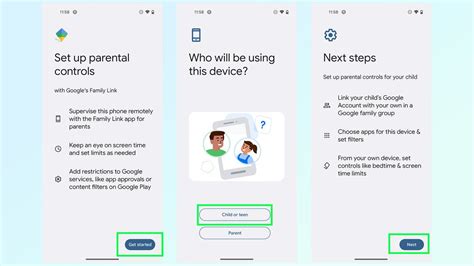
Essential Tips for Implementation
- Use Strong Passwords: Ensure your parental control settings are password-protected and that your child doesn’t know the password.
- Test the Settings: After setup, test the controls to make sure they are working as intended.
- Review Regularly: As your child grows and new games are released, periodically review and adjust the settings.
Beyond Controls: Communication and Monitoring
While technological controls are powerful, they are most effective when combined with open communication and active monitoring. Talk to your children about why these controls are in place, fostering an understanding of online safety rather than just enforcement.

Regularly ask them what games they are playing, who they are playing with, and what they encounter online. Create an environment where they feel comfortable coming to you if something makes them uncomfortable or scared. Monitoring their gaming habits, without being intrusive, helps you stay informed and address issues proactively.
Staying Informed and Adapting
The gaming landscape is constantly evolving. New games, platforms, and online trends emerge regularly. Staying informed by reading gaming news, parenting guides, and community forums can help you understand new risks and adapt your parental control strategies accordingly. Remember, the goal is not to completely isolate children from gaming, but to empower them to navigate the digital world safely and responsibly.

Conclusion
Leveraging game age ratings and parental controls is an essential part of modern parenting. By actively understanding and implementing these tools, combined with open communication and ongoing engagement, you can help ensure that your children enjoy the many benefits of gaming in an environment that is safe, age-appropriate, and conducive to healthy development.