





Best Nintendo Switch SD card for expanding game storage?
Why Your Nintendo Switch Needs More Storage
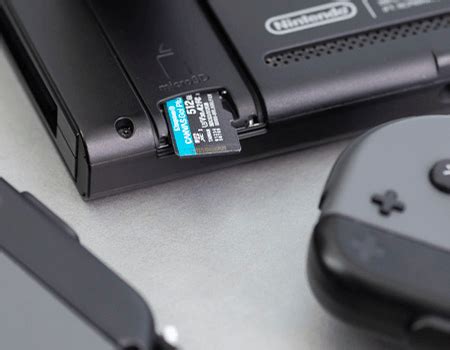
The Nintendo Switch, an incredible hybrid console, offers unparalleled gaming flexibility, whether you’re at home or on the go. However, its internal storage – 32GB for the original and Lite models, and 64GB for the OLED model – can fill up surprisingly fast. With many digital games easily exceeding 10-20GB (and some much larger), avid gamers quickly find themselves deleting titles to make space for new adventures. This is where a high-quality microSD card becomes an essential upgrade, transforming your console’s storage capacity and ensuring your entire game library is always accessible.

Understanding Nintendo Switch SD Card Requirements
While any microSD card can technically work, choosing the right one is crucial for optimal performance. The Nintendo Switch supports microSD (up to 2GB), microSDHC (2GB-32GB), and microSDXC (64GB and above). For expanding game storage, microSDXC cards are the standard choice due to their significantly larger capacities.
Key Specifications to Look For:
- UHS-I Speed Class: The Switch supports UHS-I cards, which offer read speeds of up to 104 MB/s. UHS-II cards are faster, but the Switch cannot utilize their higher speeds, so investing in one would be overkill and unnecessary.
- Speed Class (C10): Most modern microSDXC cards are Class 10 (C10), guaranteeing a minimum write speed of 10 MB/s. This is generally sufficient.
- Application Performance Class (A1 or A2): These ratings are important for applications (like games) that require random read/write operations. A1 cards offer better performance than non-rated cards, while A2 cards provide even faster random read/write speeds, though the difference might not be noticeable on the Switch.
In essence, you’re looking for a UHS-I microSDXC card with a C10 and ideally an A1 or A2 rating for the best experience.
Top Recommendations: Best SD Cards for Nintendo Switch
Based on performance, reliability, and value, here are the top microSD cards that consistently deliver for Nintendo Switch owners:
1. SanDisk microSDXC for Nintendo Switch (Official Licensed)
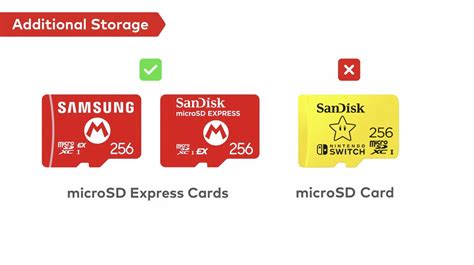
This is the official, Nintendo-licensed microSD card, often featuring iconic Switch branding (like the mushroom or Triforce). It’s specifically optimized for the console, offering reliable performance and peace of mind. Available in various capacities (64GB, 128GB, 256GB, 512GB, 1TB), these cards boast read speeds up to 100MB/s and write speeds up to 90MB/s, making them an excellent, albeit sometimes pricier, choice.
2. SanDisk Extreme/Ultra microSDXC
SanDisk’s general-purpose Extreme and Ultra lines are popular and highly reliable alternatives. The SanDisk Extreme series offers fantastic read/write speeds, often exceeding 100MB/s, and usually comes with an A2 rating. The Ultra series provides a great balance of performance and affordability, typically with A1 ratings and read speeds around 100MB/s. Both are excellent choices for the Switch, often found at competitive prices.
3. Samsung EVO Select/Plus microSDXC
Samsung’s EVO Select and EVO Plus cards are renowned for their robust performance and reliability. They offer comparable speeds to SanDisk’s Ultra series, often reaching 100MB/s read and 60-90MB/s write speeds, along with A1 ratings. Samsung cards are consistently among the most recommended for a wide range of devices, and the Switch is no exception, providing excellent value for money.
How Much Storage Do You Actually Need?
The ideal capacity depends entirely on your gaming habits:
- 128GB: A good starting point for players who mostly buy physical cartridges but want space for a few digital indies and DLC.
- 256GB: The sweet spot for most gamers. It offers ample room for a substantial digital library, even if you download a few AAA titles.
- 512GB: For serious digital collectors or those with extensive game libraries. This capacity allows you to download dozens of large titles without worry.
- 1TB: The ultimate choice for the most dedicated digital-only players or those who want to future-proof their console. It’s enough space for virtually any library imaginable.
Remember that game sizes vary greatly, so consider your typical downloads. It’s often better to go slightly larger than you think you need to avoid having to upgrade again soon.
Installing and Managing Your Nintendo Switch SD Card
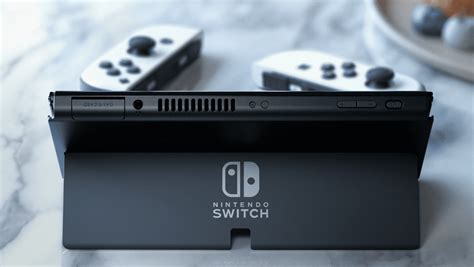
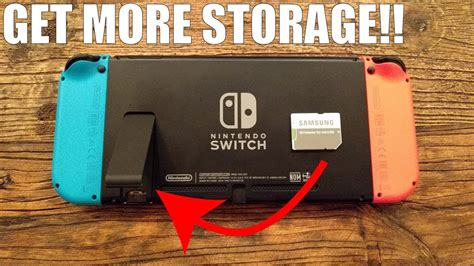
Installing a microSD card is straightforward: simply slide it into the slot located under the Switch’s kickstand. Once inserted, the Switch will automatically recognize it. If you’re upgrading from a smaller card, you can transfer your data by copying the contents of the old card to your computer, then onto the new, larger card (ensure the new card is formatted as FAT32 or exFAT, which the Switch will usually handle automatically).
Your game save data is stored on the console’s internal memory and often backed up via Nintendo Switch Online’s cloud saves, so you won’t lose progress when swapping cards, only downloaded game files.
Conclusion: Power Up Your Playtime
Investing in a high-quality microSD card is arguably the most important upgrade you can make for your Nintendo Switch. It eliminates storage anxiety, allowing you to download new releases, explore digital sales, and keep all your favorite games ready to play at a moment’s notice. Whether you opt for an officially licensed SanDisk card, a high-performance Extreme, or a reliable Samsung EVO, choosing the right capacity and speed will significantly enhance your gaming experience. Don’t let limited storage hold you back – unlock your Switch’s full potential today!


