

Best Switch SD card for maximizing game storage & performance?

Expanding Your Nintendo Switch Horizon
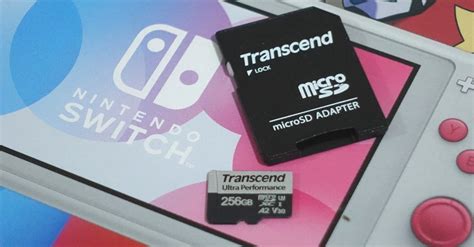
The Nintendo Switch is a marvel of portable gaming, but its Achilles’ heel for many dedicated players is its limited internal storage. With only 32GB (or 64GB for the OLED model) available, it doesn’t take long for digital game downloads, updates, and save data to fill up that space, forcing you to constantly manage your library. This is where a high-quality microSD card becomes an essential upgrade, transforming your gaming experience.
Choosing the right SD card isn’t just about adding more gigabytes; it’s also about ensuring smooth performance. A slow card can lead to longer load times, choppier gameplay in some instances, and frustratingly sluggish downloads. Our guide will help you navigate the options to find the perfect balance of storage capacity and speed, maximizing your Switch’s potential.
What Makes an SD Card “Best” for Switch?
Not all microSD cards are created equal, especially when it comes to the demands of gaming. Here are the critical factors to consider:
Capacity: How Much Space Do You Really Need?
- 128GB-256GB: A good starting point for casual gamers or those who mostly buy physical cartridges. It offers ample space for several large digital titles and many smaller ones.
- 512GB: The sweet spot for most avid digital-only gamers. This capacity provides significant room for a vast library, including AAA titles that can easily exceed 10-20GB each.
- 1TB or More: For the ultimate digital collector. If you plan to download almost every game you’re interested in, including large ports and indie gems, a 1TB card will give you peace of mind for years to come.
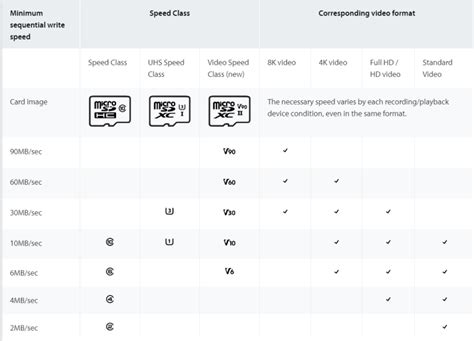
Speed: UHS-I, U3, and V30 Explained
The Nintendo Switch supports UHS-I microSD cards, with theoretical read speeds up to 104 MB/s. While some cards offer UHS-II speeds, the Switch cannot utilize them, so investing in a more expensive UHS-II card provides no benefit in terms of raw speed on the console.
- UHS Speed Class (U1 vs. U3): Look for cards rated U3. This class guarantees a minimum sequential write speed of 30 MB/s, which is crucial for faster game installations, updates, and loading times. U1 cards, with a minimum of 10 MB/s, are generally too slow for optimal Switch performance.
- Video Speed Class (V30): Often found alongside U3, the V30 rating also guarantees a minimum sustained write speed of 30 MB/s. If you see V30, you’re likely getting a U3-rated card as well.
- A1/A2 App Performance Class: While primarily designed for Android apps, A1 and A2 ratings indicate good random read/write performance, which can subtly benefit game loading. It’s a nice bonus but not as critical as U3/V30 for the Switch.
Always prioritize cards with a U3 and/or V30 rating to ensure your games load quickly and efficiently.
Our Top MicroSD Card Picks for Nintendo Switch
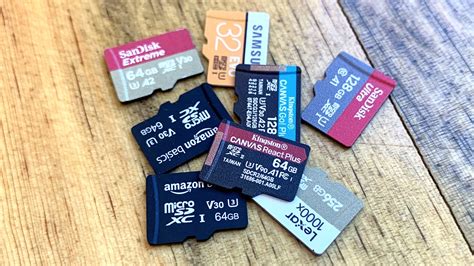
Based on performance, reliability, and value, here are our top recommendations:
Best Overall: SanDisk Extreme / Ultra (U3, A1/A2)
SanDisk is an industry leader, and their Extreme and Ultra lines are perennial favorites for the Switch. They offer excellent read/write speeds (often exceeding the Switch’s maximum capability), are highly reliable, and come in a wide range of capacities from 128GB all the way up to 1.5TB. Look for the U3 and A1 or A2 rating for optimal performance.
Best Value: Samsung EVO Select / Plus (U3, A2)
Samsung’s EVO Select and EVO Plus series provide an incredible balance of price and performance. These cards consistently deliver fast speeds that meet or exceed the Switch’s requirements and are often available at competitive prices, especially during sales events. They are a fantastic choice for gamers looking for reliability without breaking the bank.
Premium Performance & High Capacity: Lexar Play / PNY U3 Cards
Lexar Play and PNY’s U3-rated cards are strong contenders, particularly if you’re aiming for higher capacities like 512GB or 1TB. They offer solid, consistent performance and are often a good alternative if SanDisk or Samsung options are harder to find or pricier. Always ensure they carry the U3 or V30 speed rating.
Installing and Managing Your Switch SD Card
Simple Installation
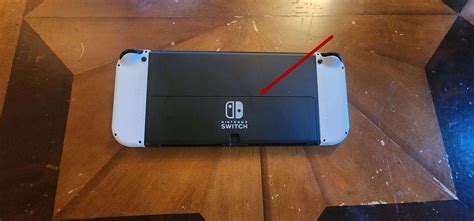
Installing a microSD card into your Nintendo Switch is straightforward. Turn off your console completely (not just sleep mode), then open the kickstand on the back of the Switch. You’ll find a small slot underneath; slide your microSD card in until it clicks. The card should be inserted with the label facing the same direction as the console’s screen.
Moving Games and Data
Once installed, your Switch will automatically recognize the new storage. New game downloads will prioritize the microSD card if it’s present. To move existing games from internal storage to the SD card, go to System Settings > Data Management > Move Data Between System / microSD Card. You can also archive games to free up space, and if you later redownload them, they’ll go to the SD card by default.
Avoiding Counterfeits and Maximizing Lifespan
A word of caution: the market is unfortunately flooded with counterfeit microSD cards. These cards often claim high capacities and speeds but deliver far less, sometimes failing completely. Always purchase your microSD card from reputable retailers and official brand stores to ensure you’re getting an authentic product with a valid warranty.
To maximize the lifespan of your SD card, avoid removing it while the console is powered on or during data transfers. Regularly check for system updates, as these can sometimes improve SD card compatibility and performance. With proper care, a good quality microSD card will serve your Nintendo Switch faithfully for years.
Final Thoughts on Your Switch Storage Upgrade
Upgrading your Nintendo Switch with the right microSD card is one of the best investments you can make to enhance your gaming experience. By choosing a card with adequate storage and the crucial U3/V30 speed rating, you’ll say goodbye to storage anxiety and frustrating load times. Enjoy your expanded digital library and seamless gameplay!