



How can I set up effective price alerts for specific games on my wishlist?

Why Price Alerts are a Gamer’s Best Friend
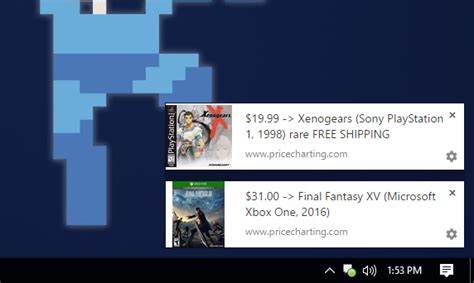
For avid gamers, the thrill of discovering a new title often comes with the dread of its full price tag. The good news is that you don’t have to pay premium prices for every game you desire. Setting up effective price alerts for specific games on your wishlist is a strategic way to snag deals, ensuring you never miss a significant discount. Whether you’re eyeing that AAA blockbuster or a hidden indie gem, a well-configured alert system can save you a substantial amount of money.
Leveraging Built-in Wishlist Features
Many popular digital storefronts offer their own integrated wishlist and notification systems. These are often the easiest and first line of defense for tracking price drops.
Steam Wishlist
Steam, being the largest PC gaming platform, has a robust wishlist feature. When you add a game to your Steam wishlist, you automatically receive an email notification whenever that game goes on sale. You can manage these notification preferences within your Steam account settings to ensure emails aren’t lost in spam or to opt for fewer notifications if desired.
Epic Games Store Wishlist
Similarly, the Epic Games Store allows you to add games to a wishlist. They will also send email notifications when games on your list go on sale. It’s a straightforward system, but like Steam, it’s limited to sales on its own platform.

Third-Party Price Tracking Services
To truly cast a wide net and track prices across multiple digital storefronts (like Steam, Epic Games Store, GOG, Humble Store, Fanatical, and more), third-party price aggregators are indispensable. These services specialize in scanning numerous retailers to find the best deals.
IsThereAnyDeal (ITAD)
ITAD is widely considered one of the best tools for PC game price tracking. It aggregates prices from dozens of legitimate digital stores. You can import your Steam wishlist directly or manually add games. Key features include:
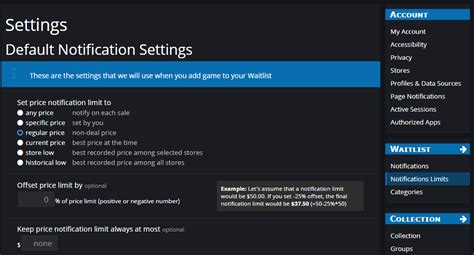
- Customizable Alerts: Set alerts for specific price points, historical lows, or percentage discounts.
- Store Preferences: Choose which stores you want to track or exclude.
- Email Notifications: Receive emails when your desired criteria are met.
- Browser Extension: A browser extension makes it easy to see ITAD data directly on store pages.
GG.deals
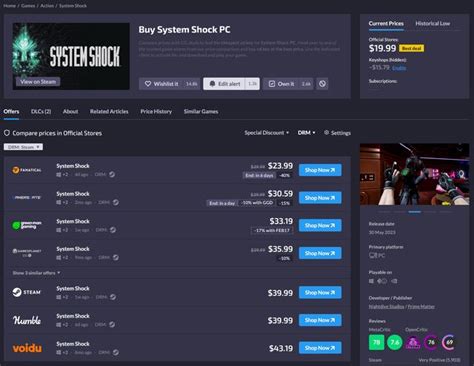
Similar to ITAD, GG.deals provides comprehensive price comparisons, historical data, and alerts across numerous PC game retailers. It boasts a clean interface and also supports wishlist imports from various platforms. You can set up personalized alerts for price drops, bundles, or freebies.
Other Aggregators
Other notable aggregators include Fanatical’s Wishlist, Humble Bundle’s Wishlist (both focused on their own stores but offer good deals), and various community-driven deal forums like r/GameDeals, where users often post significant price drops.
Setting Up Alerts: A Step-by-Step Guide (Example: IsThereAnyDeal)
Let’s walk through a common setup process using IsThereAnyDeal, a powerful third-party tool.
- Create an Account: Sign up for a free account on IsThereAnyDeal.com. This allows you to save your wishlist and alert preferences.
- Import Your Wishlist: Link your Steam account to automatically import your existing wishlist. You can also manually search for and add games from other platforms.
- Configure Alerts: For each game on your wishlist, you can set specific alert criteria. Click on a game, then look for options like “Add to waitlist” or “Set price alert.”
- Define Alert Conditions:
- Target Price: Set a specific price you’re willing to pay (e.g., $10).
- Discount Percentage: Alert me when the price drops by X% (e.g., 50% or more).
- Historical Low: Get notified if the game reaches its lowest-ever price.
- Specific Stores: Choose to only receive alerts from stores you trust or prefer.
- Choose Notification Method: Select email notifications as your primary alert method. You can also integrate with RSS feeds or browser push notifications.
Tips for Maximizing Your Price Alert Effectiveness
- Prioritize Your Wishlist: If you have hundreds of games, prioritize the ones you genuinely want to play soon. This reduces notification clutter.
- Be Patient: Sales cycles vary. Some games go on sale frequently, others less so. Don’t rush into a purchase unless it’s a stellar deal you’ve been waiting for.
- Combine Tools: Use built-in store wishlists for initial tracking, but rely on third-party aggregators for comprehensive cross-store comparisons.
- Check Storefront-Specific Sales: Keep an eye on major seasonal sales from individual stores (Steam Summer Sale, Epic Mega Sale, GOG Winter Sale) as these often have the deepest discounts.
- Beware of Gray Market Keys: Stick to legitimate retailers for your game keys. While third-party aggregators list reputable stores, be cautious of sites offering unbelievably low prices that might be selling illegitimate keys.
Conclusion
Setting up effective price alerts for games on your wishlist is a savvy move for any budget-conscious gamer. By combining the convenience of built-in store wishlists with the power of third-party aggregators, you can automate the process of finding the best deals. This proactive approach ensures you never overpay for a game again, allowing you to expand your library without emptying your wallet. Happy gaming, and happy saving!