


Stop surprise gaming costs: Parental controls for kids’ in-game purchases?
Many parents today are familiar with the joy and, sometimes, the frustration that comes with their children’s love for video games. While gaming offers entertainment and social connection, it also introduces a modern financial challenge: unexpected in-game purchases. A seemingly harmless download can quickly lead to hundreds of dollars spent on virtual items, character upgrades, or loot boxes, leaving parents with a hefty bill and a sense of helplessness.
The Growing World of Digital Microtransactions
From popular mobile games to console blockbusters, in-game purchases – often called microtransactions – are an integral part of the gaming landscape. These aren’t just for adult players; many child-friendly games actively encourage spending on cosmetic items, power-ups, or subscriptions that enhance the gameplay experience. Kids, often without a full grasp of real-world money, can easily be tempted to click ‘buy’ when their favorite character needs a new skin or they want to progress faster.
Why Surprise Costs Are a Common Problem
The primary reason for surprise bills lies in the accessibility and often subtle nature of these purchases. Credit card information might be stored on a console or app store, making it a one-click transaction. Kids might not understand that they are spending ‘real’ money, viewing virtual currency as just another game element. Furthermore, game developers are experts at making these purchases appealing and sometimes even necessary to advance, creating a ‘pay-to-win’ or ‘pay-to-progress’ environment that can be hard for children to resist.
Understanding Your Parental Control Arsenal
Fortunately, nearly all major gaming platforms, app stores, and consoles offer robust parental control features designed to manage or restrict in-game purchases. These tools are your first line of defense against unwanted spending. Here’s a general overview of where to look:
- Console Settings (PlayStation, Xbox, Nintendo Switch): Each console has a dedicated ‘Family Management’ or ‘Parental Controls’ section where you can set spending limits, require passwords for purchases, restrict content, and manage screen time.
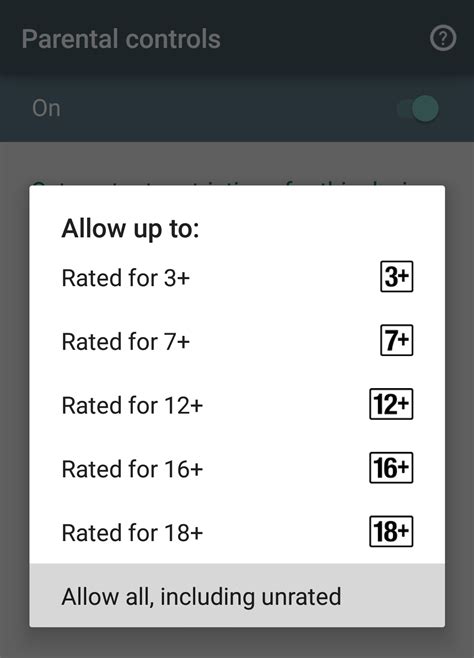
- Mobile App Stores (Apple App Store, Google Play Store): Both iOS and Android allow you to enable ‘Ask to Buy’ features, require passwords for every purchase, or disable in-app purchases entirely.
- PC Gaming Platforms (Steam, Epic Games Store): These platforms also offer parental controls that can restrict access to payment methods or require authorization for transactions.

Implementing Effective Controls: A Step-by-Step Guide
Taking the time to set up these controls correctly can save you significant headaches and expenses down the line. It’s not just about turning a switch; it’s about understanding how each setting works for your specific devices.
- Audit Your Accounts: Check every device and platform your child uses for gaming. This includes their phone, tablet, gaming console, and any PC gaming accounts.
- Require Passwords for All Purchases: This is perhaps the most crucial step. Ensure that a password (known only to you) is required before any transaction can be completed.
- Disable In-App Purchases (Temporarily): For younger children, consider disabling in-app purchases altogether until they are older and can understand the concept of digital spending.
- Set Spending Limits: Many platforms allow you to set monthly spending limits for child accounts. This can be a great way to allow some freedom while maintaining a budget.
- Remove Stored Payment Information: If possible, remove credit card details from gaming accounts or app stores. Re-enter them manually for your own purchases if necessary.
- Monitor Account Activity: Regularly check purchase histories on all platforms to ensure compliance and catch any unauthorized spending early.

Beyond Controls: Fostering Financial Literacy
While parental controls are essential, they are just one piece of the puzzle. The ultimate goal should be to help your children understand the value of money and the implications of their spending choices, even in a virtual world. Open and honest communication is key.
- Explain the Value of Money: Help them understand that virtual currency represents real money.
- Discuss In-Game Marketing Tactics: Teach them to recognize persuasive techniques designed to encourage spending.
- Set an Allowance for Digital Purchases: Consider giving them a small allowance specifically for in-game purchases. This teaches budgeting and the concept of finite resources.
- Consequences for Unauthorized Spending: Clearly define the consequences if they make unauthorized purchases, such as doing chores to ‘earn back’ the money or losing gaming privileges.

Conclusion
Navigating the landscape of kids’ gaming and in-game purchases requires vigilance and proactive measures from parents. By leveraging the available parental control tools and combining them with ongoing conversations about financial responsibility, you can protect your family budget from unexpected shocks and empower your children to make smarter, more informed choices in their digital lives. Don’t wait for a surprise bill; take control today.