





How to get instant alerts for wishlist game price drops across all platforms?

Never Miss a Deal: The Power of Instant Price Drop Alerts
For avid gamers, the thrill of discovering a beloved title on sale is matched only by the frustration of missing out on a stellar discount. With hundreds of games released annually and a multitude of digital storefronts across PC, PlayStation, Xbox, and Nintendo, keeping track of every price fluctuation on your wishlist can feel like an impossible task. Manually checking each store daily is not only tedious but also highly inefficient.
The good news is that you don’t have to be a full-time deal hunter to snag those elusive discounts. Thanks to a variety of specialized tools and strategies, getting instant alerts for price drops on your wishlist games across all major platforms is not just possible, but surprisingly easy. By leveraging these resources, you can ensure that you’re always informed the moment a game you’ve been eyeing hits its lowest price.
This guide will walk you through the most effective methods to set up a robust, cross-platform price tracking system, so you can expand your game library without breaking the bank.
Why Timely Alerts Are a Game Changer for Gamers
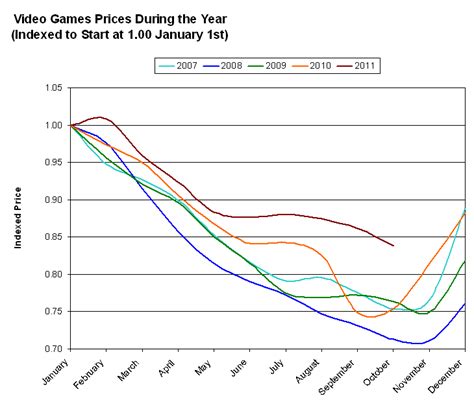
In the dynamic world of video game sales, prices can change without warning. A game that’s full price today might be 50% off tomorrow during a flash sale, or even briefly appear in a bundle. Without an automated alert system, these fleeting opportunities are often missed, leading to regret or paying a higher price later.
Instant alerts empower you to make informed purchasing decisions. Instead of impulse buying, you can patiently wait for the optimal moment to strike, saving significant amounts of money over time. This becomes especially crucial when considering the ever-increasing cost of new AAA titles.
Furthermore, managing a wishlist across disparate platforms – Steam, Epic Games Store, GOG for PC; PlayStation Store; Xbox Games Store; Nintendo eShop – presents a unique challenge. Each platform operates independently, often with different sale cycles and pricing. A comprehensive alert system unifies this experience, providing a holistic view of your desired games’ pricing status regardless of where they’re sold.
Top Tools for Cross-Platform Price Tracking
1. Dedicated Price Comparison Websites & Apps
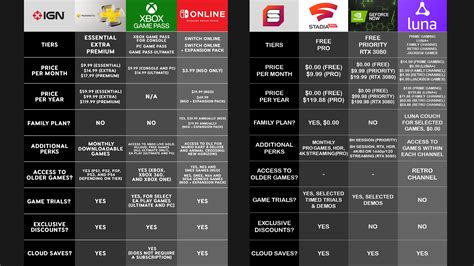
These are your go-to solutions for comprehensive, cross-platform tracking. They aggregate data from numerous digital storefronts, allowing you to track prices and set alerts from a single dashboard. Many also provide historical price data, so you can see if a current sale is truly a good deal.
- IsThereAnyDeal (ITAD): One of the most popular and comprehensive aggregators for PC games. It covers Steam, Epic Games Store, GOG, Humble Store, Fanatical, Green Man Gaming, and many more. You can import your Steam wishlist, create a custom list, and receive email alerts for price drops or specific percentage discounts.
- CheapShark: Focuses primarily on PC games from various digital retailers. It’s known for its clean interface and quick price updates, offering email alerts and RSS feeds.
- GG.deals: A fantastic option that not only covers PC but also major console platforms (PlayStation, Xbox, Nintendo Switch). It allows you to create a universal wishlist and provides email alerts, browser notifications, and even differentiates between official store prices and legitimate key reseller prices.
2. Platform-Specific Wishlists & Notifications
While not cross-platform, these are essential for direct alerts from the source and can complement your primary tracking tool:
- Steam Wishlist: Steam will email you when games on your wishlist go on sale. It’s reliable for Steam-specific deals.
- PlayStation Store Wishlist: Similarly, the PlayStation Store allows you to add games to a wishlist and sends email notifications for sales.
- Xbox Store Wishlist: Xbox provides notifications for games on your wishlist, often through the console’s dashboard or email.
- Nintendo eShop Wishlist: The eShop also has a wishlist feature that notifies you of discounts.
- Epic Games Store Wishlist: Epic also offers email notifications for wishlist titles.
It’s a good practice to use these in conjunction with a dedicated price tracker. They act as a direct, first-party alert system.
3. Browser Extensions & Community Sites
- Browser Extensions: Some price tracking sites (like GG.deals) offer browser extensions that can integrate directly with store pages, showing price history or alerting you to better deals elsewhere while you browse.
- Reddit r/gamedeals: While not an automated alert for your specific wishlist, this subreddit is an excellent resource for discovering new deals quickly. Set up custom notifications for keywords using third-party Reddit tools if you want to follow specific games or publishers.
Setting Up Your Ultimate Price Alert System
Here’s a streamlined approach to building your personalized game deal detection system:
- Choose Your Primary Cross-Platform Tracker: Start by selecting one of the dedicated price comparison websites (e.g., GG.deals for multi-platform, or IsThereAnyDeal for PC focus).
- Import/Create Your Wishlist: Most trackers allow you to import your wishlist from Steam, Epic, or GOG directly. For console games, manually add them to your chosen tracker.
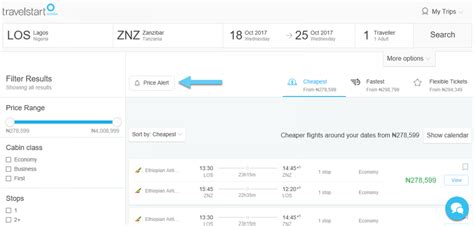
- Configure Alert Preferences: Set up email notifications for desired price drops (e.g., any price drop, a specific percentage off, or below a certain price threshold). Many also offer browser push notifications for even more immediate alerts.
- Maintain Platform-Specific Wishlists: Keep your wishlists updated on Steam, PlayStation, Xbox, and Nintendo eShop. These serve as a valuable backup and ensure you don’t miss any first-party promotions.
- Install Relevant Browser Extensions: If your chosen tracker has an extension, install it to get real-time price comparisons and historical data directly on store pages as you browse.
Pro Tips for Maximizing Your Savings
- Be Patient: Most games will eventually go on sale. Unless you absolutely need to play it on release, waiting a few weeks or months can lead to significant savings.
- Check Historical Lows: Always consult the historical price data provided by price trackers. This helps you determine if a current sale is genuinely a good deal or if the game has been cheaper in the past.
- Consider Bundles: Keep an eye out for game bundles (e.g., Humble Bundle, Fanatical) that might include games from your wishlist at an incredibly low collective price.
- Set Realistic Price Targets: Instead of waiting for 90% off on a brand new AAA title, set a more achievable target like 25-50% off to catch earlier sales.
- Utilize “Ignore” Features: Most trackers allow you to ignore specific stores (e.g., if you only buy from official stores and not key resellers) or specific editions of a game.

Conclusion: Play More, Pay Less
Gone are the days of aimlessly browsing digital storefronts hoping for a discount. By implementing a smart, multi-layered price tracking system, you can turn your game wishlist into a powerful money-saving tool. Instant alerts for price drops across all platforms mean you’ll never again miss a fantastic deal on the games you truly want to play. Invest a little time now to set up your system, and reap the rewards of a fatter wallet and an ever-growing, yet affordably acquired, game library.



