



How to optimize mobile game settings for battery life without sacrificing performance?

The Mobile Gamer’s Dilemma: Power vs. Playtime
Mobile gaming has become incredibly sophisticated, offering console-quality experiences in the palm of your hand. However, this graphical prowess and complex processing come at a cost: battery life. Many gamers face the tough choice between enjoying stunning visuals and consistent performance or having their device last through an extended play session. The good news is that you don’t always have to make a drastic sacrifice. By understanding how various settings impact your device’s power consumption, you can strategically optimize your mobile games to achieve a harmonious balance.
Understanding the Battery Drain Culprits
Before diving into solutions, it’s crucial to know what’s draining your battery. High-fidelity graphics, demanding physics calculations, constant network communication, and a brightly lit, high-refresh-rate screen are primary culprits. Each frame rendered, every pixel lit, and every data packet sent requires energy. The goal of optimization is to reduce these energy demands where they have the least impact on your personal enjoyment of the game.
Optimizing In-Game Settings for Efficiency
Most modern mobile games offer a range of customizable settings. These are your first line of defense against battery drain.
1. Resolution and Graphics Quality: Finding Your Sweet Spot
One of the most significant impacts on performance and battery life comes from resolution and overall graphics quality. Rendering more pixels at a higher quality demands more GPU power. Often, slightly reducing the resolution or turning down texture quality, shadow detail, and anti-aliasing can lead to substantial battery savings without a noticeable drop in gameplay immersion on a small screen.
- Resolution: If your game allows it, lowering the internal rendering resolution can be a game-changer. Your screen will still display at its native resolution, but the game’s assets will be rendered at a slightly lower pixel count, then upscaled, saving significant processing power.
- Texture Quality: High-resolution textures consume more VRAM and processing power. Set them to medium or low if the visual difference isn’t critical.
- Shadows: Dynamic and high-resolution shadows are very demanding. Reducing shadow quality or disabling them entirely (if an option) can free up considerable resources.
- Anti-Aliasing: This setting smooths jagged edges but is computationally expensive. Disabling it or using a lower-quality option like FXAA instead of MSAA can yield performance and battery benefits.
2. Frame Rate (FPS) Capping: Smoothness Without Overkill
While a higher frame rate generally means a smoother experience, constantly pushing your device to render 60+ FPS can be a significant battery drain. Many games offer an FPS cap option. Capping your frame rate to 30 FPS or 45 FPS, especially for slower-paced games, can provide a perfectly enjoyable experience while drastically reducing the workload on your CPU and GPU. For competitive games, you might aim for a higher, stable FPS (e.g., 60 FPS) but ensure other settings are optimized to maintain it.

3. Visual Effects and Post-Processing: Less Eye Candy, More Battery Life
Settings like bloom, motion blur, depth of field, and reflections add to the visual flair but are often resource hogs. Experiment with turning these off one by one. You might find that the game still looks great without them, and your battery will thank you.
System-Level Optimizations for Extended Gaming
Beyond in-game settings, your device’s operating system and hardware settings play a crucial role in battery consumption.
1. Screen Brightness and Refresh Rate: The Display’s Thirst for Power
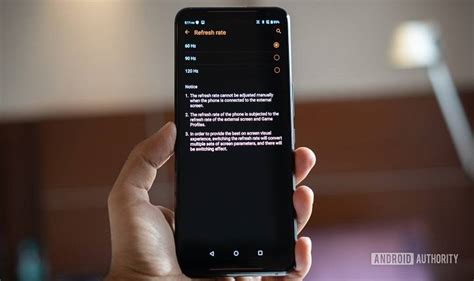
Your screen is one of the biggest power consumers. Lowering the screen brightness is a simple yet highly effective way to save battery. Additionally, if your phone has a high refresh rate display (90Hz, 120Hz, or higher), consider setting it to a standard 60Hz during gaming sessions. While high refresh rates offer buttery smoothness, they consume significantly more power.
2. Background Apps and Notifications: Clear the Clutter
Apps running in the background, even if not actively used, can consume CPU cycles and network data. Before a gaming session, close unnecessary background applications. Similarly, disable non-essential notifications, as each notification lights up your screen and activates radios. Many phones have a “Do Not Disturb” or “Gaming Mode” that can automate this.
3. Network Connectivity: Wi-Fi vs. Mobile Data
Playing games over Wi-Fi generally consumes less power than using mobile data (4G/5G). Mobile data radios work harder to maintain a connection, especially in areas with poor signal strength. Whenever possible, connect to a stable Wi-Fi network for gaming.
4. Game Modes and Device Performance Tools
Many Android and iOS devices now include dedicated “Game Modes” or performance management tools. These often automatically optimize settings like closing background apps, managing notifications, and sometimes even dynamically adjusting CPU/GPU clock speeds to prioritize gaming performance and efficiency. Explore these built-in features on your device.
Monitoring, Testing, and Personalization
The best optimization strategy is one tailored to your specific device, games, and preferences. Use your device’s built-in battery usage statistics to see which apps are consuming the most power. Experiment with different settings combinations: play a game for 15-20 minutes with one set of optimizations, then adjust and try again. What works perfectly for an RPG might be too restrictive for a fast-paced shooter. Find the sweet spot that offers you the best balance between visual fidelity, smooth performance, and extended playtime.
Conclusion: Game Smarter, Not Shorter
You don’t have to choose between an immersive gaming experience and a dead battery. By strategically tweaking both in-game and system-level settings, you can significantly extend your mobile device’s battery life without feeling like you’re playing on a toaster. Embrace the power of optimization, experiment with the suggestions above, and enjoy longer, more satisfying mobile gaming sessions.