



What parental controls effectively manage kids’ online gaming?

In today’s digital age, online gaming is an integral part of many children’s lives, offering entertainment, social connection, and skill development. However, it also presents potential risks, from exposure to inappropriate content and cyberbullying to excessive screen time. Navigating this landscape requires a thoughtful approach, and effective parental controls are a crucial tool in ensuring a safe and balanced gaming experience for kids.
Understanding the Landscape of Online Gaming Risks
Before diving into specific controls, it’s vital for parents to understand the diverse range of potential issues. These include interactions with strangers, exposure to mature content, in-game purchases (microtransactions), addiction, and the potential for cyberbullying. A comprehensive strategy involves both technical solutions and open communication.
Platform-Specific Parental Controls (Consoles & PCs)
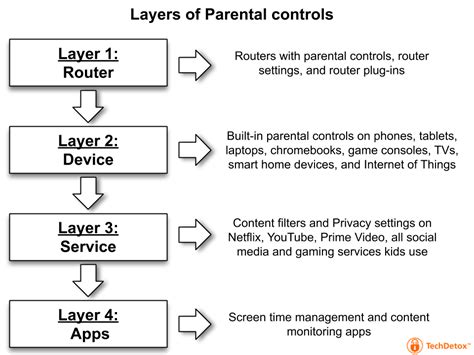
Most modern gaming consoles (PlayStation, Xbox, Nintendo Switch) and PC operating systems (Windows, macOS) come equipped with robust built-in parental control features. These allow parents to manage screen time limits, restrict access to age-inappropriate games, control online communication, prevent unauthorized purchases, and filter web content. Familiarizing yourself with these settings is often the first and most effective step.
- Screen Time Management: Set daily or weekly play limits and schedules.
- Content Filtering: Restrict games based on age ratings (ESRB, PEGI).
- Communication Settings: Control who your child can interact with online (friends only, no one).
- Purchase Restrictions: Require passwords for all transactions.
Router-Level Controls and Network Filters
For a more universal approach across all devices connected to your home network, consider leveraging your Wi-Fi router’s parental control features. Many modern routers allow you to block specific websites, set internet access schedules for individual devices, and filter content. This can be particularly useful for managing screen time across multiple devices or for devices that don’t have robust built-in controls.
Third-party DNS services like OpenDNS also offer network-wide content filtering that can block categories of websites and provide usage reports, adding an extra layer of protection beyond what some routers offer.
In-Game Settings and Family Modes
Beyond console and network-level controls, many popular online games themselves offer in-game settings that parents can utilize. Look for “family modes,” privacy settings, or communication options within the game’s interface. These might allow you to mute chat functions, block specific players, or disable voice chat, tailoring the experience directly within the gaming environment. Always check the game’s specific settings and privacy policy.

Third-Party Monitoring Software and Apps
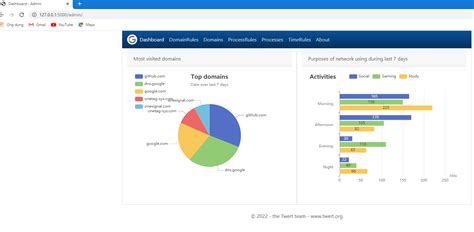
For parents seeking more granular control and comprehensive monitoring, dedicated third-party software and apps can be a powerful solution. These tools often provide features like detailed activity reports, location tracking (for mobile devices), app usage limits, and more advanced content filtering across various devices. While they offer extensive capabilities, it’s important to discuss their use with older children to maintain trust.
- Qustodio: Comprehensive screen time and content filtering.
- Bark: AI-powered monitoring for text, email, and social media.
- Norton Family: Web supervision, time limits, and location tracking.
The Power of Communication and Digital Literacy
While technical controls are essential, the most effective “parental control” is an open dialogue with your child. Educating them about online risks, responsible gaming habits, privacy, and cyber etiquette empowers them to make safer choices independently. Establish clear family rules regarding gaming, screen time, and online interactions. Encourage them to come to you if they encounter anything uncomfortable or concerning online.
Regular check-ins, playing games with them, and understanding their online world can help bridge the generational gap and foster a trusting environment where they feel comfortable sharing their experiences.
Conclusion: A Balanced and Evolving Approach
Effectively managing kids’ online gaming is not about absolute restriction, but about fostering a safe, healthy, and balanced environment. A combination of platform-specific settings, network-level filters, in-game controls, and thoughtful third-party tools, coupled with open communication and digital education, forms the most robust defense. Remember that the digital world is constantly evolving, so regularly review and adjust your parental control strategies to keep pace with new games, platforms, and risks. The goal is to empower children to enjoy the benefits of online gaming responsibly, within boundaries that ensure their safety and well-being.