
What microSD card best optimizes Switch game storage?
Why Your Switch Needs a microSD Card
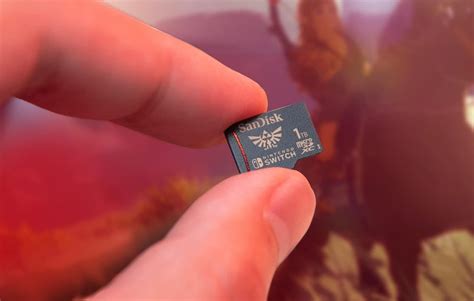
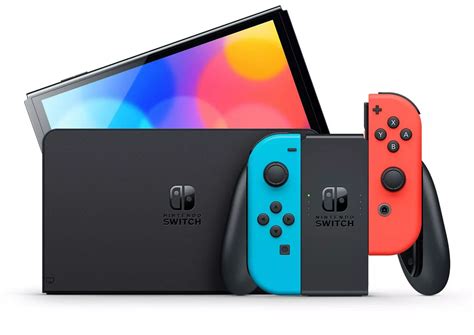
The Nintendo Switch, while a marvel of portable gaming, comes with a rather modest 32GB (or 64GB for the OLED model) of internal storage. A significant portion of this is reserved for the system’s operating software, leaving precious little room for downloaded games, updates, and DLC. Modern games can easily consume several gigabytes each, making a microSD card an almost indispensable accessory for any serious Switch owner looking to expand their digital library.
Understanding microSD Card Specifications for Switch
Not all microSD cards are created equal, especially when it comes to gaming. Several key specifications determine how well a card will perform with your Nintendo Switch:
Capacity: How Much Space Do You Need?
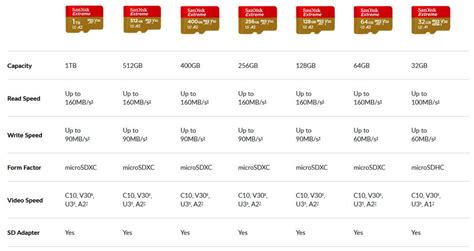
microSD cards come in a wide range of capacities, from 32GB all the way up to 1TB or even 2TB. The Switch officially supports up to 2TB, though 1TB cards are currently the largest widely available and practical option. Consider your gaming habits:
- Casual Gamer (32GB-128GB): If you mostly play physical cartridges and only download a few indie titles or DLCs.
- Moderate Gamer (256GB-512GB): A good balance for a mix of physical and digital games, or if you plan to download several large titles. This is often the sweet spot for value and storage.
- Heavy Digital Gamer (1TB): If you primarily download all your games and want to build a vast digital library without constantly deleting and re-downloading.
Keep in mind that game sizes vary wildly. A 512GB card can typically hold dozens of smaller games or several large AAA titles.
Speed: Crucial for Load Times
While the Nintendo Switch’s internal card reader isn’t the fastest, opting for a higher-speed card can still provide a noticeable difference in game load times and overall system responsiveness. Look for these speed indicators:
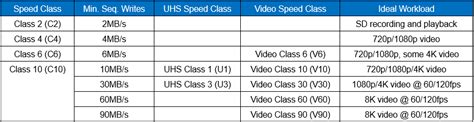
- UHS-I (Ultra High Speed – Phase I): The Switch supports the UHS-I interface, which has a theoretical maximum speed of 104 MB/s. Cards labeled UHS-II or UHS-III are faster but the Switch can’t fully utilize their extra pins, so you’ll only get UHS-I speeds.
- Speed Class (C10): Most modern cards are Class 10 (C10), guaranteeing a minimum sequential write speed of 10 MB/s. This is the minimum recommended for Switch.
- UHS Speed Class (U1, U3): U1 guarantees 10 MB/s, while U3 guarantees 30 MB/s. For the Switch, a U1 card is generally sufficient, but a U3 card will provide slightly better performance if its read/write speeds are higher.
- Application Performance Class (A1, A2): These classes are designed for running apps directly from the card, which is exactly what the Switch does. A1 (1500 IOPS read, 500 IOPS write) is good, and A2 (4000 IOPS read, 2000 IOPS write) is even better for random read/write operations, which are common in gaming. While the Switch may not fully leverage A2’s raw potential, cards with A2 ratings often have overall higher quality components, leading to better real-world performance.
Aim for a card with at least a U1 or preferably U3 rating, and ideally an A1 or A2 rating for the best experience.
Recommended microSD Cards for Nintendo Switch
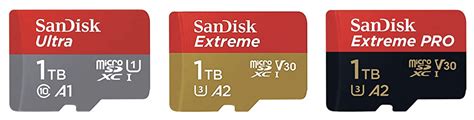
While many brands offer suitable microSD cards, some consistently deliver reliable performance for the Nintendo Switch. Look for reputable brands like SanDisk, Samsung, Lexar, and PNY. Specifically, the SanDisk Extreme and SanDisk Ultra lines are very popular and perform excellently with the Switch.
- SanDisk Ultra: Often a great balance of price and performance, meeting the recommended A1/U1 or A1/U3 standards.
- SanDisk Extreme: Offers even faster read/write speeds (U3/A2), which can lead to marginally quicker load times, though the difference might not always be drastic on the Switch.
- Samsung EVO Select/Plus: Similar to SanDisk Ultra, these provide reliable performance at competitive price points.
The key is to select a card from a trusted manufacturer to avoid counterfeit products or those with unreliable performance.
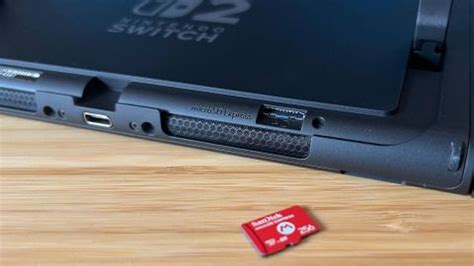
Tips for Managing Your Switch Game Storage
Once you have your microSD card, here are a few tips:
- Install Games Directly: When downloading new digital titles, ensure your microSD card is inserted. The Switch will automatically prioritize installing games to the card if there’s enough space.
- Transfer Data: You can move existing game data between the system’s internal storage and the microSD card via the Switch’s Data Management settings. Go to System Settings > Data Management > Move Data Between System / microSD Card.
- Archiving Software: If you need to free up space, you can “Archive Software” from the HOME Menu. This deletes the game data but keeps the save data and icon, allowing you to easily re-download it later.
- Back Up Your Data: While save data is primarily stored on the console’s internal memory (and often backed up to the cloud with a Nintendo Switch Online subscription), game data on your microSD card can be copied to a PC for backup, though it won’t be playable without the original console.
Conclusion
Optimizing your Nintendo Switch game storage is straightforward once you understand the key specifications. Prioritize a reputable brand, aim for a capacity that suits your gaming style (256GB to 512GB often being the sweet spot for most), and ensure the card has at least a U1/A1 rating for smooth performance. With the right microSD card, you can enjoy an expansive digital library without worrying about running out of space or enduring lengthy load times, enhancing your overall Switch gaming experience.