



What’s the best microSD card for Switch game storage & speed?

The Nintendo Switch’s internal storage of 32GB (or 64GB for the OLED model) fills up surprisingly fast, especially with large digital game downloads and frequent updates. Investing in a quality microSD card isn’t just an upgrade; it’s practically a necessity for any serious Switch gamer. But with so many options on the market, how do you choose the one that’s right for your gaming needs, balancing both ample storage and swift performance?
Understanding Switch MicroSD Card Compatibility and Standards
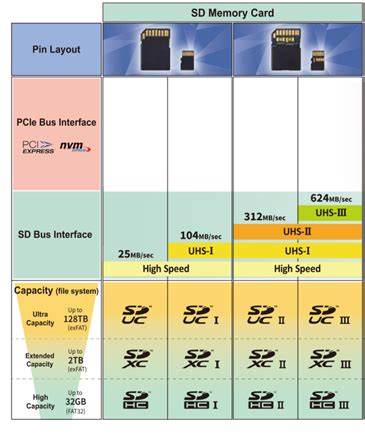
Before diving into specific recommendations, it’s crucial to understand what the Nintendo Switch supports. The console is compatible with microSD, microSDHC, and microSDXC cards. For optimal performance, the Switch utilizes the UHS-I (Ultra High Speed Phase I) interface, meaning cards designed for UHS-II or UHS-III, while backward compatible, won’t leverage their faster speeds on the Switch itself. Therefore, focusing on high-quality UHS-I cards is key.
Speed classes are also important. You’ll typically see markings like C10 (Class 10), U1 (UHS Speed Class 1), and U3 (UHS Speed Class 3). The Switch benefits most from U3 cards, which guarantee a minimum sequential write speed of 30MB/s. This is vital for faster game installations, loading times, and smoother gameplay, especially for open-world titles or games with large assets.
Choosing the Right Storage Capacity
The first decision most players face is how much storage they need. While a 64GB or 128GB card might seem sufficient initially, modern Switch games can range from a few gigabytes to over 20GB. Titles like The Legend of Zelda: Tears of the Kingdom, Pokémon Scarlet/Violet, or NBA 2K can quickly eat up space. Consider your gaming habits:
- Casual Gamer (Mostly physical games, few digital): 64GB – 128GB
- Moderate Gamer (Mix of physical & digital, some large titles): 256GB – 512GB
- Heavy Digital Gamer (Many downloads, future-proofing): 512GB – 1TB+
It’s often recommended to go for a higher capacity than you think you need. MicroSD cards have become very affordable, and future-proofing yourself by getting a 256GB or 512GB card now will save you the hassle of upgrading later.

Prioritizing Speed: U3, A1, and A2 Ratings
Beyond capacity, speed is paramount for a responsive gaming experience. Here’s what those cryptic ratings mean:
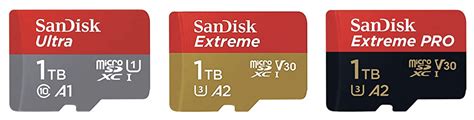
- UHS Speed Class (U1, U3): U3 cards (30MB/s minimum write speed) are strongly recommended over U1 (10MB/s minimum write speed) for the Switch. Faster write speeds mean quicker game installations and updates.
- Application Performance Class (A1, A2): These ratings indicate how well a card handles random read/write operations, which are crucial for running applications (like games) directly from the card. A1 cards offer a minimum of 1,500 IOPS random read and 500 IOPS random write, while A2 cards boost this to 4,000 IOPS random read and 2,000 IOPS random write. While the Switch doesn’t fully utilize A2’s peak random speeds, cards rated A2 often have overall better build quality and sustained performance, making them a good choice if available at a reasonable price.
Look for cards that are at least U3, and ideally A1 or A2 for the best balance of sequential and random performance.
Top MicroSD Card Recommendations for Nintendo Switch
Several brands consistently deliver excellent performance and reliability for the Nintendo Switch. When making a choice, consider these:
1. SanDisk microSDXC for Nintendo Switch
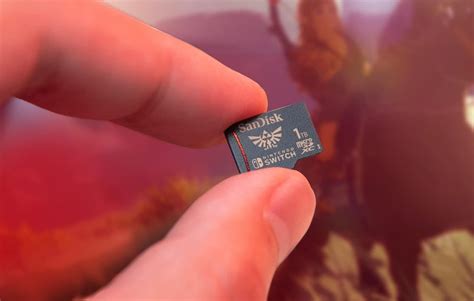
SanDisk has an official licensing partnership with Nintendo, offering branded microSD cards featuring iconic characters. These cards are specifically optimized for the Switch, come in capacities up to 1TB, and are rated U3 and A1 (sometimes A2 for newer versions). They provide excellent read speeds (up to 100MB/s) and solid write speeds, making them a safe and reliable choice.
2. Samsung EVO Select / EVO Plus / PRO Plus
Samsung’s line of microSD cards offers fantastic value and performance. The EVO Select and EVO Plus series are typically U3 and A2 rated, providing high read/write speeds comparable to (and sometimes exceeding) the official SanDisk cards. The PRO Plus series offers even higher performance, often at a slightly higher price point, but all are excellent contenders for Switch storage.
3. Lexar PLAY microSDXC
Lexar’s PLAY series is designed with gaming in mind. These cards typically boast U3 and A2 ratings, with high read speeds and robust performance. They are a great alternative to SanDisk and Samsung, often found at competitive prices.

Installation and Best Practices
Inserting a microSD card into your Switch is straightforward: power off the console, open the kickstand, and slide the card into the slot until it clicks. The Switch will automatically detect it and prompt you to format it if necessary.
- Transferring Data: If you’re upgrading from a smaller card, you can transfer your game data by copying the contents of the old card to your computer, then pasting them onto the new, larger card. Alternatively, you can redownload games directly to the new card.
- Formatting: Always allow the Switch to format the card. This ensures optimal compatibility and performance.
- Avoid Cheap Knock-offs: Stick to reputable brands and trusted retailers to avoid counterfeit cards that promise high capacity but deliver poor performance or fail prematurely.

Conclusion: Making the Best Choice for Your Switch
For the best balance of storage, speed, and reliability on your Nintendo Switch, aim for a UHS-I U3 A1 or A2 microSDXC card from a reputable brand like SanDisk, Samsung, or Lexar. While the official Nintendo-licensed cards are a solid choice, general-purpose high-speed cards from these manufacturers often offer comparable or superior performance for a similar or better price.
Prioritize capacity based on your gaming habits, but remember that going a bit larger than you initially think you’ll need is always a good strategy. A 256GB or 512GB card is an excellent sweet spot for most players, providing ample room for dozens of digital titles and ensuring fast load times for years to come.