




What are practical tips for parents to ensure child safety in online multiplayer games?
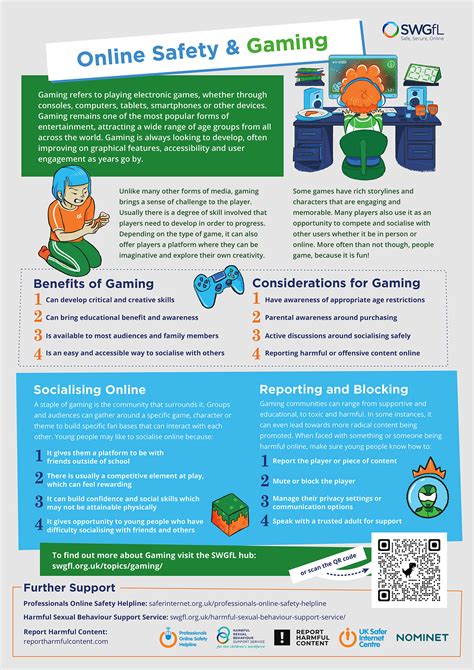
Navigating the Digital Playground: Essential Tips for Parents
Online multiplayer games have become a ubiquitous part of modern childhood, offering entertainment, social connection, and skill development. However, this vibrant digital world also presents unique challenges and potential risks for children. Ensuring child safety in these environments requires proactive engagement and informed strategies from parents. This guide offers practical tips to help you safeguard your children while allowing them to enjoy their gaming experiences responsibly.

Understanding the Risks in Online Gaming
Before implementing safety measures, it’s crucial to understand the common risks associated with online multiplayer games:
- Interaction with Strangers: Children might encounter individuals with malicious intent or inappropriate behavior.
- Exposure to Inappropriate Content: This can range from explicit language in chat to violent or mature themes in game design not suitable for their age.
- Cyberbullying: Online anonymity can embolden bullies, leading to harassment or exclusion.
- Excessive Screen Time: The immersive nature of games can lead to unhealthy screen habits, impacting sleep, schoolwork, and physical activity.
- In-Game Purchases and Scams: Children might be pressured into making unauthorized purchases or fall victim to phishing attempts.
Practical Strategies for Ensuring Child Safety
1. Foster Open Communication and Trust
The most powerful tool a parent has is open dialogue. Talk to your children about their gaming experiences. Ask them what games they play, who they play with, and what they enjoy. Encourage them to come to you if they encounter anything that makes them uncomfortable or scared. Establish an environment where they feel safe disclosing issues without fear of judgment or having their games taken away.
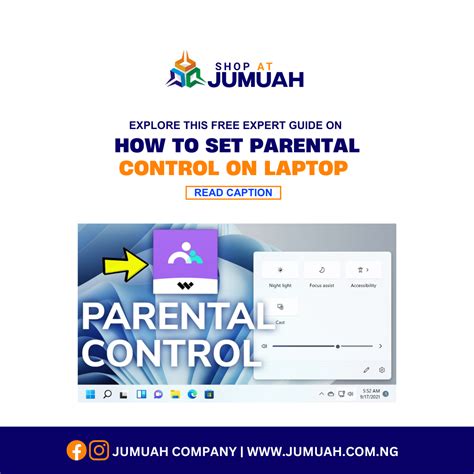
2. Master Parental Controls and Privacy Settings
Most gaming platforms (consoles, PCs, mobile devices) and individual games offer robust parental control features. Learn how to use them. These often allow you to:
- Restrict access to age-inappropriate games.
- Manage friend requests and private messaging.
- Limit spending on in-game purchases.
- Set time limits for gameplay.
- Filter explicit language in chat.
Beyond platform settings, check the privacy settings within each game your child plays. Make sure their profile is not publicly visible and that communication is restricted to approved friends.
3. Research Game Ratings and Content
Before allowing your child to play a new game, research its age rating (e.g., ESRB in North America, PEGI in Europe) and read reviews. These ratings provide insights into a game’s content, including violence, language, and interactive elements. Don’t just rely on the age number; understand what ‘M for Mature’ or ‘T for Teen’ actually implies for the specific game.
4. Teach Online Etiquette and Stranger Danger
Educate your children about responsible online behavior. Remind them:
- Never to share personal information (full name, address, school, phone number, photos) with anyone they don’t know in real life.
- To be respectful to other players and avoid cyberbullying.
- That not everyone online is who they say they are.
- To never agree to meet up with an online acquaintance without discussing it with you first.
Explain that if someone asks them uncomfortable questions or makes them feel uneasy, they should immediately stop communicating with that person and inform a trusted adult.

5. Set Clear Time Limits and Boundaries
Work with your child to establish healthy gaming habits. Set clear, consistent time limits for gameplay, and ensure these don’t interfere with schoolwork, sleep, physical activity, or family time. Use timers or parental control features to enforce these limits. Encourage a balanced lifestyle that includes various activities.
6. Play Together or Observe Gameplay
One of the best ways to understand what your child experiences is to join them in their games or observe them playing. This gives you firsthand insight into the game’s mechanics, social dynamics, and potential risks. It also provides an excellent opportunity for bonding and opens up conversations about appropriate online behavior.

7. Utilize Report and Block Functions
Most online games include features to report or block problematic players. Teach your child how and when to use these tools. Emphasize that reporting inappropriate behavior is not “snitching” but a way to keep the online community safe for everyone.
Conclusion
Ensuring child safety in online multiplayer games is an ongoing process that evolves as children grow and new games emerge. By combining open communication, smart use of parental controls, education about online risks, and active involvement in their digital lives, parents can create a safer and more enjoyable gaming environment for their children. Staying informed and engaged is key to empowering your kids to navigate the digital world responsibly.