


Best Switch SD card for expanding game library & preventing full storage issues?

Why Your Nintendo Switch Needs an SD Card
The Nintendo Switch, a marvel of portable gaming, comes with a modest 32GB (or 64GB for the OLED model) of internal storage. While sufficient for a few small digital titles or save data, this space quickly dwindles once you start downloading larger digital games, game updates, DLC, and screenshots. Many modern AAA Switch titles can easily consume 10-20GB or more, making the built-in storage a significant bottleneck for serious gamers.
Running out of storage means you can’t download new games, apply crucial updates, or even save your game progress if your system’s memory is completely full. This not only interrupts your gaming experience but can force you into the frustrating decision of deleting beloved games to make space for new ones. Expanding your Switch’s storage with a high-quality microSD card is not just a luxury; it’s a necessity for any avid player.
Understanding SD Card Types: What Matters for Switch?
When selecting a microSD card for your Nintendo Switch, not all cards are created equal. The Switch supports microSDHC (Secure Digital High Capacity) and microSDXC (Secure Digital eXtended Capacity) cards. Given the need for substantial storage, microSDXC cards (which range from 64GB to 2TB) are almost always the way to go.
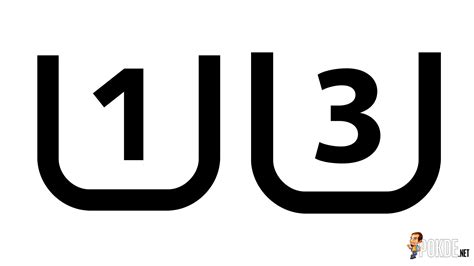
Beyond capacity, speed is crucial. Look for cards with a UHS-I (Ultra High Speed-I) interface, which the Switch supports. Within UHS-I, you’ll often see speed classes like U1 or U3, and application performance classes like A1 or A2. While the Switch doesn’t fully utilize the maximum theoretical speeds of A2 cards, both A1 and A2 offer good performance for loading games and saving data, with A2 providing slightly better responsiveness for app-heavy usage (though less critical specifically for Switch games). Aim for cards that specify read speeds of at least 90MB/s or higher to ensure smooth gameplay and fast load times.
Recommended SD Card Capacities for Gamers
Choosing the right capacity depends heavily on your gaming habits:
- 64GB-128GB: Suitable for casual gamers who primarily buy physical game cartridges and only download a few digital titles or small indies.
- 256GB: A good balance for many gamers. It allows for a decent library of digital games and plenty of space for updates and DLC without being overly expensive.
- 512GB: An excellent choice for most digital-first gamers. You can comfortably store a large collection of AAA titles, indies, and still have room to grow. This is often the sweet spot for value and capacity.
- 1TB: For the ultimate digital collector. If you plan to download every game you can get your hands on, especially larger first-party titles and frequent eShop purchases, 1TB offers virtually limitless storage for years to come.
Remember that even physical cartridges often require significant downloads for updates, patches, and DLC, so some extra space is always beneficial.
Top Picks: Best SD Cards for Nintendo Switch
When it comes to reliability, performance, and compatibility with the Nintendo Switch, a few brands consistently stand out:
- SanDisk: Widely regarded as a top choice, SanDisk offers a range of excellent microSD cards. Their official Nintendo-licensed Switch cards are popular, guaranteeing compatibility and featuring iconic Switch branding. The SanDisk Ultra and Extreme lines are also superb, offering great speeds and reliability.
- Samsung: Samsung’s EVO Select and EVO Plus series are fantastic alternatives, providing excellent value, strong performance, and durability. They are known for their high read/write speeds, making them ideal for gaming.
- Lexar: Lexar offers competitive options, particularly their Play and High-Performance series, which are designed for gaming and demanding applications. They often provide good performance at attractive price points.
Always purchase from reputable retailers to avoid counterfeit cards, which can lead to data loss or poor performance.
Tips for Installing and Managing Your Switch SD Card
Installing an SD card into your Nintendo Switch is straightforward. Simply power off your console, flip up the kickstand on the back of the Switch, and you’ll find the microSD card slot. Insert the card gently until it clicks into place. Power your Switch back on, and it should automatically recognize the new storage.
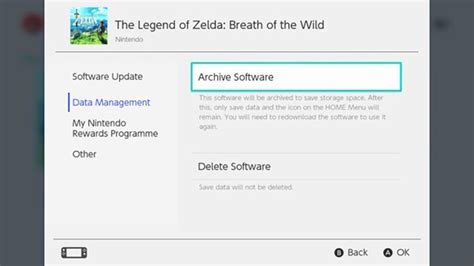
To optimize your storage, you can set your Switch to automatically download new games and updates to the microSD card. Go to System Settings > Data Management. You can also transfer existing data between internal storage and the SD card, though it’s often easier to redownload games directly to the preferred storage location if your internet is fast. Regularly check your available space to avoid future full storage issues, and enjoy your expanded game library!

Conclusion
Investing in a good quality microSD card is perhaps the most essential upgrade for any Nintendo Switch owner looking to maximize their gaming experience. By selecting the right capacity and a reputable brand, you can banish storage woes, download freely, and ensure your adventure never gets cut short by a lack of space. Don’t let a full storage message disrupt your gameplay; equip your Switch with the space it deserves and dive into an endless world of gaming possibilities!