
Best microSD card for Switch? Maximize game storage effectively!

Why a microSD Card is Essential for Your Nintendo Switch
Nintendo Switch owners quickly realize that the console’s meager 32GB (or 64GB for OLED models) internal storage fills up fast. With a vast library of incredible digital titles, downloadable content (DLC), and game updates, investing in a high-quality microSD card isn’t just a recommendation—it’s a necessity. Maximizing your game storage effectively ensures you spend more time playing and less time managing data.
Key Factors When Choosing a Switch microSD Card
Selecting the right microSD card isn’t just about picking the largest capacity; several crucial factors influence performance and value.
1. Capacity: How Much Do You Really Need?
The ideal capacity depends on your gaming habits. Do you primarily buy physical cartridges or download many digital titles?
- 128GB: Good for light digital users or those who mostly buy physical games, offering supplementary space.
- 256GB – 512GB: The sweet spot for most gamers, providing ample room for dozens of large digital titles and updates.
- 1TB (or more): For hardcore digital collectors who want virtually unlimited space for an extensive library.
2. Speed: Why It Matters for Gaming
Speed ratings directly impact game loading times and data transfer. For the Switch, you’ll want a card that’s at least UHS-I (Ultra High Speed – Phase I) compatible.
Look for cards with a V30 speed class rating (guaranteed minimum write speed of 30MB/s) and an A1 or A2 App Performance Class rating. While A2 offers theoretical benefits, the Switch doesn’t fully utilize its capabilities, so A1 is often sufficient and more affordable.
Faster cards can marginally improve loading times for games installed on the microSD card. While the Switch itself has a speed bottleneck, investing in a decent speed class ensures you won’t experience slowdowns due to your storage.
![How to Run Micro SD Card Speed Test on Windows 10/11 [Free Tools] - EaseUS](/images/aHR0cHM6Ly90czMubW0uYmluZy5uZXQvdGg/aWQ9T0lQLlViX2R2RHFGTGFRNUtZekRoN3NIWXdIYUVCJnBpZD0xNS4x.webp)
3. Brand Reliability
Stick to reputable brands like SanDisk, Samsung, Western Digital, or Kingston. These brands offer consistent performance, reliability, and often better warranty support. Avoid suspiciously cheap, unbranded cards, as they often have inflated capacities or poor performance that can lead to data loss or corruption.
Recommended microSD Card Types for Switch
Based on the factors above, here’s what you should look for:
The Best All-Rounder: 256GB – 512GB UHS-I U3/V30 A1
This range offers the best balance of cost, capacity, and performance for the vast majority of Switch users. A 512GB card often provides the best value per gigabyte, giving you significant room to grow your game library without frequent management.

For Digital Hoarders: 1TB UHS-I U3/V30 A1
If you plan to own every digital game you can get your hands on, a 1TB card is the way to go. Be prepared for a higher price point, but the convenience of never having to delete games is unmatched.
For Budget-Conscious Gamers: 128GB UHS-I U3/V30 A1
If you primarily buy physical games or only have a few digital favorites, a 128GB card is an excellent, affordable choice to supplement your internal storage and hold essential updates and smaller downloads.
Installing Your New microSD Card and Managing Games
Installing a microSD card is straightforward: simply slide it into the dedicated slot located under the kickstand on the back of your Switch. The console will prompt you to format it automatically if needed.
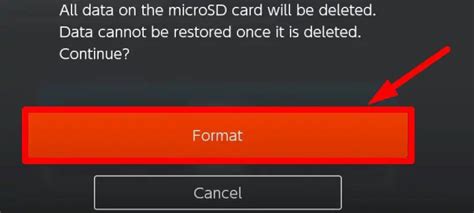
Once installed, new game downloads will automatically save to the microSD card. You can also move existing data from your internal storage to the card via the system settings (System Settings > Data Management > Move Data Between System / microSD Card).
Remember to regularly check your storage space, especially before downloading large new releases, to ensure a smooth gaming experience without interruptions.
Conclusion: Invest Wisely, Game More
Choosing the best microSD card for your Nintendo Switch is a simple yet crucial upgrade that significantly enhances your gaming experience. By considering capacity, speed, and brand reliability, you can ensure your Switch has all the room it needs for future adventures. Don’t let limited storage hold you back – unlock your Switch’s full potential and keep all your favorite games at your fingertips!