





What’s the best microSD card for Nintendo Switch game storage expansion?

The Nintendo Switch, while a marvel of portable gaming, comes with a rather modest internal storage capacity – 32GB for the original model and Switch Lite, and 64GB for the OLED model. Given that many digital games can easily chew through this space, expanding your storage with a microSD card is not just a luxury, but often a necessity for serious gamers. But with so many options on the market, how do you pick the best one for your beloved console?
Why You Need a MicroSD Card for Your Switch
Most modern AAA titles, even those optimized for the Switch, can range from 5GB to over 20GB. Factor in downloadable content (DLC), game updates, and multiple titles, and your internal storage will fill up alarmingly fast. A microSD card provides a simple, effective, and relatively inexpensive way to significantly boost your storage, allowing you to carry a vast library of games wherever you go without constantly deleting and re-downloading.
Key Factors When Choosing a MicroSD Card
Not all microSD cards are created equal, and selecting the right one involves understanding a few key specifications. The Nintendo Switch supports UHS-I microSD cards, meaning you don’t need to splurge on the more expensive UHS-II cards as the Switch won’t utilize their full speed capabilities. Here’s what truly matters:
Capacity
This is arguably the most important factor. MicroSD cards for the Switch come in various sizes, from 32GB up to 2TB. While 32GB or 64GB might seem sufficient initially, it’s wise to think long-term. Many recommend starting with at least 128GB or 256GB. If you’re a heavy digital game buyer, 512GB or even 1TB will offer peace of mind for years to come.
Speed
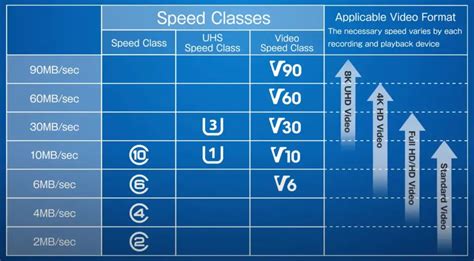
The speed class indicates how fast data can be written to and read from the card. For the Switch, you’re looking for UHS-I (Ultra High Speed Phase I) cards. Within UHS-I, look for a “U3” speed class rating, which guarantees a minimum sequential write speed of 30 MB/s. Some cards also feature “Application Performance Class” ratings like A1 or A2. While the Switch doesn’t fully leverage A2’s advantages, both A1 and A2 cards offer excellent random read/write speeds that are beneficial for game loading times.
Brand Reliability
Sticking with reputable brands like SanDisk, Samsung, PNY, and Lexar is always a good idea. These brands are known for their quality, durability, and often come with good warranties. Beware of extremely cheap, unbranded cards, as they may offer poor performance or fail prematurely.
Recommended MicroSD Cards for Nintendo Switch
SanDisk MicroSDXC for Nintendo Switch
SanDisk has an officially licensed line of microSD cards specifically for the Nintendo Switch, featuring iconic Nintendo branding. These cards are UHS-I U3 rated and come in capacities from 64GB to 1TB. They offer excellent performance and reliability, making them a top-tier choice.
SanDisk Extreme / Extreme Pro
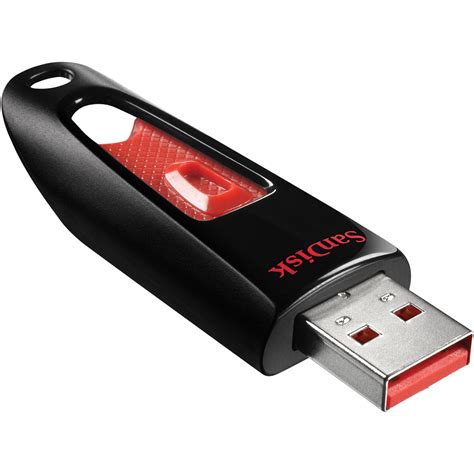
These non-licensed cards are also fantastic options. The SanDisk Extreme and Extreme Pro series boast U3 and A2 ratings, delivering some of the fastest read and write speeds available for UHS-I cards. They are often competitively priced and a great alternative if you don’t mind the lack of official branding.
Samsung EVO Select / EVO Plus / PRO Plus
Samsung’s EVO Select (Amazon exclusive), EVO Plus, and PRO Plus lines are highly regarded for their balance of performance, reliability, and value. They are typically U3 rated, with the PRO Plus offering A2 performance, ensuring smooth game loading and excellent overall experience on the Switch.

PNY Elite-X
The PNY Elite-X is another strong contender, offering U3 and A1 ratings at competitive price points. It’s a reliable choice for those looking for good performance without breaking the bank, available in capacities up to 512GB or 1TB.
Choosing the Right Card for Your Playstyle
- Casual Gamer (A few digital games): 128GB is a good starting point.
- Regular Gamer (Mix of physical and digital): 256GB provides plenty of room.
- Digital Enthusiast (Mostly digital games, large library): 512GB or 1TB is highly recommended to avoid future upgrades.
Installation and Formatting
Installing a microSD card in your Nintendo Switch is straightforward. Simply open the kickstand on the back of the console and slide the card into the slot until it clicks. The Switch will automatically detect the new card and prompt you to format it if necessary. It’s always best to let the Switch format the card itself to ensure optimal compatibility.

Conclusion
Expanding your Nintendo Switch storage with a high-quality microSD card is one of the best upgrades you can make to your gaming experience. While there’s no single “best” card for everyone, prioritizing a reputable brand, a U3 speed class, and a capacity that suits your gaming habits will ensure you have ample space and smooth performance for all your adventures on the go. Happy gaming!


