





How to fix Joy-Con drift on Nintendo Switch effectively?

Understanding and Tackling Joy-Con Drift
Joy-Con drift is a frustrating issue where your Nintendo Switch controller registers movement even when the joystick is untouched, leading to unwanted character movement or menu selections. This common problem can severely impact your gaming experience, but fortunately, there are several effective strategies you can employ to fix it.
Before diving into more complex solutions, it’s essential to understand the potential causes, which often range from minor calibration issues to wear and tear or dust accumulation within the joystick mechanism.

Start with Software & Simple Cleaning Solutions
Often, the solution to Joy-Con drift can be found in basic software adjustments or superficial cleaning. These methods are the least invasive and should always be your first course of action.
1. Recalibrate Your Joy-Cons
Nintendo provides built-in tools for calibrating your Joy-Cons. Navigate to System Settings > Controllers and Sensors > Calibrate Control Sticks. Follow the on-screen prompts carefully for each affected Joy-Con. This can often correct minor drift caused by miscalibration.
2. Update Your System Firmware
Ensure your Nintendo Switch console and Joy-Cons are running the latest firmware. Go to System Settings > System > System Update. While less common, outdated firmware can sometimes contribute to controller anomalies.
3. Clean Around the Joystick with Compressed Air
Dust, dirt, or debris can easily get underneath the joystick cap and interfere with the internal sensors. Hold the Joy-Con upside down and gently lift the rubber skirt around the base of the joystick. Use a can of compressed air with a thin nozzle to blow out any visible or hidden particles. Be careful not to spray too close or for too long, as this can introduce moisture or damage components.

Advanced Cleaning and DIY Repairs
If software solutions and compressed air don’t resolve the drift, you might need to perform a deeper clean or consider replacing components. Proceed with caution, as opening your Joy-Cons can void warranties if not done correctly.
1. Using Electronic Contact Cleaner
For persistent drift, electronic contact cleaner (like isopropyl alcohol or specialized electronics cleaner) can be effective. Power off your Switch and remove the Joy-Con. Lift the rubber skirt around the joystick and carefully apply a small amount of contact cleaner directly into the mechanism. Move the joystick around to help the cleaner distribute, then let it dry completely before retesting. Avoid spraying excessive amounts.
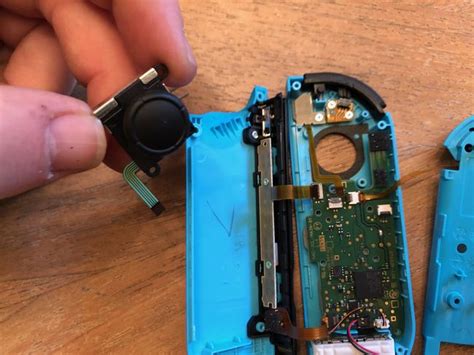
2. Replacing the Joystick Module
When the internal potentiometer of the joystick itself is worn out, a replacement is often the most reliable fix. This involves opening the Joy-Con using specific small screwdrivers (usually Tri-wing and Phillips), disconnecting ribbon cables, and swapping out the old joystick module for a new one. Replacement kits are readily available online and come with the necessary tools and instructions. This is a more advanced DIY repair, so watch tutorials and proceed carefully.
Professional Repair and Warranty Options
If you’re uncomfortable with DIY repairs or if they haven’t worked, professional assistance is another route.
1. Nintendo’s Repair Service
Nintendo offers repair services for Joy-Con drift, and in many regions, they have provided these repairs for free, even if your warranty has expired, due to the widespread nature of the issue. Check Nintendo’s official support website for your region’s policy and instructions on how to send in your controllers for repair.
2. Third-Party Repair Shops
Local electronics repair shops might also offer Joy-Con repair services. This can be a quicker option, though costs may vary. Ensure the shop is reputable and experienced with console repairs.
Prevention and Maintenance Tips
To minimize the chances of future Joy-Con drift:
- Handle your Joy-Cons with care, avoiding excessive force on the joysticks.
- Keep your gaming area clean to reduce dust and debris accumulation.
- Consider using joystick caps or protective covers that can add a small layer of defense against wear.
Conclusion
Joy-Con drift can be a frustrating obstacle to enjoying your Nintendo Switch, but with a range of solutions from simple software recalibrations to more involved hardware replacements, you can effectively tackle the problem. Start with the easiest methods and escalate as needed, always prioritizing caution and, when in doubt, seeking professional help. Restoring your Joy-Cons means getting back to seamless, drift-free gaming.




