How do we effectively onboard new players with concise game how-to guides?

In the vast and ever-evolving landscape of modern gaming, the initial moments a new player spends with your game are critical. A poorly designed onboarding experience can lead to frustration, confusion, and ultimately, player churn. The challenge lies in providing enough information to empower new players without overwhelming them with an encyclopedic manual. This article explores effective strategies for creating concise, impactful how-to guides that seamlessly integrate new players into your game world.
The Core Challenge: Information Overload
Many games, particularly those with deep mechanics or complex systems, fall into the trap of front-loading tutorials. Players are often subjected to lengthy text walls, intrusive pop-ups, or unskippable sequences that explain every single button and feature from the outset. This approach quickly leads to cognitive overload, where players retain very little and become disengaged before the fun even begins. The goal isn’t to teach everything, but to teach the essentials needed to start playing and have fun.
Effective onboarding recognizes that players learn best by doing. Concise guides move away from exhaustive explanations and instead focus on delivering just-in-time, relevant information. This means breaking down complex systems into digestible chunks, introducing mechanics as they become relevant, and allowing players to experiment and discover within a supportive framework.

Principles of Concise Guide Design
Break It Down into Micro-Lessons
Instead of one massive tutorial, think of onboarding as a series of micro-lessons. Each lesson should address a single core concept or mechanic. For example, introduce movement, then combat, then inventory management, each as a separate, focused guide. This modular approach prevents overwhelm and allows players to absorb information incrementally.
Show, Don’t Just Tell
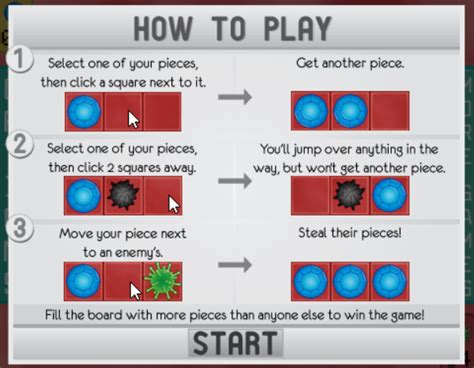
Visuals are paramount in game guides. Use clear icons, animated demonstrations, short video clips (if feasible), and highlighted UI elements to illustrate concepts. Text should complement these visuals, not replace them. Interactive elements, where players directly apply what they’ve learned, are even more effective. For instance, instead of explaining how to jump, prompt the player to jump over a small obstacle.
Prioritize Critical Information
What does a player absolutely need to know to take their first meaningful action? Focus on those core mechanics. Secondary or advanced features can be introduced later or made accessible through an optional in-game codex. Distinguish between “must-know” and “nice-to-know” information, heavily favoring the former during initial onboarding.
Facilitate Iterative Learning
Don’t expect players to master everything at once. Design your guides to be layered. Introduce basic concepts, then progressively reveal more complex layers as players demonstrate proficiency or encounter new challenges. This iterative approach builds confidence and a sense of accomplishment.

Practical Strategies for Implementation
Contextual Tooltips & Prompts
Implement dynamic tooltips that appear when a player hovers over a new UI element or when a new mechanic becomes available. Use subtle, non-intrusive prompts that guide players towards their next objective without holding their hand too tightly. These “just-in-time” learning moments are incredibly effective because they provide information precisely when it’s most relevant.
Interactive Mini-Tutorials within Gameplay
Embed short, interactive tutorials directly into the initial gameplay. For example, a “practice range” to teach combat, or a simple puzzle to introduce environmental interaction. These are distinct from lengthy, forced tutorials; they are organic extensions of the game’s opening moments, making learning feel like playing.
Accessible In-Game Knowledge Base
While the goal is conciseness, some players will want to dive deeper. Provide an easily accessible in-game encyclopedia, codex, or help menu where players can review mechanics, lore, and advanced strategies at their own pace. This acts as a safety net for those who missed something or want to master specific aspects.
Measuring Success and Iterating
Effective onboarding isn’t a one-off task; it’s an ongoing process. Utilize analytics to track player behavior during the initial hours: where do they drop off? Which features are they struggling with? Combine this data with direct player feedback through surveys, forums, and playtesting sessions. This invaluable information allows you to identify pain points and continuously refine your how-to guides and overall onboarding flow.
Regularly review and update your guides as game features evolve. What was clear yesterday might be outdated today. A commitment to continuous improvement ensures that your onboarding remains fresh, relevant, and effective, welcoming new players into your community with open arms.
Conclusion
Concise how-to guides are more than just instructions; they are the welcoming handshake that introduces new players to your game. By embracing principles of modularity, visual learning, prioritization, and iterative design, and by implementing practical strategies like contextual prompts and interactive mini-tutorials, developers can transform a potentially frustrating entry point into an engaging and empowering experience. Successful onboarding not only improves initial player satisfaction but also lays a strong foundation for long-term player retention and game enjoyment.