





Best MicroSD for Switch storage? Maximize space for all your big & small games!

Why Your Nintendo Switch Needs a MicroSD Card Upgrade
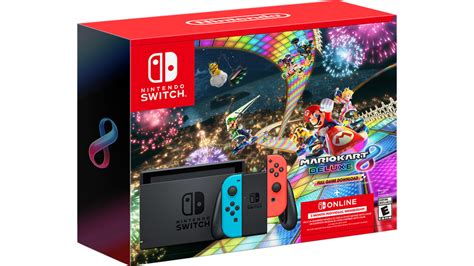
The Nintendo Switch, an incredibly versatile console, comes with a rather modest 32GB (or 64GB for the OLED model) of internal storage. While this might seem sufficient for a few small indie titles, it quickly fills up once you start downloading blockbuster games like The Legend of Zelda: Tears of the Kingdom, Pokémon Scarlet & Violet, or any number of digital-only releases. With game sizes constantly increasing, a reliable and spacious MicroSD card isn’t just a luxury—it’s a necessity for any serious Switch gamer.
Investing in a good MicroSD card means you can download more games, keep all your save data in one place, and avoid the frustrating cycle of deleting games just to make space for new ones. But with so many options on the market, how do you choose the right one?
Key Factors When Choosing a Switch MicroSD Card
Not all MicroSD cards are created equal, especially when it comes to performance on the Nintendo Switch. Here’s what you need to consider:
1. Capacity: How Much Space Do You Really Need?
- 128GB: A good starting point for casual gamers or those who primarily buy physical cartridges. It offers decent room for several large digital titles and many smaller ones.
- 256GB: The sweet spot for most gamers. It provides ample space for a significant digital library without breaking the bank.
- 512GB: Ideal for avid digital collectors or those who want to future-proof their storage. This capacity can hold dozens of AAA titles.
- 1TB or more: For the ultimate collector. While more expensive, it offers virtually limitless space for the foreseeable future. The Switch officially supports up to 2TB, though 1TB is currently the largest widely available option.
2. Speed: Don’t Compromise on Load Times
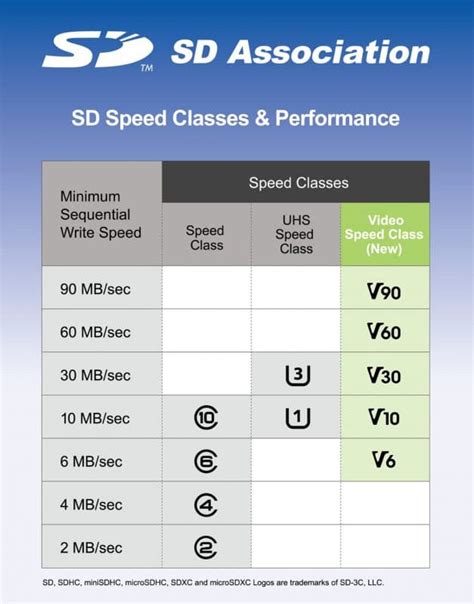
The Nintendo Switch supports UHS-I (Ultra High Speed-I) MicroSD cards. Look for cards with:
- UHS Speed Class 3 (U3): This indicates a minimum write speed of 30MB/s, which is excellent for gaming.
- Video Speed Class V30: Equivalent to U3, also ensuring fast performance.
- Application Performance Class A1 or A2: While A2 offers theoretical benefits, the Switch doesn’t fully utilize it, so A1 is perfectly sufficient and often more cost-effective. These classes ensure good random read/write speeds, crucial for game loading.
Aim for cards with read speeds of 90MB/s or higher for the best experience. Faster read speeds mean quicker game loading and smoother gameplay.
Top Recommended MicroSD Cards for Nintendo Switch
Based on performance, reliability, and value, these brands consistently offer excellent options for your Switch:
1. SanDisk MicroSDXC for Nintendo Switch
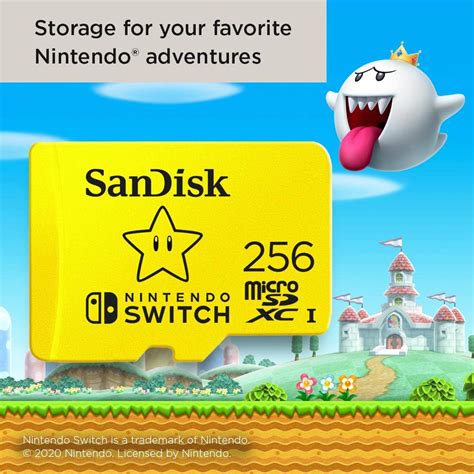
SanDisk, in partnership with Nintendo, offers officially licensed MicroSD cards that are specifically designed and tested for the console. These cards feature iconic Nintendo characters (like Mario and Link) and come in various capacities, typically offering U3 and A1 speeds. They are a safe, reliable, and guaranteed compatible choice.
2. Samsung EVO Select / EVO Plus MicroSDXC
Samsung’s EVO series cards are renowned for their balance of speed, durability, and affordability. The EVO Select (often exclusive to Amazon) and EVO Plus lines offer U3, A1/A2 performance with impressive read and write speeds, making them an excellent choice for Switch users looking for great value.
3. Lexar PLAY MicroSDXC
Lexar’s PLAY series is designed with mobile gaming in mind, boasting high speeds (up to 150MB/s read) and A1/U3 ratings. They provide reliable performance for quick game loading and smooth operation, making them a solid contender for your Switch storage.
Installing and Managing Your Switch Storage
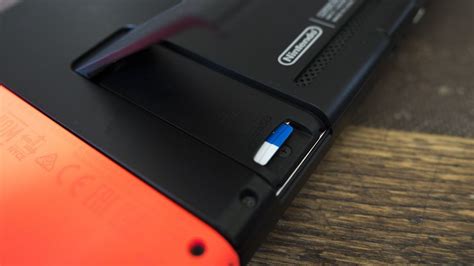
Installing a MicroSD card into your Nintendo Switch is incredibly simple. Just power off your console, open the kickstand, and slide the card into the slot. The Switch will prompt you to format it, which you should do to ensure proper functionality.
To manage your storage, navigate to System Settings > Data Management. Here you can see how much space you have left, archive software to free up space (keeping save data), and move downloaded data between your console’s internal memory and the MicroSD card.
Tips for Maximizing Your Switch Storage
- Archive Games: If you’re not playing a game, archive it! This removes the game data but keeps your save data on the console, making it easy to redownload later if you wish.
- Prioritize Digital Downloads: Install your most frequently played digital games to the MicroSD card to benefit from potentially faster loading times compared to physical cartridges.
- Physical vs. Digital: Consider buying physical cartridges for games you play less often. While some physical games still require downloads, it can save significant storage space for others.
Conclusion
Upgrading your Nintendo Switch’s storage with a high-quality MicroSD card is one of the best investments you can make as a gamer. Not only does it alleviate storage anxiety, but it also enhances your overall gaming experience by ensuring your favorite titles are always ready to play.
For most users, a 256GB or 512GB U3/A1 MicroSD card from SanDisk, Samsung, or Lexar will provide the perfect blend of capacity, speed, and value. Don’t let limited storage hold you back – unlock the full potential of your Nintendo Switch today!



