





Which MicroSD card is best for Switch game storage, considering game size?
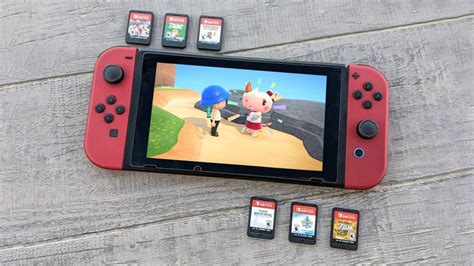
The Nintendo Switch, with its incredible portability and vast game library, has one notable limitation: its internal storage. With only 32GB (or 64GB for the OLED model), which is further reduced by the operating system, avid gamers quickly run out of space, especially when downloading digital titles. This makes a MicroSD card an essential accessory for any Switch owner. But with so many options available, how do you choose the best one, particularly when considering the diverse sizes of Switch games?
Understanding Nintendo Switch Game Sizes
Before diving into MicroSD card specifics, it’s crucial to grasp how much space Switch games typically consume:
- AAA Titles: Major first-party games like The Legend of Zelda: Tears of the Kingdom or Pokémon Scarlet and Violet can range from 10GB to over 20GB. Third-party AAA games like DOOM Eternal or The Witcher 3: Wild Hunt can even exceed 30GB.
- Mid-Tier & Indie Games: Many popular indie titles and smaller eShop exclusives might be anywhere from a few hundred MB to 5GB.
- Updates & DLC: Even if you buy physical cartridges, game updates and downloadable content (DLC) still require internal or MicroSD card storage.
As you can see, just a handful of large digital games can easily fill the Switch’s internal memory, making a MicroSD card indispensable.
Key Factors for Choosing a Switch MicroSD Card
1. Capacity: How Much Storage Do You Really Need?
This is arguably the most critical factor and directly relates to your gaming habits:
- 128GB: The Casual Gamer’s Choice. If you primarily buy physical game cartridges and only download a few indie titles or smaller games, 128GB might suffice. It provides enough room for essential updates and a small digital library.
- 256GB: The Balanced Option. For players who enjoy a mix of physical and digital games, or who don’t mind occasionally deleting and redownloading titles, 256GB offers a good balance of cost and capacity. It can hold a decent library of around 10-15 AAA digital games or many more smaller ones.
- 512GB: The Digital Enthusiast. If you frequently buy digital-only games, subscribe to Nintendo Switch Online’s game library, or want to keep a large collection readily accessible, 512GB is an excellent investment. It provides substantial space for dozens of large games.
- 1TB+: The Future-Proof Solution. For hardcore digital collectors who want virtually unlimited space without worrying about storage for years to come, 1TB (or even 1.5TB) cards are available. While more expensive, they offer ultimate peace of mind.
Consider your current game library and how many new games you anticipate buying digitally each year.
2. Speed: UHS-I, U1, U3, A1, and A2 Explained
While capacity is crucial, the speed of your MicroSD card affects game loading times. The Nintendo Switch supports the UHS-I standard, with a maximum read speed of up to 100MB/s. This means that even if you buy a card rated for higher speeds (like a UHS-II card), the Switch will only utilize up to 100MB/s.
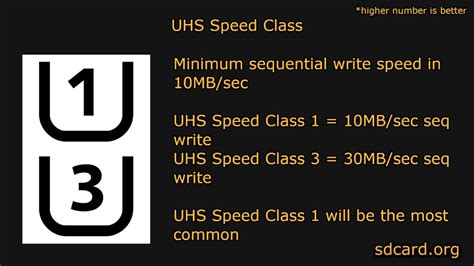
- UHS Speed Class (U1 vs. U3): U1 guarantees a minimum write speed of 10MB/s, while U3 guarantees 30MB/s. For games, faster read speeds are generally more important than write speeds once the game is installed. Most modern quality cards are U3.
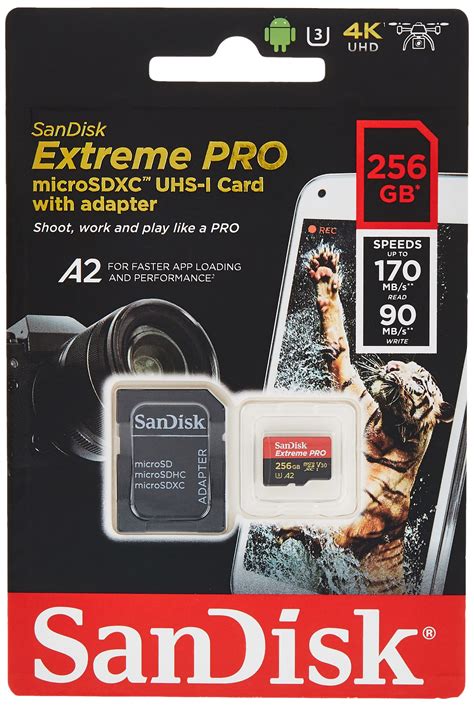
- Application Performance Class (A1 vs. A2): A1 and A2 classes relate to how well the card handles random read/write operations, which are crucial for running applications directly from the card. While more relevant for smartphones, an A1 or A2 rating typically indicates a card with good overall performance.
Recommendation: Look for cards with a UHS-I U3 A1 or A2 rating and a read speed of at least 90-100MB/s. Cards like the SanDisk Ultra or Extreme, or Samsung EVO Select, perfectly fit this description and are widely recommended for the Switch.
3. Brand and Reliability
Investing in a reputable brand is crucial to avoid counterfeit cards and ensure data integrity. Popular and reliable brands include:
- SanDisk: Widely considered the gold standard for Switch storage, especially their Ultra and Extreme lines. They even have officially licensed Nintendo Switch MicroSD cards.
- Samsung: Their EVO Select and EVO Plus lines offer excellent performance and value.
- Lexar & Kingston: Other trustworthy brands that produce high-quality MicroSD cards.
Always purchase from authorized retailers to guarantee authenticity.
Top MicroSD Card Recommendations for Nintendo Switch
Considering capacity, speed, and brand, here are some general recommendations:
- Best Overall Value: SanDisk Ultra 256GB/512GB or Samsung EVO Select 256GB/512GB. These offer an excellent balance of speed, capacity, and price for most users.
- Premium Performance & Reliability: SanDisk Extreme 512GB/1TB. While slightly pricier, they offer top-tier performance within the Switch’s limitations and exceptional durability.
- Nintendo-Branded Option: SanDisk officially licensed Nintendo Switch MicroSD cards (available in various capacities). These are essentially re-skinned SanDisk Ultra cards but often come with a slightly higher price tag for the branding.
Remember that prices fluctuate, so keep an eye out for sales, especially during major shopping events.
Installation and Management Tips
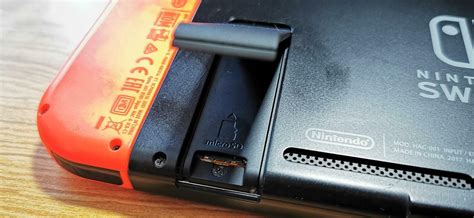
- Installation: Power off your Switch completely before inserting the MicroSD card into the slot located under the kickstand.
- Formatting: The Switch will prompt you to format the card. Always allow the Switch to do this, as it optimizes the card for console use.
- Data Transfer: If you’re upgrading from an existing card, you can transfer your data by copying the contents of the old card to your computer, then pasting them onto the new, formatted card.
Conclusion: Making the Right Choice for Your Switch
Choosing the best MicroSD card for your Nintendo Switch ultimately comes down to your individual gaming habits and budget. For most users, a 256GB or 512GB UHS-I U3 A1/A2 card from a reputable brand like SanDisk or Samsung offers the perfect blend of space, speed, and value. Evaluate your digital game library, consider future purchases, and invest in a card that will keep your gaming experience smooth and unhindered by storage limitations.


