





How to choose age-appropriate games for kids using game ratings effectively?

Navigating the vast and ever-evolving landscape of video games can be daunting for any parent. What’s suitable for a 6-year-old versus a 12-year-old? How can you ensure your child isn’t exposed to content that’s too mature or violent? The answer lies in understanding and effectively using game rating systems, powerful tools designed to help parents make informed decisions.
Understanding Game Rating Systems
Globally, two of the most prominent game rating systems are the Entertainment Software Rating Board (ESRB) in North America and the Pan European Game Information (PEGI) in Europe and beyond. These systems exist to provide clear, concise information about video game content, allowing parents to gauge a game’s appropriateness for their children’s age and maturity level.

They are not meant to be censorship tools but rather informative guides, much like movie ratings. Each system categorizes games based on their content, ensuring that consumers know what to expect before a game is purchased or played.
Decoding Age Ratings and Content Descriptors
At the core of these systems are two main components: age ratings and content descriptors.
Age Ratings
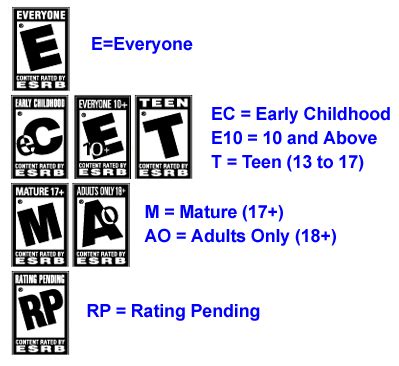
- ESRB: Ratings like ‘E’ (Everyone), ‘E10+’ (Everyone 10+), ‘T’ (Teen), ‘M’ (Mature 17+), and ‘AO’ (Adults Only 18+) suggest a suitable age range for players.
- PEGI: Ratings like ‘PEGI 3’, ‘PEGI 7’, ‘PEGI 12’, ‘PEGI 16’, and ‘PEGI 18’ directly indicate the minimum age for which the game content is considered appropriate.
It’s crucial to remember that these are suggestions based on content, not skill level or difficulty. A ‘PEGI 7’ game might be challenging for a 7-year-old, but its content won’t be unsuitable.
Content Descriptors
Beyond the age rating, content descriptors provide specific details about elements within the game that contributed to its rating. For example, an ESRB ‘T’ game might carry descriptors like ‘Fantasy Violence,’ ‘Mild Language,’ or ‘Suggestive Themes.’ A PEGI ’12’ game might feature icons for ‘Violence,’ ‘Bad Language,’ or ‘In-Game Purchases.’
These descriptors are your best friend. Two games with the same age rating can be vastly different. A ‘T’ rated game with ‘Violence’ will have different implications than a ‘T’ rated game with ‘Sexual Themes.’ Always check these descriptors for a clearer picture of the game’s specific content.
Why Game Ratings Are Your Best Friend
Utilizing game ratings effectively offers several significant benefits for parents:
- Child Safety: Protect your children from exposure to graphic violence, mature sexual content, drug use, or strong language that they are not ready for.
- Developmental Appropriateness: Ensure games align with your child’s cognitive and emotional maturity, fostering a positive play experience without unnecessary anxiety or confusion.
- Informed Decisions: Gain confidence in your choices, knowing you’ve considered the content before allowing your child to play.
- Preventing Surprises: Avoid unexpected and potentially awkward moments when your child encounters unsuitable content in a game you thought was harmless.
Practical Tips for Parents
Making game ratings work for your family is straightforward with a few key habits:
- Check the Rating Before You Buy/Download: This is the golden rule. Look for the rating on the game box, the product page in digital stores (e.g., PlayStation Store, Xbox Marketplace, Steam, App Store), or the game’s official website.
- Go Beyond the Age Number: Always read the content descriptors. They tell you why a game received its rating, which is often more informative than the age number alone.
- Watch Gameplay Videos: If you’re still unsure, search for gameplay trailers or reviews on YouTube or reputable gaming sites. Seeing the game in action can provide invaluable insight.
- Read Parent Reviews: Many gaming websites and forums offer reviews specifically from a parental perspective.
- Communicate with Your Kids: Explain to your children why certain games are considered inappropriate for their age. This helps them understand your decisions and encourages responsible gaming habits.

Beyond the Ratings: Parental Involvement
While ratings are a vital tool, they are just one part of effective digital parenting. Your active involvement remains paramount:
- Play Together: Engage with your children’s games. Not only does it allow you to see the content firsthand, but it also creates shared experiences and strengthens your bond.
- Set Family Rules: Establish clear guidelines regarding screen time, types of games allowed, and online interaction rules.
- Monitor Online Interactions: Be aware of multiplayer games, especially those with open chat features, as these can expose children to unmoderated content or strangers.
- Use Parental Controls: Most consoles, PCs, and mobile devices offer built-in parental controls that can restrict access to games based on ratings, limit screen time, and manage purchases.

Common Pitfalls to Avoid
- Ignoring Ratings Entirely: Dismissing ratings as overly cautious can expose children to content far beyond their emotional or cognitive readiness.
- Peer Pressure: Don’t let the fact that ‘all their friends are playing it’ dictate your choices. What’s appropriate for one child isn’t necessarily appropriate for another.
- Over-Reliance on Age Number Alone: Remember the content descriptors are critical. Two ‘T’ rated games can offer vastly different experiences.

Conclusion
Empowering yourself with knowledge about game rating systems is an essential step in fostering a safe and enriching gaming environment for your children. By taking a few extra moments to check ratings and understand their descriptors, you can confidently guide your kids through the digital world, ensuring their play experiences are not only fun but also age-appropriate and positive. It’s a key piece of the modern parenting toolkit, offering peace of mind in an increasingly complex digital age.


