





What’s the best micro SD card for Switch game storage expansion?

Why Your Nintendo Switch Needs More Storage
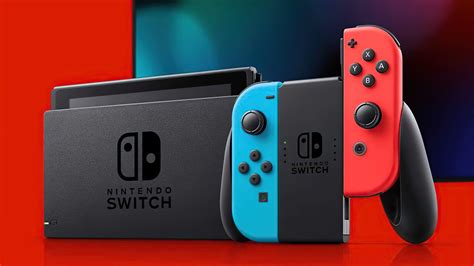
The Nintendo Switch, an incredibly popular hybrid console, comes with a rather modest 32GB (original and Lite models) or 64GB (OLED model) of internal storage. While this might suffice for a few small indie titles, modern AAA games can quickly devour that space. For avid gamers who enjoy a diverse library of digital downloads, or even physical game owners who need space for patches and DLC, expanding your Switch’s storage is not just a luxury—it’s a necessity. This guide will walk you through choosing the best micro SD card to ensure your gaming adventures never hit a storage wall.
Understanding Micro SD Card Types for Switch
Not all micro SD cards are created equal, especially when it comes to gaming. The Nintendo Switch supports three types of micro SD cards:
- microSD (2GB maximum): Obsolete for modern Switch use.
- microSDHC (4GB – 32GB): Still viable for smaller needs, but limited.
- microSDXC (64GB – 2TB): The standard and recommended choice for most Switch users due to its larger capacities.
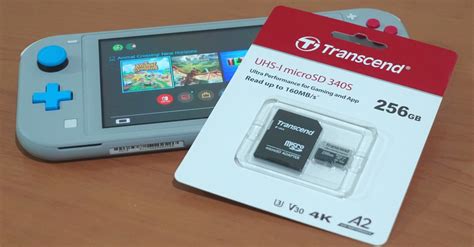
Beyond type, speed ratings are crucial. Look for cards with a “UHS-I” interface and a “Class 10” speed rating. Additionally, an “A1” or “A2” application performance class rating indicates better random read/write speeds, which are beneficial for game loading and performance.
Key Factors When Choosing Your Micro SD Card
1. Capacity: How Much Space Do You Really Need?
This is often the first consideration. Game sizes vary wildly, from a few hundred megabytes to over 50GB. Here’s a general guide:
- 64GB – 128GB: Good for casual gamers with a few digital titles or mostly physical games.
- 256GB – 512GB: Ideal for most gamers, offering a healthy balance for a growing digital library.
- 1TB+: For hardcore digital collectors who want virtually unlimited space for years to come.
Remember, it’s often better to slightly overestimate your needs to future-proof your storage.

2. Speed: Don’t Compromise on Load Times
While the Switch itself has limitations on how fast it can read data, a faster card will always perform better up to that limit. Key speed indicators:
- UHS-I: The Switch only supports this interface. Don’t pay extra for UHS-II or UHS-III as the Switch won’t utilize their full speeds.
- Video Speed Class (V30): Indicates a minimum write speed of 30MB/s, good for large file transfers.
- Application Performance Class (A1 or A2): A1 provides a minimum random read of 1500 IOPS and random write of 500 IOPS. A2 significantly improves this to 4000 IOPS read and 2000 IOPS write, which can make a noticeable difference in game loading times and overall system responsiveness. Always aim for A1 or A2 if possible.
3. Brand Reliability and Warranty
Stick to reputable brands to avoid counterfeit cards or those with poor performance/longevity. Established brands typically offer better reliability and warranties.
- SanDisk: Widely popular, especially their officially licensed Nintendo Switch cards.
- Samsung: Excellent performance and reliability with their EVO Select/Plus lines.
- Lexar: Another solid contender known for good value.
- Kingston: Reliable performance.
Top Recommendations for Your Nintendo Switch
Based on performance, reliability, and value, here are some of the top micro SD cards for your Switch:
- SanDisk MicroSDXC for Nintendo Switch: Officially licensed, these cards come in various capacities (up to 1TB) and offer excellent read/write speeds optimized for the Switch. They are often a bit pricier due to the licensing, but you get guaranteed compatibility and peace of mind.
- Samsung EVO Select/Plus MicroSDXC: These are fantastic all-around performers. They offer high read/write speeds, A2 ratings, and are often available at competitive prices, making them a great value option.
- Lexar Play MicroSDXC: Designed with gaming in mind, Lexar Play cards offer good read speeds and A1 or A2 ratings, making them a solid, budget-friendly alternative.
Installing Your New Micro SD Card
Once you’ve chosen your ideal card, installation is straightforward:
- Power off your Nintendo Switch completely (not just sleep mode).
- Open the kickstand on the back of the console to reveal the micro SD card slot.
- Insert the micro SD card with the label facing down until it clicks into place.
- Close the kickstand and power on your Switch.
The Switch will automatically format the card if needed. You can then navigate to System Settings > Data Management to confirm the new storage is recognized and manage your game data.
Conclusion: The Smart Choice for Endless Gaming
Investing in a high-quality micro SD card is essential for any serious Nintendo Switch owner. By prioritizing capacity, speed (UHS-I, A1/A2), and brand reliability, you can ensure smooth performance, quick loading times, and ample space for all your digital adventures. Whether you opt for an officially licensed SanDisk card or a high-performance Samsung EVO, expanding your Switch storage means more games, less deleting, and uninterrupted fun.


