





How can I ensure I always find the best deals and codes for PC games?
In the vast and ever-expanding world of PC gaming, the pursuit of new titles can quickly become an expensive hobby. Fortunately, smart gamers know that paying full price is often optional. With a strategic approach, a keen eye, and the right tools, you can consistently secure the best deals, discounts, and codes for your next adventure. This guide will equip you with the knowledge to become a master deal-finder, ensuring your gaming library grows without emptying your wallet.
Harnessing Price Comparison Websites
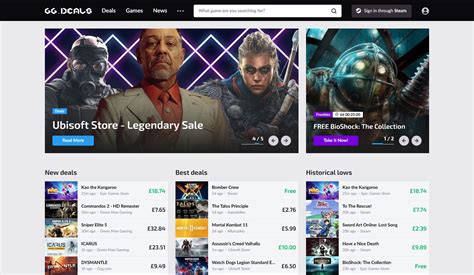
The first line of defense in your quest for savings should always be price comparison websites. These platforms aggregate prices from numerous digital storefronts and key resellers, presenting you with the lowest available price at a glance. They save you the trouble of checking each store individually.
Popular examples include IsThereAnyDeal, PCGameBenchmark, and GG.deals. These sites often feature historical price data, allowing you to see if a current “deal” is truly a good one or if the game has been cheaper in the past. Many also offer email alerts for specific games on your wishlist, notifying you when they drop to a desired price.

Joining Deal Aggregators and Gaming Communities
Beyond automated comparison tools, human-powered deal aggregation communities are invaluable. Websites like Reddit (specifically subreddits like r/GameDeals) are bustling hubs where users share newly discovered discounts, flash sales, and coupon codes almost instantly. These communities often provide additional context, such as whether a deal is region-locked or if a particular key seller is reputable.
Dedicated deal sites like HotUKDeals (for UK users), Slickdeals (for US users), or MyDealz (for Germany) also frequently feature gaming deals posted by their user base. Subscribing to their gaming sections or setting up keyword alerts can ensure you’re among the first to know about a significant price drop.
Mastering Digital Storefront Sales and Wishlists
Every major digital storefront for PC games — Steam, Epic Games Store, GOG, Humble Store, Fanatical, Green Man Gaming, and many others — hosts regular sales events. These can range from massive seasonal blowouts (Summer Sale, Winter Sale) to publisher-specific promotions, daily deals, and weekly discounts. Keeping an eye on these individual stores is crucial.
A highly effective strategy is to utilize the wishlist feature on your preferred storefronts. Most platforms will send you an email notification when a game on your wishlist goes on sale. Combine this with price comparison sites, and you create a robust system for tracking games you want at the lowest possible price.

Leveraging Publisher Newsletters and Social Media
Don’t underestimate the power of direct communication from game publishers and developers. Signing up for their newsletters can grant you early access to sale announcements, exclusive discount codes, or even free game giveaways. Similarly, following their social media accounts on platforms like Twitter, Facebook, or Discord can often reveal flash sales or special promotions before they hit wider deal sites.
Many publishers also run their own digital stores, where they might offer unique bundles or discounts not available elsewhere. Being on their mailing list ensures you don’t miss out on these direct-to-consumer opportunities.

Exploring Browser Extensions and Price Trackers
For those who prefer a more passive approach, browser extensions can do much of the heavy lifting. Extensions like Enhanced Steam, Augmented Steam, or similar tools for other storefronts often integrate price history, highlight current best deals, and provide quick links to comparison sites directly on the store page. Some even alert you if a game’s price has recently changed or if a better deal is available elsewhere.
These tools act as a convenient overlay, giving you critical pricing information without needing to navigate away from your current browsing session. They’re particularly useful for impulse buys, helping you pause and check if you’re truly getting a good deal.
Understanding Key Resellers (with Caution)
Third-party key reseller sites like G2A, Kinguin, CDKeys, or Eneba can sometimes offer extremely competitive prices, especially for older titles. These platforms operate on a marketplace model where individual sellers offer digital game keys. While the potential for savings is significant, it’s crucial to proceed with caution.
Always verify the legitimacy of the seller and the key. Stick to reputable sites and check user reviews. There have been instances of fraudulent keys being sold, which can lead to your game being revoked. Tools like “IsThereAnyDeal” often link to these sites but also provide trust ratings, helping you make an informed decision.
Don’t Overlook Free Games and Bundles
Finally, remember that sometimes the best deal is no deal at all! The Epic Games Store regularly gives away free PC games every week, and Amazon Prime Gaming offers a selection of free titles monthly. Keep an eye on these platforms to snag full games at no cost.
Game bundles from sites like Humble Bundle or Fanatical also offer incredible value, often letting you purchase several games for a fraction of their individual cost, sometimes even supporting charity in the process. These are excellent ways to discover new games or expand your library without breaking the bank.
Conclusion
Consistently finding the best deals and codes for PC games requires a multi-pronged approach: combining automated price tracking with community insights, direct store monitoring, and a healthy dose of patience. By integrating these strategies into your gaming routine, you’ll be well-equipped to grow your game collection without ever feeling like you’ve overpaid. Happy gaming, and happy saving!



