





What’s the best microSD card for Switch game storage (big and small titles)?

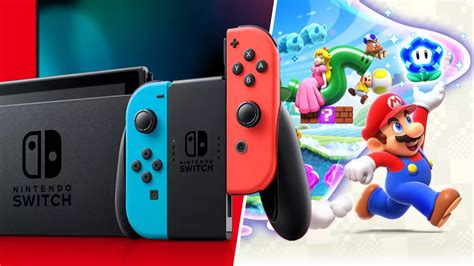
The Nintendo Switch, an incredibly versatile console, offers a fantastic library of games, from sprawling open-world epics to charming indie gems. However, its modest 32GB (or 64GB for the OLED model) internal storage fills up surprisingly fast, especially if you prefer digital downloads or frequently play titles with large update files. This is where a quality microSD card becomes not just an accessory, but a necessity for any serious Switch gamer.
Why Expand Your Switch Storage?
Unlike some other consoles, the Switch relies heavily on its internal storage for game data, save files, and system updates. While physical game cartridges save some space, many games still require significant downloads, and all digital titles live entirely on your console’s memory. Running out of space can mean deleting games, facing long re-download times, or simply being unable to install new purchases. A microSD card provides a seamless and essential solution to this storage crunch, allowing you to carry your entire game library with you.
Key Factors When Choosing a microSD Card for Switch
Not all microSD cards are created equal. To ensure optimal performance and value, consider these crucial factors:
Capacity: How Much Do You Really Need?
This is often the first consideration. Game sizes vary wildly: a small indie title might be under 1GB, while a major AAA release like The Legend of Zelda: Tears of the Kingdom can easily exceed 18GB, and other titles often push 30GB or more. For a casual gamer with a mix of physical and digital games, 128GB or 256GB offers a good starting point. If you primarily buy digital games or plan to build a large library, 512GB or even 1TB cards are increasingly popular and more affordable than ever. It’s generally better to buy slightly more than you think you need, as games and updates tend to grow.
Speed: Does It Really Matter?
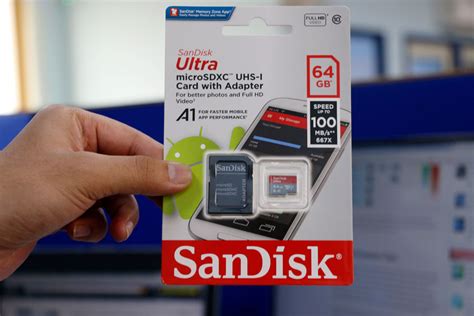
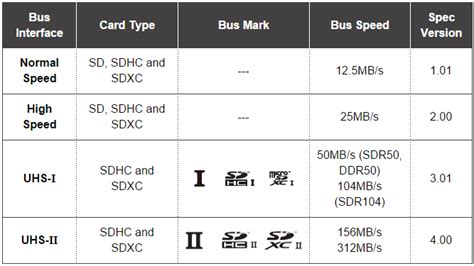
Absolutely. While the Switch doesn’t fully utilize the absolute fastest speeds available on some microSD cards, a good speed rating significantly impacts game loading times and overall system responsiveness. Look for:
- UHS Speed Class 1 (U1) or Class 3 (U3): U3 cards offer faster minimum write speeds (30MB/s vs. 10MB/s for U1) and are generally recommended for better performance.
- Application Performance Class A1 or A2: The Switch benefits from A1 (1500 IOPS read, 500 IOPS write) or A2 (4000 IOPS read, 2000 IOPS write) rated cards, which are designed to optimize random read/write operations crucial for app and game performance. While the Switch doesn’t fully leverage A2’s peak speeds, cards with this rating often offer superior baseline performance.
Ultimately, a U3 and A1/A2 rated card will provide the best experience on your Switch.
Brand Reliability and Durability
Stick to reputable brands to avoid counterfeit cards and ensure long-term reliability. Leading manufacturers like SanDisk, Samsung, and Lexar offer robust warranties and quality control. Investing in a trusted brand minimizes the risk of data corruption or card failure.
Top microSD Card Recommendations for Nintendo Switch
Best All-Rounder: SanDisk microSDXC for Nintendo Switch
SanDisk has an official licensing deal with Nintendo, producing branded microSD cards specifically for the Switch. These cards are reliable, meet the recommended U3/A1 speed ratings, and come in various capacities (64GB up to 1TB). They offer excellent performance and peace of mind, making them a consistently safe and popular choice for Switch owners. Their speeds are perfectly optimized for the console’s requirements.
Best Value Pick: Samsung EVO Select/Plus
Samsung’s EVO Select and EVO Plus lines are fantastic alternatives, often available at very competitive price points. These cards consistently deliver U3/A2 performance, making them incredibly fast and reliable. They are highly recommended for those looking for premium performance without the official Nintendo branding premium. Available in capacities up to 512GB and 1TB, they provide ample space for extensive game libraries.
For Serious Collectors: Higher Capacity Options
If you’re a digital-only gamer or have an enormous library, consider 512GB or 1TB cards. While more expensive, they eliminate storage worries for years. Brands like SanDisk and Samsung offer these larger capacities with excellent performance, ensuring you never have to choose which game to delete again.

Installation and Setup Tips
Installing a microSD card is straightforward: simply insert it into the slot beneath the Switch’s kickstand (or on the top left edge for the Lite). The Switch will automatically detect it and format it if necessary. You can then move existing games to the new card via the system settings (System Settings > Data Management > Move Data Between System / microSD Card).
Final Thoughts: Investing in Your Gaming Experience
Choosing the right microSD card is a small investment that significantly enhances your Nintendo Switch gaming experience. By prioritizing adequate capacity and reliable speed from a reputable brand, you ensure smooth gameplay, faster loading times, and the freedom to download and enjoy every title that catches your eye. Whether you’re a casual player or a dedicated collector, a good microSD card is truly indispensable for unlocking the full potential of your Switch.



