





Best external SSD for Xbox/PS5 games: boost load times & expand console storage?

Why an External SSD for Your Next-Gen Console?
Modern video games are larger and more graphically intensive than ever, quickly devouring the precious internal storage of your Xbox Series X/S or PlayStation 5. While both consoles boast incredibly fast internal SSDs, expanding that storage is often a necessity for serious gamers. An external Solid State Drive (SSD) offers a compelling solution, not just for sheer capacity but also for potentially boosting load times for compatible games and improving overall game management.
Beyond simply adding gigabytes, an external SSD can dramatically cut down on the agonizing wait times between levels or during game launches, especially for backward-compatible titles. It’s also an excellent way to keep your favorite games readily accessible without constantly redownloading them or juggling installs on your console’s primary drive. Plus, many external SSDs are highly portable, allowing you to carry your game library with you.
Understanding Console Compatibility: Xbox vs. PlayStation 5
It’s crucial to understand how external SSDs work with each next-gen console, as their architectures handle external storage differently when it comes to playing current-generation titles.
Xbox Series X|S Compatibility
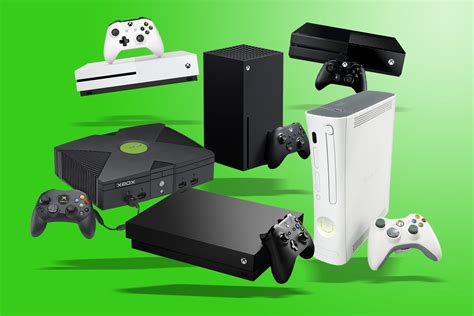
For Xbox Series X|S optimized games, an external USB SSD can serve as excellent “cold storage.” This means you can store your Series X|S titles on the external drive to save space on your internal SSD, but to actually play them, you’ll need to transfer them back to the console’s internal drive or an official Xbox Series X|S Storage Expansion Card. However, for Xbox One, Xbox 360, and original Xbox backward-compatible games, you can play them directly from a fast external USB SSD, often with significant improvements in load times compared to a traditional HDD.
PlayStation 5 Compatibility
Similar to Xbox, PlayStation 5 games must be played from the console’s internal SSD or an officially supported M.2 NVMe SSD installed in the dedicated expansion slot. An external USB SSD connected to your PS5 is perfect for storing your PS5 games (again, as cold storage) to free up internal space, but they cannot be played directly from the external drive. Where external USB SSDs shine on PS5 is playing PlayStation 4 games; you can play PS4 titles directly from the external drive, often with reduced load times and smoother performance than if they were on a standard external hard drive.
Key Factors to Consider When Choosing an External SSD
When shopping for an external SSD, several factors will influence your decision and overall gaming experience.
Speed (USB 3.2 Gen 2 is ideal)
Look for drives that support USB 3.2 Gen 2 (or higher if available). This standard provides transfer speeds of up to 10 Gbps, which is significantly faster than older USB 3.0 or 3.1 Gen 1 drives. While you won’t get NVMe internal speeds, this ensures the fastest possible transfer times when moving games and excellent performance for playing backward-compatible titles.
Capacity (1TB, 2TB are popular)
Storage needs vary, but 1TB is a solid starting point for most gamers. With modern game sizes, 2TB or even 4TB options offer more future-proofing and reduce the need to constantly manage your library. Balance your budget with your expected storage needs.
Durability & Portability
Most external SSDs are more robust than traditional hard drives due to the absence of moving parts. However, some are designed with extra drop protection or water resistance. If you plan to travel with your game library, consider a more rugged and compact model.
Price vs. Performance
While an external SSD is an investment, prices have become much more competitive. Compare read/write speeds, warranty, and brand reputation against the cost to find the best value for your budget.

Top External SSD Recommendations (General Types)
Several brands consistently deliver high-quality external SSDs perfect for console gaming. Look for models like the Samsung T7 series, Crucial X8 or X9 Pro, WD My Passport SSD, or SanDisk Extreme Portable SSDs. These drives generally offer excellent read/write speeds, come in various capacities, and have a strong reputation for reliability.
Always ensure the drive you choose explicitly states USB 3.2 Gen 2 compatibility for optimal performance. While an external SSD won’t allow you to play current-gen Xbox Series X|S or PS5 games directly, its ability to store them and play last-gen titles with vastly improved load times makes it an invaluable accessory for any serious console gamer.
Installation and Setup Guide
Setting up an external SSD for your console is straightforward, typically involving just plugging it into an available USB port. Both Xbox and PlayStation will prompt you to format the drive for console use. Always follow the on-screen instructions, as formatting will erase any existing data on the drive.
For Xbox
Plug the drive into any available USB 3.0 or faster port. The console will detect it and ask if you want to format it for games and apps. Confirm this, and once formatted, you can begin moving games to it or setting it as your default install location for backward-compatible titles.
For PlayStation 5
Connect the external SSD to one of the PS5’s USB-A ports (preferably a SuperSpeed USB port). Go to Settings > Storage > Extended Storage, select ‘Format as Extended Storage,’ and follow the prompts. Once formatted, you can transfer PS4 games to it or store PS5 games there for later transfer to the internal drive.
Conclusion
Investing in a quality external SSD is a smart move for any Xbox Series X|S or PS5 owner. While the consoles have specific rules for playing current-gen games, an external SSD excels at expanding your overall storage, acting as a rapid cold storage solution, and significantly improving the load times and experience for your vast library of backward-compatible titles. Choose wisely based on speed, capacity, and durability, and enjoy a much smoother, less constrained gaming experience.


