





Switch Joy-Con drift: Diagnose & fix common controller issues.
Understanding Joy-Con Drift: A Gamer’s Frustration
Joy-Con drift is a widely reported issue affecting Nintendo Switch controllers, where the analog sticks register movement even when they are not being touched. This phantom input can lead to frustrating gameplay experiences, from characters inexplicably walking off cliffs to menus scrolling out of control. Understanding why drift occurs and how to address it is crucial for any Switch owner.
The problem typically stems from wear and tear on the internal components of the analog stick, or from dust and debris accumulating beneath the stick’s skirt, interfering with the optical sensors or potentiometers.
Diagnosing Joy-Con Drift: Confirming the Issue
Before attempting any fixes, it’s important to confirm that you are indeed experiencing drift and not another connectivity or software issue. Nintendo provides a built-in calibration tool for this purpose:
- From the Switch HOME Menu, select ‘System Settings’.
- Scroll down and select ‘Controllers and Sensors’.
- Select ‘Calibrate Control Sticks’.
- Press down on the stick you wish to test.
- Follow the on-screen prompts to check the stick’s response. If the crosshair moves without you touching the stick, or if it doesn’t return to the center perfectly, you have drift.
Initial Software Fixes: The Easy Steps
Sometimes, drift isn’t a hardware issue but a minor software glitch. Try these steps first:
- Update System Firmware: Ensure your Nintendo Switch console is running the latest system update. Go to System Settings > System > System Update.
- Recalibrate Controllers: Even if you’ve already used the calibration tool to diagnose, performing a full recalibration can sometimes resolve minor drift. Follow the steps above, but select the ‘Calibrate’ option instead of just ‘Check’.
- Disconnect and Reconnect: Detach the Joy-Cons from the console, turn the console off and on again, then reattach them. For wireless use, try unpairing and re-pairing them via the ‘Controllers and Sensors’ menu.
DIY Cleaning Methods: Tackling Dust and Debris
Many cases of drift are caused by dust, lint, or other debris getting under the analog stick. A simple cleaning can often work wonders:
- Compressed Air: Hold the Joy-Con with the stick pulled to one side. Gently spray short bursts of compressed air underneath the stick’s skirt from different angles. Rotate the stick and repeat. This can dislodge superficial debris.
- Electronic Contact Cleaner (CAUTION): For a more thorough clean, some users find success with a small amount of electronic contact cleaner (like WD-40 Specialist Contact Cleaner). Apply a tiny amount under the stick’s skirt while holding the stick to one side, then rotate the stick to help distribute it. Allow it to fully dry before use. Use sparingly and at your own risk, as this involves liquids near electronics.
Advanced Hardware Repair: Replacing the Analog Stick
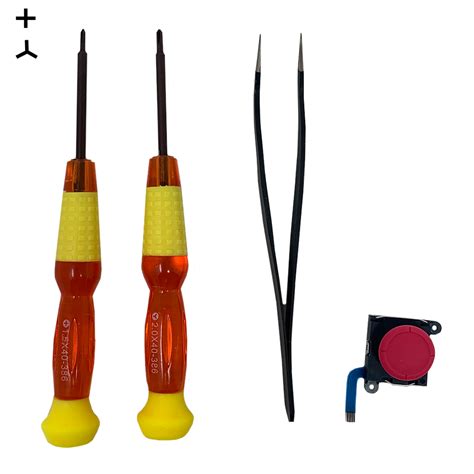
If cleaning and software fixes don’t resolve the issue, the analog stick module itself may be worn out and need replacement. This is a more advanced DIY repair that requires specific tools (tri-wing screwdriver, spudger, tweezers) and a new analog stick module. Be aware that opening your Joy-Cons will likely void any remaining warranty.
Several online guides and video tutorials detail this process, which generally involves carefully opening the Joy-Con, disconnecting internal ribbon cables, removing the old stick, and installing a new one. Patience and a delicate touch are essential.
When to Consider Professional Help or Replacement
If DIY repairs are beyond your comfort level or fail to fix the drift, you have a few options:
- Nintendo Repair Service: Nintendo offers repair services for Joy-Con drift, even out of warranty in some regions, often for free due to the widespread nature of the issue. Check Nintendo’s official support website for current policies in your area.
- Buy New Joy-Cons: While an expense, purchasing a new pair of Joy-Cons is the simplest solution if you want to avoid repairs entirely.
- Third-Party Controllers: Consider investing in a third-party controller like the Nintendo Switch Pro Controller or other reputable alternatives that may offer a more durable stick design or different ergonomics.
Preventative Measures to Extend Joy-Con Life
While drift can be an inevitable outcome of extensive use, you can take steps to potentially prolong your Joy-Cons’ lifespan:
- Gentle Handling: Avoid excessive force or ‘mashing’ on the analog sticks during intense gameplay.
- Keep Them Clean: Regularly wipe down your controllers to prevent dust and grime buildup. Store them in a clean environment.
- Use Protective Covers: Silicone covers can help keep debris out of the small gaps around the sticks.
Conclusion
Joy-Con drift can be a major annoyance, but with a range of diagnostic tools and repair options available, you’re not powerless. From simple software adjustments and cleaning to more involved hardware replacements, there’s a solution for most cases. By understanding the causes and available fixes, you can often restore your Joy-Cons to full functionality and get back to enjoying your Nintendo Switch gaming experience.


