





What’s the best microSD for Switch storage and game management?

Why a MicroSD Card is Essential for Your Nintendo Switch
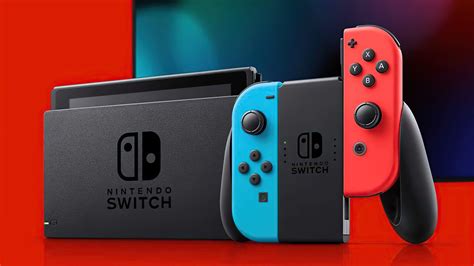
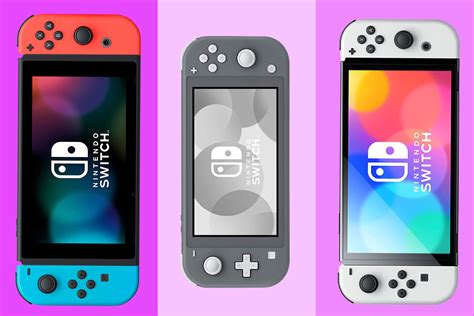
The Nintendo Switch, while a fantastic console, comes with limited internal storage—just 32GB for the standard model and 64GB for the OLED version. Considering many modern games can easily exceed 10GB, and digital downloads are increasingly popular, expanding your storage with a microSD card isn’t just a recommendation; it’s practically a necessity. A good microSD card allows you to download more games, store screenshots and video captures, and keep all your favorite titles readily accessible without constantly deleting and re-downloading.
Key Factors When Choosing a Switch MicroSD Card
Not all microSD cards are created equal, and choosing the right one for your Switch involves balancing several critical factors:
1. Capacity: How Much Space Do You Really Need?
- 128GB – 256GB: A good starting point for casual gamers or those who primarily buy physical cartridges. It offers decent room for several digital titles and updates.
- 256GB – 512GB: The sweet spot for most gamers. This range provides ample space for a large digital library, including several AAA titles, without breaking the bank.
- 512GB – 1TB: For hardcore digital collectors or those who want to future-proof their storage. A 1TB card means you’ll rarely, if ever, have to worry about running out of space. While 1.5TB and 2TB cards exist, they are often cost-prohibitive for most users.
2. Speed: Read and Write Performance
The speed of your microSD card affects game loading times and the overall smoothness of your gaming experience. For the Nintendo Switch, you’ll want to look for:
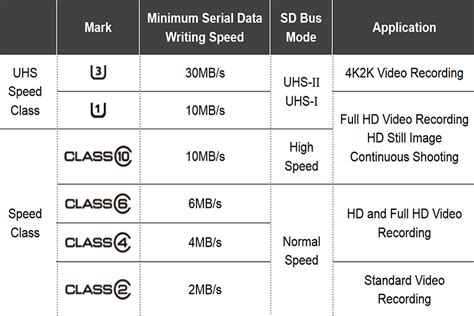
- UHS-I (Ultra High Speed Phase I): The Switch supports UHS-I cards. There’s no benefit to purchasing faster UHS-II cards as the console cannot utilize their full speed.
- Speed Class U3: This indicates a minimum write speed of 30 MB/s, which is ideal for the Switch. Look for the ‘U3’ symbol on the card.
- Application Performance Class A1 or A2: These classes ensure good random read/write performance, which is crucial for loading game assets quickly. A1 is perfectly sufficient, but A2 offers a slight performance edge if the price difference is negligible.
While theoretical maximum speeds advertised on packaging might be high (e.g., 100 MB/s read), real-world performance on the Switch will typically cap out around 60-95 MB/s for read speeds.
3. Reliability and Brand Reputation
Investing in a reputable brand minimizes the risk of data corruption or card failure. Stick with well-known manufacturers:
- SanDisk: Often considered the gold standard, particularly their ‘SanDisk Extreme’ and ‘SanDisk Ultra’ lines. They even have officially licensed Nintendo Switch microSD cards.
- Samsung: Known for their ‘EVO Select’ and ‘PRO Plus’ series, offering excellent performance and reliability.
- Kingston: A solid choice with good value.
- Lexar: Another reliable brand with various options.
Beware of unusually cheap cards from unknown brands, as they often have inflated capacities or poor performance.

Top Recommended MicroSD Cards for Nintendo Switch
Based on performance, reliability, and value, here are some top picks:
- SanDisk MicroSDXC for Nintendo Switch: Officially licensed, these cards come in various capacities (64GB to 1TB) and are optimized for the Switch, guaranteeing U3 and A1 performance.
- SanDisk Extreme / Extreme PRO: While not officially licensed, these cards offer excellent performance (U3, A2) and durability, often at competitive prices.
- Samsung EVO Select / PRO Plus: Strong contenders that deliver consistent high speeds and are highly reliable. Great alternatives to SanDisk.
Remember to always buy from reputable retailers to avoid counterfeit products.
Tips for Optimal Game Management on Switch
Once you have your microSD card, here’s how to make the most of it:
- Install New Games to MicroSD: By default, the Switch will prioritize the microSD card if one is inserted. You don’t usually need to manually set this.
- Transferring Games: You can move games between internal storage and the microSD card via System Settings > Data Management. This is useful if you want to keep frequently played games on the slightly faster internal storage, though the difference is often negligible.
- Organize with Folders: Use the Switch’s software update to organize your game library into groups (folders) for easier navigation, especially with a large number of titles.
- Offload Rarely Played Games: If you’re nearing your capacity limit, consider archiving games you don’t play often. This deletes the game data but keeps your save data, allowing you to re-download it later without losing progress.

Conclusion
Investing in the best microSD card for your Nintendo Switch is one of the most impactful upgrades you can make to enhance your gaming experience. Prioritize a reputable brand like SanDisk or Samsung, aim for a capacity between 256GB and 512GB (or 1TB for extensive libraries), and ensure it has at least a U3 speed class. With the right card, you’ll spend less time managing storage and more time enjoying the vast world of Nintendo Switch games.


