





Maximize Switch storage: What SD card best fits your big and small games?
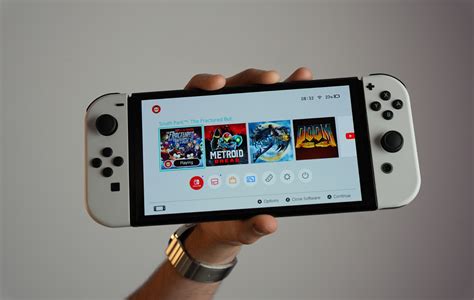
The Nintendo Switch, a marvel of portable gaming, comes with a critical limitation for many players: its internal storage. With only 32GB (or 64GB for the OLED model), a significant portion of which is reserved for the system, it doesn’t take long for digital game downloads, patches, and screenshots to eat up space. This quickly leads to frustrating ‘storage full’ messages, especially if you’re a fan of digital titles or large AAA games. Investing in a reliable microSD card isn’t just an upgrade; it’s a necessity for any serious Switch gamer looking to expand their library without constant game management.
Why Your Switch Needs More Storage
While physical game cartridges are great for preserving space, many gamers prefer the convenience of digital downloads. Even physical games often require significant updates and DLC, which are stored internally. Modern titles like The Legend of Zelda: Tears of the Kingdom or Pokémon Scarlet and Violet can easily consume over 10-15GB each, while some games like DOOM Eternal can push past 30GB. Without additional storage, you’ll be constantly deleting and redownloading games, a tedious process that eats into your gaming time.
Understanding SD Card Types for Nintendo Switch
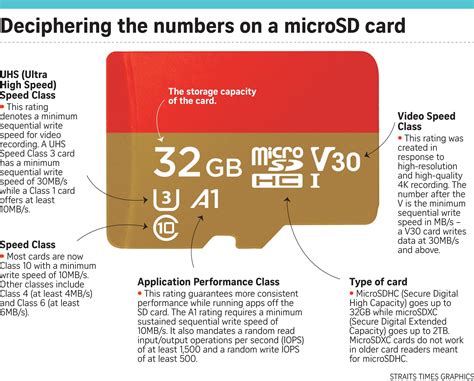
The Nintendo Switch exclusively uses microSD cards, specifically microSDHC (High Capacity) and microSDXC (Extended Capacity) formats. While standard SD cards won’t fit, the key distinctions for Switch performance lie in speed and capacity:
-
Capacity: MicroSDHC cards range from 4GB to 32GB, while microSDXC cards span from 64GB up to 2TB. For most users, a microSDXC card is the way to go.
-
Speed: Look for cards with a UHS-I (Ultra High Speed Phase I) rating. The Switch supports speeds up to 100MB/s for read and 90MB/s for write, so purchasing cards with higher theoretical speeds (UHS-II or UHS-III) won’t yield noticeable benefits and are generally more expensive.
-
Application Performance Class: An A1 or A2 rating (e.g., SanDisk Ultra’s A1 or SanDisk Extreme’s A2) indicates the card is optimized for running apps, which directly translates to better game loading times and overall performance on your Switch.
How Much Capacity Do You Really Need?
The ideal capacity depends entirely on your gaming habits and library size. Here’s a breakdown to help you decide:
-
Small Games & Physical Focus (64GB – 128GB): If you mostly buy physical cartridges and only download a few small indie titles (2-5GB each) or rely on cloud saves, a 64GB or 128GB card might suffice. This covers patches, screenshots, and a handful of digital gems.
-
Moderate Digital Library (256GB – 400GB): This is the sweet spot for many Switch owners. A 256GB card can hold 5-10 large games, plus several smaller ones. A 400GB card offers even more breathing room, perfect for those who regularly pick up digital sales and have a mix of big and small titles.
-
Extensive Digital Collector (512GB – 1TB+): For players who go all-in on digital games, download every major release, and keep a vast backlog, a 512GB or 1TB card is essential. These allow you to install dozens of AAA titles and hundreds of indies without worry, effectively eliminating storage concerns for years to come.
Key Factors When Choosing an SD Card
-
Speed (A1/A2 and U1/U3): As mentioned, A1 (or A2 for slightly better performance) and U1 (minimum for smooth gaming) are important. U3 offers faster theoretical speeds but might not be fully utilized by the Switch for game loading.
-
Reliability & Brand: Stick with reputable brands like SanDisk, Samsung, Lexar, or Kingston. These brands offer consistent performance, better warranties, and lower failure rates compared to generic or suspiciously cheap alternatives.
-
Price: While 1TB cards offer ultimate freedom, they come at a premium. Consider the price-per-gigabyte when making your decision. Often, 256GB or 512GB cards strike the best balance between cost and capacity.
Top Picks for Different Gamers
While specific models change, here are general recommendations:
-
For the Budget-Conscious / Mostly Physical Gamer: A 128GB or 256GB SanDisk Ultra microSDXC card (A1, U1). It offers excellent value and reliable performance for its price point.
-
For the Balanced Digital User: A 400GB or 512GB Samsung EVO Select/Plus or SanDisk Extreme microSDXC card (A2, U3 recommended for these higher tiers). These cards provide ample space and fast loading times for a growing digital library.
-
For the Hardcore Digital Collector: A 1TB SanDisk Extreme or Samsung EVO Plus microSDXC card (A2, U3). This is the pinnacle of Switch storage, allowing you to download virtually anything without compromise.

Installation and Management Tips
Installing a microSD card is straightforward: simply open the kickstand on the back of your Switch and insert the card into the slot. The system will automatically detect and format it. To optimize your storage, consider moving games from internal memory to your SD card via the System Settings. This frees up crucial internal space for system updates and essential files. Regularly delete games you don’t play to keep your storage organized, especially if you’re on a smaller card.

Conclusion
Choosing the right microSD card is a crucial step in enhancing your Nintendo Switch gaming experience. By understanding your gaming habits and balancing capacity with speed and budget, you can ensure your Switch is always ready for your next adventure, whether it’s a quick indie romp or an epic AAA saga. Don’t let limited storage hold you back – upgrade your Switch and unlock its full potential today!


