





Best micro SD cards for Switch? Maximize game storage for big & small titles.

The Storage Conundrum: Why Your Switch Needs an Upgrade
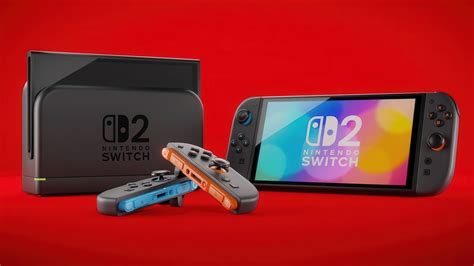
The Nintendo Switch is a fantastic console, offering unparalleled versatility for gaming on the go or at home. However, one common limitation Switch owners quickly encounter is its relatively small internal storage. With only 32GB (or 64GB for the OLED model) of built-in memory, a significant portion of which is reserved for the system itself, you’ll find space dwindling rapidly, especially if you prefer digital downloads.
Modern games, even on the Switch, can demand a surprising amount of storage. Large-scale titles like The Legend of Zelda: Tears of the Kingdom, Pokémon Scarlet/Violet, or Mortal Kombat 11 can easily eat up 10-15GB or more per game. Add in a handful of indie favorites, DLC, and system updates, and your internal memory will be screaming for relief. This is where a high-quality micro SD card becomes not just a luxury, but an essential accessory for any serious Switch gamer.
Key Factors When Choosing a Micro SD Card for Switch
Not all micro SD cards are created equal. To ensure optimal performance and value for your Nintendo Switch, consider these crucial factors:
Storage Capacity: How Much Do You Really Need?
This is often the first consideration. While a 64GB card might seem like an upgrade, it can fill up quickly. For most users, we recommend starting with at least 128GB or 256GB. If you’re a heavy digital gamer or plan to keep a vast library on hand, 512GB or even 1TB options offer ample breathing room for years to come.
- 64GB: Suitable for very casual gamers with a few small digital titles.
- 128GB: A good balance for most gamers, allowing for several large titles and many indies.
- 256GB: Ideal for avid digital collectors, offering plenty of space without breaking the bank.
- 512GB: For those who want to download almost everything and not worry about storage for a long time.
- 1TB: The ultimate choice for serious collectors who want every game at their fingertips.
Speed Matters: UHS-I and Read/Write Speeds
The Nintendo Switch supports the UHS-I (Ultra High Speed – Phase I) standard for micro SD cards. While there are faster UHS-II cards available, the Switch cannot fully utilize their speed, so paying extra for them is generally unnecessary. Look for cards with:
- UHS Speed Class 1 (U1) or Class 3 (U3): U3 offers faster minimum write speeds, which can slightly improve game loading times, but U1 is often sufficient.
- Application Performance Class A1 or A2: These ratings indicate the card’s ability to handle random read/write operations efficiently, which is beneficial for running apps and games. The Switch will perform well with an A1 or A2 rated card.
- Read Speeds: Aim for cards with read speeds of 90MB/s or higher. This impacts how quickly games load.

Brand Reputation and Reliability
Stick with reputable brands to ensure reliability and performance. Cheap, generic cards can be prone to failure, data corruption, or simply not deliver the advertised speeds. Top brands typically offer better warranties and quality control.
Our Top Picks: Best Micro SD Cards for Nintendo Switch
Based on performance, reliability, and value, these brands and specific cards consistently come out on top for Nintendo Switch users:
SanDisk Micro SD Cards for Nintendo Switch
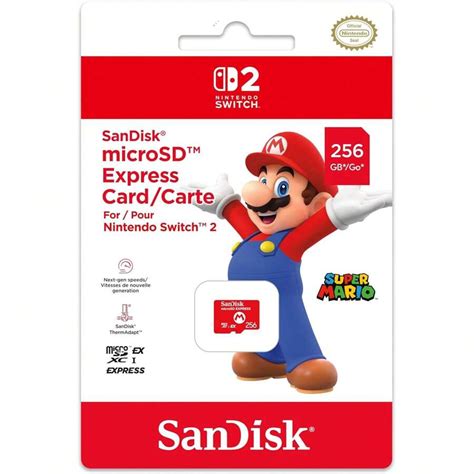
SanDisk is a long-standing leader in flash storage, and they even offer officially licensed Nintendo Switch micro SD cards. These cards are specifically tested and branded for the Switch, often featuring iconic Nintendo characters. While the licensed versions are excellent, their standard Extreme, Ultra, or Ultra Plus lines also work perfectly and might offer better value.
- Recommended: SanDisk Ultra, SanDisk Extreme, SanDisk for Nintendo Switch (Official Licensed)
Samsung EVO Select/Plus/PRO Plus
Samsung’s EVO line of micro SD cards (EVO Select, EVO Plus, PRO Plus) offers fantastic performance and reliability at competitive prices. They are known for their strong read/write speeds and are a favorite among tech enthusiasts for various devices, including the Switch.
- Recommended: Samsung EVO Select, Samsung EVO Plus, Samsung PRO Plus
Other Reputable Options: PNY, Adata, Kingston
While SanDisk and Samsung often dominate the market, other brands like PNY, Adata, and Kingston also produce high-quality micro SD cards that are perfectly suitable for the Nintendo Switch. Always check reviews and ensure you’re buying from an authorized retailer to avoid counterfeits.

Installing Your New Micro SD Card: A Quick Guide
Installing a micro SD card in your Switch is incredibly simple:
- Turn off your Nintendo Switch completely (hold the power button, then select Power Options > Turn Off).
- Open the kickstand on the back of the console to reveal the micro SD card slot.
- Insert the micro SD card into the slot with the label facing the same direction as the console’s screen, pushing until it clicks into place.
- Close the kickstand and power on your Switch.
- The Switch will automatically detect and format the card if necessary. You can verify the storage by going to System Settings > Data Management.
Once installed, new game downloads and screenshots will automatically save to the micro SD card. You can also move existing games from internal storage to the SD card if you need to free up space on the console’s internal memory.
Conclusion
Investing in a good micro SD card is one of the best upgrades you can make for your Nintendo Switch. It frees you from the constant struggle of managing limited internal storage, allowing you to download more games, capture more screenshots, and simply enjoy your gaming experience without interruption. By choosing a reputable brand and the right capacity, you’ll ensure your Switch is ready for all the big adventures and small indie gems Nintendo has to offer, now and in the future.


