





Which microSD card offers the best value for expanding Switch game storage?
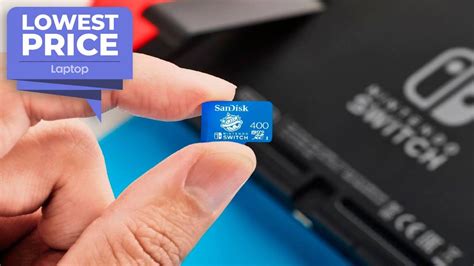
With the ever-growing library of incredible titles available digitally on the Nintendo eShop, and the increasing size of game updates, the Nintendo Switch’s internal 32GB (or 64GB for OLED) storage fills up remarkably fast. Expanding your storage with a microSD card is virtually essential for any serious Switch gamer, but with so many options, how do you pick one that offers the best value?
Understanding Your Storage Needs
Before diving into specific cards, consider how much storage you actually need. Are you a digital-only gamer or do you primarily buy physical cartridges? Even physical games often require significant downloads for updates, DLC, or sometimes the full game data itself. A 128GB card is a good starting point for casual digital gamers, but most will find 256GB or 512GB to be a more comfortable and future-proof choice.
For hardcore digital collectors, or those who simply never want to worry about space, 1TB cards are now more affordable than ever. Remember, you can only use one microSD card at a time with your Switch, so choose a capacity that will last you a while.

Speed Matters (But Not Too Much)
MicroSD cards come with various speed ratings like U1, U3, A1, and A2. For the Nintendo Switch, speed is important for loading times, but there’s a practical limit. The Switch itself has a maximum theoretical read speed of around 100MB/s, meaning cards faster than this won’t offer additional performance benefits.
Look for cards rated U1 (UHS Speed Class 1) or U3 (UHS Speed Class 3), and ideally A1 (Application Performance Class 1). A2 cards are technically faster, but the Switch doesn’t fully utilize their increased random read/write capabilities, so paying a premium for A2 isn’t usually worthwhile for Switch storage. Most reputable brands will exceed the Switch’s requirements even with their standard ‘Ultra’ or ‘EVO Select’ lines.
Top Contenders for Value
When it comes to the best balance of price, performance, and reliability, a few brands consistently stand out.

SanDisk microSDXC Cards
SanDisk is perhaps the most well-known brand for microSD cards, and for good reason. Their ‘Ultra’ series offers excellent value with U1 and A1 ratings, providing more than enough speed for the Switch. They also have an ‘Extreme’ series, which is faster (U3, A2), but often unnecessary for the Switch’s limitations. SanDisk also produces officially licensed Nintendo Switch branded cards, which are essentially ‘Extreme’ cards with a premium price tag for the branding – you’re often better off getting a standard SanDisk Ultra or Extreme for less.
Samsung EVO Select/Plus microSDXC Cards
Samsung’s EVO Select and EVO Plus lines are fantastic alternatives to SanDisk. They consistently offer competitive pricing, especially during sales, and provide robust performance (U3, A1/A2) and excellent reliability. Many users report these cards to be among the most dependable for Switch storage, often matching or slightly exceeding SanDisk’s performance at similar price points.
Other Reputable Brands (PNY, Lexar)
While SanDisk and Samsung dominate, brands like PNY and Lexar also offer solid microSD card options. PNY’s Elite-X and Lexar’s Play series are often good budget-friendly choices, providing adequate speed and reliability for the Switch. Always ensure you’re buying from a reputable retailer to avoid counterfeit cards, regardless of the brand.
Price Per Gigabyte: The True Value Metric
To truly gauge value, calculate the price per gigabyte (GB). This is especially useful when comparing cards of different capacities. Larger capacity cards (e.g., 512GB or 1TB) often have a lower price per GB than smaller ones (128GB or 256GB), making them better long-term investments if your budget allows.
Keep an eye out for sales events like Black Friday, Prime Day, or Cyber Monday, as microSD cards frequently go on deep discount. A sweet spot for value often lies in the 256GB to 512GB range, offering significant storage without the premium cost of 1TB cards, while still having a good price per GB.
Installation and Management Tips
Installing a microSD card is simple: just slide it into the slot under the kickstand on the back of the Switch. The console will prompt you to format it if necessary. If you’re upgrading, you can transfer data from your old card to the new one using a PC, but it’s often easier to simply redownload games from the eShop onto the new, larger card.

Conclusion
For the best value in expanding your Nintendo Switch storage, we recommend a 256GB or 512GB microSD card from SanDisk (Ultra or Extreme) or Samsung (EVO Select/Plus). These brands offer the optimal blend of speed, reliability, and price per gigabyte, ensuring you have plenty of space for your games without overspending. Always buy from a trusted retailer to guarantee authenticity and peace of mind.


