Best settings to optimize mobile game battery life?

Mobile gaming offers an unparalleled level of entertainment and portability, but there’s a common nemesis that often cuts short our epic quests and intense battles: rapidly draining battery life. Whether you’re a casual player or a hardcore gamer, optimizing your device settings can significantly extend your playtime, allowing you to immerse yourself longer without constantly searching for an outlet.
Device-Level Settings: Your Phone’s Core Efficiency
The first line of defense against battery drain lies within your smartphone’s system settings. Tweaking these can have a profound impact across all your apps, not just games.
Screen Brightness and Refresh Rate
- Lower Brightness: Your screen is often the biggest power consumer. Reduce your screen brightness to a comfortable, but not excessive, level. Most phones have an auto-brightness feature, which can be useful, but manual control allows for stricter conservation.
- Adaptive/Lower Refresh Rate: High refresh rate screens (90Hz, 120Hz, or higher) offer a smoother visual experience, but they demand more power. If your phone has an adaptive refresh rate setting, enable it. Otherwise, consider lowering it to 60Hz specifically for gaming sessions to save battery.
Background Apps and Notifications
Apps running in the background, even when not actively used, can consume valuable battery. Similarly, constant notifications wake your screen and drain power.
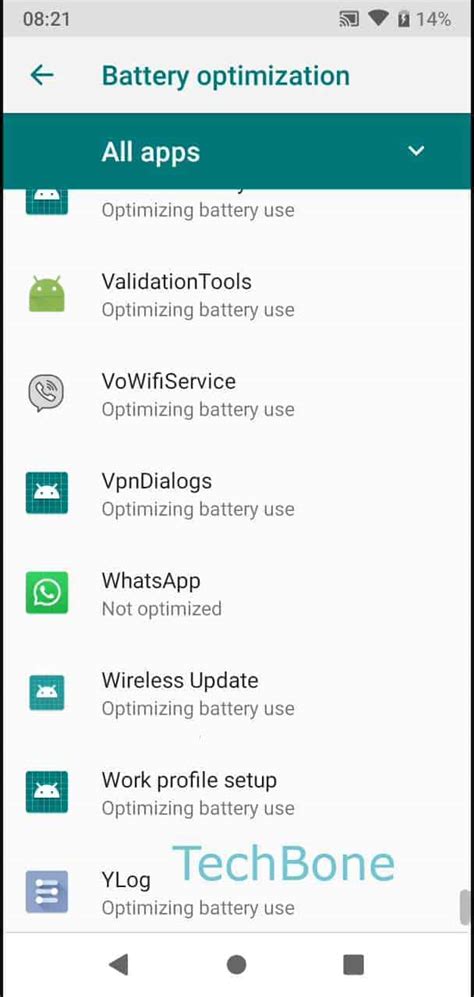
- Close Unused Apps: Before starting a game, close all unnecessary apps running in the background.
- Restrict Background Activity: Go into your app settings and restrict background data or activity for apps that don’t need to be constantly synced.
- Manage Notifications: Turn off notifications for non-essential apps, or switch your phone to “Do Not Disturb” mode while gaming.
Location Services and Connectivity
GPS, Wi-Fi, Bluetooth, and mobile data are all power-hungry features that might not be fully necessary for every game.
- Disable GPS: Unless the game explicitly requires location services (e.g., AR games), turn off GPS.
- Use Wi-Fi Over Mobile Data: Wi-Fi is generally more power-efficient than mobile data for internet connectivity. If available, connect to Wi-Fi.
- Turn Off Bluetooth: If you’re not using a Bluetooth controller or headphones, switch off Bluetooth.
In-Game Settings: Tailoring Your Gaming Experience
Many modern mobile games offer a range of customizable graphics and performance settings. Adjusting these can be a goldmine for battery saving.
Graphics Quality and Resolution
High-fidelity graphics look fantastic, but they make your phone’s GPU work harder, leading to faster battery drain and increased heat.
- Lower Graphics Settings: Most games offer “Low,” “Medium,” “High,” or “Ultra” graphics presets. Opting for “Medium” or “Low” can dramatically reduce power consumption.
- Reduce Resolution: If the game allows, lowering the in-game resolution means fewer pixels for your GPU to render, saving battery.
Frame Rate (FPS)
While a higher frame rate (e.g., 60 FPS) provides a smoother experience, it also demands more processing power.
- Cap FPS: If the game allows, cap the frame rate to 30 FPS. For many mobile games, 30 FPS is perfectly playable and significantly reduces battery usage compared to 60 FPS.

Sound and Vibration
Even these seemingly minor features contribute to battery drain.
- Reduce Volume/Use Headphones: The phone’s internal speakers consume more power than headphones. If possible, use wired headphones or reduce the in-game volume.
- Turn Off Vibration: Haptic feedback and vibration motors use a noticeable amount of power. Disable in-game vibrations for notifications and actions.
External Factors and Gaming Habits
Beyond settings, your environment and how you game also play a role.
- Keep Your Phone Cool: High temperatures can reduce battery efficiency and overall battery lifespan. Avoid gaming in direct sunlight or in hot environments. Remove your phone case if it’s contributing to heat buildup.
- Charge Smartly: While playing plugged in can keep your battery topped up, it’s generally better for long-term battery health to play unplugged until the battery is low (e.g., 20-30%), then recharge. Avoid constantly playing while charging if your phone gets excessively hot.
- Close Other Resource-Intensive Apps: Ensure no other apps (like video streaming or heavy browsers) are running simultaneously in the background while you game.

Conclusion: Game Longer, Charge Less
By implementing a combination of these device-level and in-game adjustments, you can significantly extend your mobile gaming sessions. From dimming your screen and lowering graphics to managing background apps and keeping your device cool, these strategies empower you to take control of your battery life. So go ahead, conquer those dungeons, win those races, and embark on longer adventures without the constant worry of a dying battery.