




How do I choose age-appropriate video games for my child using ratings systems?

Understanding Video Game Ratings: Your First Line of Defense
In today’s digital age, video games are an integral part of many children’s lives. While they offer immense entertainment and developmental benefits, ensuring the games your child plays are suitable for their age and maturity level is paramount. Fortunately, robust rating systems exist specifically to help parents make informed decisions. This guide will walk you through how to effectively use these systems to choose age-appropriate video games.
Decoding Major Rating Systems: ESRB and PEGI
Globally, two of the most prominent video game rating systems are the Entertainment Software Rating Board (ESRB) and the Pan European Game Information (PEGI). While their specific labels differ, their core mission is the same: to provide clear, objective information about game content.
The ESRB System (North America)
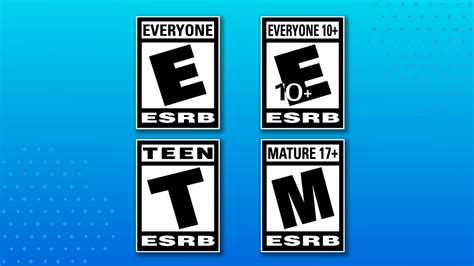
The ESRB system, primarily used in North America, provides both an age rating and content descriptors. The age ratings are:
- EC (Early Childhood): Ages 3+; content is appropriate for young children.
- E (Everyone): Ages 6+; content generally suitable for all ages.
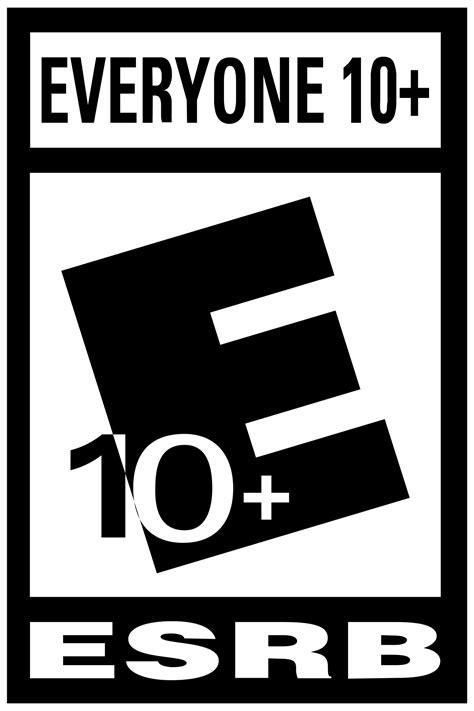
- E10+ (Everyone 10+): Ages 10+; may contain more cartoon, fantasy or mild violence, or minimal suggestive themes.
- T (Teen): Ages 13+; may contain violence, suggestive themes, crude humor, minimal blood, and/or infrequent use of strong language.
- M (Mature): Ages 17+; generally contains intense violence, blood and gore, sexual content, and/or strong language.
- AO (Adults Only 18+): Ages 18+; contains prolonged scenes of intense violence, graphic sexual content, and/or gambling with real currency.
Crucially, ESRB also includes Content Descriptors, which are brief phrases explaining why a game received its rating (e.g., “Fantasy Violence,” “Mild Language,” “Sexual Themes”). These are often found on the back of game boxes or on digital storefronts.
The PEGI System (Europe and beyond)
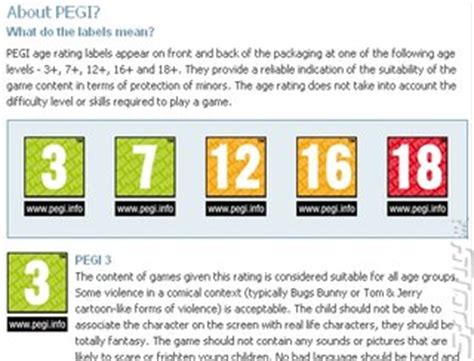
PEGI is widely used across Europe and in other countries, focusing primarily on age recommendations, though it also includes content descriptors. PEGI age ratings are:
- PEGI 3: Suitable for all age groups.
- PEGI 7: Game content that might be disturbing to very young children.
- PEGI 12: Games with mild violence, nudity, or bad language.
- PEGI 16: More realistic violence, sexual activity, use of illegal drugs.
- PEGI 18: Adult content, often featuring explicit violence, sexual content, or drug use.
PEGI’s Content Descriptors are icons that indicate elements like violence, bad language, fear, sex, drugs, discrimination, gambling, and in-game purchases. These icons provide a quick visual summary of potentially concerning elements.
Beyond the Labels: Practical Tips for Parents
While ratings are an excellent starting point, they are just one tool in your parenting arsenal. Consider these additional steps:
- Know Your Child: A rating is a general guideline. Your child’s individual maturity level, sensitivity, and interests should always be taken into account. A mature 10-year-old might handle an E10+ game better than a sensitive 12-year-old.
- Read Reviews and Watch Gameplay: Before purchasing, look up game reviews from reputable sources and, if possible, watch some gameplay videos online. This gives you a more comprehensive understanding of the game’s actual content, tone, and themes.
- Play Together or Observe: The best way to know if a game is appropriate is to experience it yourself or observe your child playing. This allows for open discussions about what they are seeing and doing in the game.
- Check for Online Interaction: Many games now include online multiplayer components. Even if the game’s core content is appropriate, interactions with other players online might not be. Look for parental control options within the game or console settings to manage online communication.
- Utilize Parental Controls: Most gaming consoles, PCs, and mobile devices offer robust parental control settings that allow you to restrict games by rating, limit play time, and manage purchases. Learn how to set these up on your family’s devices.

Making Empowered Choices
Choosing age-appropriate video games doesn’t have to be a guessing game. By understanding and utilizing rating systems like ESRB and PEGI, combined with your knowledge of your child and additional research, you can make confident decisions that foster a positive and safe gaming environment. Empower yourself with information, and you’ll empower your child to enjoy the vast world of video games responsibly.