





How can I track game deals (PC/console) & get instant price drop alerts?

Gaming can be an expensive hobby, especially when new titles launch at full price. However, with a bit of savvy and the right tools, you can build an impressive game library without breaking the bank. Tracking game deals across PC and console platforms, and getting timely notifications for price drops, is a game-changer for budget-conscious gamers.
Why Track Game Deals?
The primary benefit of tracking game deals is, of course, saving money. Games frequently go on sale, often cycling through deep discounts throughout the year, during seasonal events, or even spontaneously. By monitoring prices, you can purchase games at their historical lows, allowing you to buy more titles for the same budget or simply save money for other things. It also prevents buyer’s remorse when a game you just bought at full price goes on sale a week later.

Essential Tools for Tracking PC Game Deals
PC gaming offers a vast ecosystem of digital storefronts, leading to a highly competitive market where deals are abundant. Here are the top ways to track them:
- Dedicated PC Storefronts: Platforms like Steam, Epic Games Store, GOG, Humble Store, and Itch.io frequently hold their own sales. Adding games to your wishlist on these platforms often triggers email notifications when an item goes on sale.
- Deal Aggregators & Price Comparison Sites: These are your best friends for PC deals.
- IsThereAnyDeal: Tracks prices across dozens of legitimate PC game stores, shows historical lows, and allows you to set up custom alerts for specific games or publishers.
- CheapShark: A similar aggregator that pulls deals from various retailers, often updated very quickly.
- Fanatical & Green Man Gaming: These aren’t just aggregators; they are also legitimate key retailers that often have their own exclusive discounts and bundles.
- Browser Extensions: Extensions like ‘Enhanced Steam’ (for Steam) can integrate price history and comparisons directly into your storefront browser experience, making it easier to spot good deals instantly.

Essential Tools for Tracking Console Game Deals
Console deals can be a bit trickier to track due to fewer independent digital storefronts, but there are still excellent resources:
- Official Digital Storefronts: The PlayStation Store, Xbox Store, and Nintendo eShop regularly feature sales. Use their built-in wishlist features to get notifications for games you’re interested in.
- Retailers: For both digital codes and physical copies, major retailers like Amazon, Best Buy, Walmart, Target, and GameStop frequently run sales. Keep an eye on their gaming sections.
- Console-Specific Deal Sites:
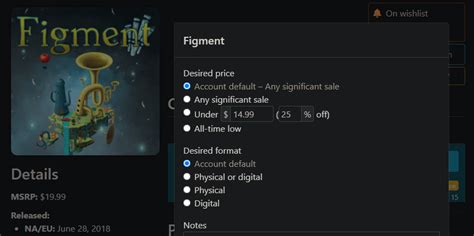
- DekuDeals (Nintendo Switch): This is an indispensable tool for Switch owners, tracking digital and physical game prices, showing historical lows, and providing alerts.
- PSNProfiles & Xbox Ambassadors: While not exclusively deal sites, they often highlight current sales on their respective platforms.

How to Get Instant Price Drop Alerts
The key to never missing a deal is setting up effective alerts:
- Storefront Wishlists: As mentioned, adding games to wishlists on Steam, Epic, PS Store, Xbox Store, and Nintendo eShop will often trigger email notifications when those games go on sale.
- Deal Aggregator Alerts: Sites like IsThereAnyDeal and DekuDeals offer robust alert systems. You can set a desired price threshold, and they’ll email you (or send push notifications via their apps) when a game drops to or below that price.
- Discord Servers & Reddit Communities: Join gaming deal-focused Discord servers or subreddits like r/GameDeals, r/PS4Deals, r/XboxDeals, and r/NintendoSwitchDeals. Users in these communities are incredibly quick to post new deals as they go live, often providing a real-time stream of discounts.
- Dedicated Mobile Apps: Some deal aggregator sites also have mobile apps that can send push notifications directly to your phone, ensuring you get alerts even when you’re away from your computer.
Tips for Smart Deal Hunting
- Be Patient: Most games, especially popular ones, will eventually go on sale. If you’re not in a hurry, waiting can save you significant money.
- Check Historical Lows: Before buying, always check a game’s price history on sites like IsThereAnyDeal or DekuDeals. This tells you if the current sale is truly a good deal or if it’s been cheaper before.
- Consider Bundles: Keep an eye out for game bundles (e.g., Humble Bundle, Fanatical) which often offer multiple games for a fraction of their individual prices.
- Read Reviews: Just because a game is cheap doesn’t mean it’s worth your time. Quickly check reviews to ensure it’s a game you’ll actually enjoy.
- Beware of Grey Market Keys: While tempting, sites selling incredibly cheap keys from unofficial sources can be risky. Stick to reputable retailers and aggregators to avoid invalid keys or potential account issues.
Conclusion
Tracking game deals and utilizing price drop alerts is an effective way to maximize your gaming budget. By combining the power of official store wishlists, comprehensive deal aggregators, and real-time community alerts, you can build an extensive game library without ever paying full price again. Happy deal hunting!



