What’s the best way to track PC game deals across multiple stores like Steam/Epic?

Navigating the Digital Storefront Labyrinth
The world of PC gaming offers an astounding variety of titles, but with multiple digital storefronts like Steam, Epic Games Store, GOG, Humble Bundle, and many others, keeping track of sales can feel like a full-time job. Thankfully, a range of tools and strategies exist to help you snag the best deals without constantly checking each store individually. The key is automation and aggregation, allowing you to focus on playing, not price hunting.
The Power of Deal Aggregators
Dedicated deal aggregation websites are arguably the most effective way to track PC game prices across the entire digital landscape. These platforms constantly scrape data from numerous stores, providing real-time price comparisons, historical price charts, and sale alerts.
- IsThereAnyDeal (ITAD): This is often considered the gold standard. ITAD allows you to add games to a personalized wishlist and receive email notifications when a game goes on sale at your desired price point across a vast array of stores. It also provides historical price data, helping you determine if a ‘deal’ is truly a good one.
- Fanatical and Humble Bundle: While also storefronts themselves, they often feature curated bundles and sales that cross-promote deals from other publishers and platforms. Keeping an eye on their daily/weekly deals can yield great value.

Leveraging Store-Specific Wishlists and Notifications
While aggregators are excellent for a broad view, don’t underestimate the utility of the built-in features of your favorite storefronts. Most major platforms offer robust wishlist functionalities.
- Steam Wishlist: Add any game to your Steam wishlist, and you’ll receive an email notification when it goes on sale. This is essential for tracking games specifically on Steam.
- Epic Games Store Wishlist: Similar to Steam, Epic also provides sale notifications for wishlisted games. Given Epic’s frequent large discounts and free game giveaways, this is a must-use feature.
- GOG & Others: Almost all digital stores have a wishlist system. Utilize them for games you specifically want from that particular store.
Browser Extensions and Community Forums
For even greater convenience, consider browser extensions and active online communities:
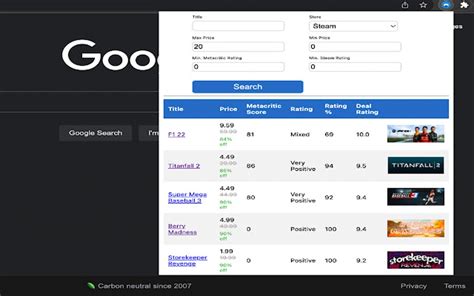
- Augmented Steam / Enhanced Steam: These popular browser extensions add a wealth of information directly to Steam store pages, including historical low prices from ITAD, review scores, and region price comparisons. While primarily for Steam, they integrate external deal data.
- Reddit Communities: Subreddits like r/GameDeals are incredibly active, with users posting deals as soon as they appear. It’s a great way to catch flash sales or lesser-known promotions.
- Discord Servers: Many gaming communities and deal-focused servers exist, offering real-time alerts and discussions on the latest discounts.
Setting Price Alerts and Utilizing Newsletters
Beyond active searching, you can set up passive monitoring:
- Price Alert Websites (e.g., GG.deals): Similar to ITAD, these sites allow you to set specific price thresholds. When a game hits that price, you’ll receive an alert. Some even track legitimate key resellers alongside official stores.
- Email Newsletters: Sign up for newsletters from your favorite storefronts (Steam, Epic, GOG) and deal aggregators (ITAD, Humble Bundle, Fanatical). They’ll send curated lists of current sales directly to your inbox.

Strategies for Smart Deal Hunting
To maximize your savings, combine these tools with a smart strategy:
- Consolidate Your Wishlist: Use a primary aggregator like IsThereAnyDeal for all games you’re interested in, regardless of the store.
- Set Realistic Price Alerts: Check historical low prices before setting your alert to avoid buying too soon.
- Be Patient: Most popular games go on sale multiple times a year. If you miss one, another will likely come around.
- Focus on Your Backlog: Avoid buying games just because they’re on sale if you have a huge backlog. Prioritize games you genuinely want to play soon.

Conclusion: Your Personal Deal Command Center
By integrating a few key tools into your routine, you can transform the daunting task of tracking PC game deals into a streamlined, efficient process. Whether it’s a powerful aggregator, the simple convenience of a store wishlist, or the real-time buzz of a community forum, there’s a perfect solution waiting to help you build your game library without breaking the bank. Happy hunting!