





Best Switch microSD: Capacity & speed for all digital games?

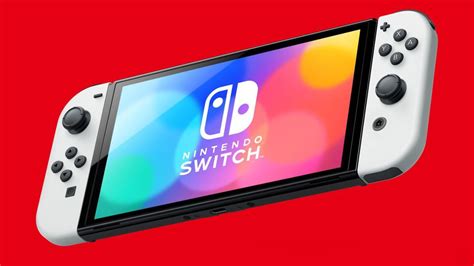
For many Nintendo Switch owners, the console’s built-in 32GB (or 64GB for the OLED model) storage quickly proves insufficient. With an ever-growing library of fantastic digital-only titles, downloadable content, and system updates, a reliable microSD card isn’t just an accessory—it’s a necessity. But with so many options available, how do you choose the best one that balances ample capacity with the speed required for seamless gaming?
Why Expand Your Switch’s Storage?
While physical game cartridges save some space on your internal storage by not requiring a full install, many digital games, updates, and DLC still need to be stored directly on your console or an external card. Major titles like The Legend of Zelda: Tears of the Kingdom can exceed 18GB, and multiple such games can quickly fill up your Switch’s limited internal memory. A microSD card provides the breathing room you need to download more games, capture screenshots, record videos, and enjoy your Switch without constant storage anxiety.
Understanding Your Capacity Needs
The ideal capacity for your Switch microSD card depends heavily on your gaming habits:
- Casual Gamer (128GB – 256GB): If you primarily play physical cartridges and only download a few digital indies or smaller titles, 128GB might suffice. However, 256GB offers a comfortable buffer for future downloads and updates.
- Avid Digital Gamer (256GB – 512GB): For those who frequently purchase digital games, especially larger AAA titles, 256GB is a good starting point, but 512GB is often recommended to avoid needing an upgrade too soon.
- Digital Collector (512GB – 1TB+): If you aim to own a vast digital library, 512GB or even a 1TB card is the way to go. While more expensive, it provides peace of mind for years of gaming.
Remember that system software and game updates also consume space, so always factor in a little extra room beyond just game sizes.

Speed Matters: Decoding MicroSD Card Performance
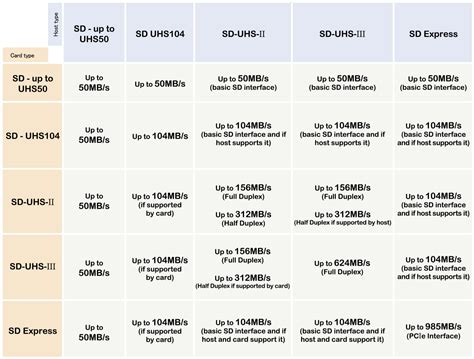
Capacity isn’t the only factor; speed significantly impacts your gaming experience, affecting load times, game installations, and even in-game performance. The Nintendo Switch supports UHS-I microSD cards, which have a theoretical maximum transfer speed of 104 MB/s. While faster UHS-II cards exist, the Switch cannot fully utilize their increased speeds, making them an unnecessary expense.
Key Speed Metrics to Look For:
- UHS Speed Class (U1 or U3):
- U1 (Class 10): Guarantees a minimum sequential write speed of 10 MB/s. Good for general use.
- U3: Guarantees a minimum sequential write speed of 30 MB/s. Recommended for smoother performance on the Switch, especially for larger games.
- Application Performance Class (A1 or A2):
- A1: Offers better random read/write speeds, which are crucial for running applications (like games) directly from the card. Minimum random read IOPS of 1,500 and write IOPS of 500.
- A2: Even better random read/write performance with minimums of 4,000 read IOPS and 2,000 write IOPS. While the Switch might not fully leverage A2’s peak potential, these cards often provide a noticeable performance boost, particularly in load times, and are generally a good future-proof choice.
For the best balance of speed and value, look for microSD cards rated at least UHS-I U3 and A1. Many premium cards now offer U3 and A2 ratings.
Recommended MicroSD Cards for Your Nintendo Switch
Several brands consistently offer high-quality, reliable microSD cards suitable for the Nintendo Switch. Look for cards from reputable manufacturers like SanDisk, Samsung, and Lexar.
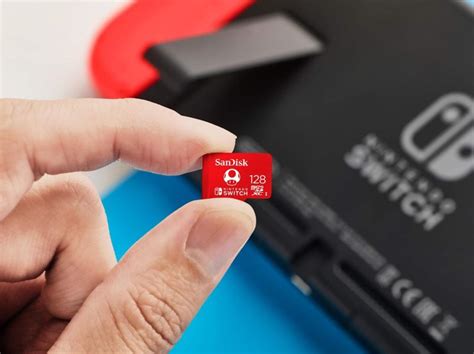
- SanDisk MicroSDXC for Nintendo Switch: These officially licensed cards often come with iconic Switch branding and are specifically optimized for the console. They are typically U3 and A1 rated, offering excellent performance and reliability.
- SanDisk Extreme / Extreme Pro: While not Switch-branded, these are premium cards known for their robust performance, U3 and A2 ratings, making them an excellent choice for demanding users.
- Samsung EVO Select / EVO Plus: Samsung’s offerings are highly reliable and provide great value. The EVO Select and Plus lines often boast U3 and A2 ratings, delivering strong performance.
- Lexar Play: Designed with gaming in mind, Lexar Play cards offer competitive speeds and capacities, often at attractive price points.
Always purchase from trusted retailers to avoid counterfeit cards, which can lead to data loss and poor performance.
Installation and Management Tips
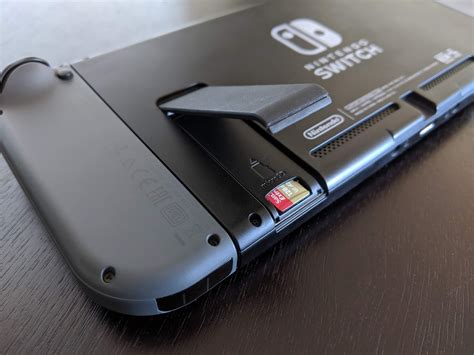
Installing a microSD card in your Switch is straightforward: simply open the kickstand on the back of the console and insert the card into the slot. The Switch will automatically detect it. If you’re upgrading from an older card, you can transfer your data by copying the contents of the old card to your computer, then onto the new card. Alternatively, you can redownload games directly from the eShop onto your new, larger card.
To manage your storage, navigate to System Settings > Data Management. Here, you can see how much space is being used, archive software to free up space (keeping save data), or delete games entirely. Regularly backing up your save data (if you have a Nintendo Switch Online subscription) is always a good practice, regardless of your microSD card setup.
Making Your Best Choice
Choosing the best microSD card for your Nintendo Switch involves weighing your current and future gaming needs against your budget. For most users, a 256GB or 512GB card with a U3 and A1/A2 rating offers the sweet spot between ample storage and excellent performance. Investing in a high-quality card from a reputable brand will ensure a smooth, expansive, and worry-free gaming experience on your beloved Switch for years to come.



