How can I reduce mobile game battery drain and data usage effectively?

Tackling Mobile Gaming’s Biggest Hurdles: Battery and Data
Mobile gaming has become a cornerstone of modern entertainment, offering immersive experiences on the go. However, the thrill often comes at a cost: rapidly draining battery life and excessive data consumption. These issues can cut short your gaming sessions and lead to unexpected charges or slower connectivity. Fortunately, with a few smart adjustments and habits, you can significantly mitigate these problems, ensuring a smoother, longer-lasting, and more cost-effective gaming experience.

Why Do Games Drain So Much Battery and Data?
Modern mobile games are incredibly resource-intensive. High-definition graphics, complex physics engines, constant network communication for multiplayer or updates, and vibrant displays all demand significant processing power and energy. Similarly, online games constantly exchange data with servers, downloading assets, syncing progress, and facilitating real-time interactions, all contributing to high data usage.
Effective Strategies to Reduce Battery Drain
1. Adjust In-Game Graphics Settings
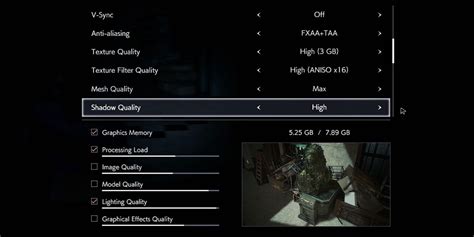
Most games offer graphic quality options. Lowering resolutions, texture quality, frame rates, and disabling visual effects like shadows or anti-aliasing can dramatically reduce the processing load on your device, leading to less power consumption. Experiment with settings to find a balance between visual quality and battery life.
2. Optimize Screen Settings
The screen is often the biggest battery hog. Reduce your screen brightness to the lowest comfortable level. If your phone has a high refresh rate (e.g., 90Hz, 120Hz), consider setting it to a lower standard (e.g., 60Hz) while gaming, or enable adaptive refresh rate if available.
3. Manage Background Apps and Sync
Before launching a game, close unnecessary background applications that might be consuming resources. Turn off automatic app updates, email sync, and cloud backups while gaming. These background processes consume CPU cycles and data, contributing to faster battery drain.
4. Utilize Game Boosters or Modes
Many modern smartphones come with dedicated “Game Mode” or “Game Booster” features. These tools often optimize performance by clearing RAM, blocking notifications, and sometimes even managing power profiles to prioritize gaming and reduce background activity. Make sure to activate them.
5. Disable Unnecessary Connectivity Features
If you’re not using them, turn off Wi-Fi, Bluetooth, GPS, and NFC. While Wi-Fi is essential for online gaming, if you’re playing an offline game, turning it off along with other radios can save a significant amount of battery. Location services, in particular, can be a major drain.
6. Keep Software Updated
Developers frequently release updates for both games and your phone’s operating system (OS) that include performance optimizations and bug fixes, which can sometimes improve power efficiency. Ensure your game and OS are always up to date.
Effective Strategies to Reduce Data Usage
1. Prioritize Offline Games
The simplest way to save data is to play games that don’t require an internet connection. Many excellent single-player titles can be enjoyed entirely offline once downloaded.
2. Download Game Assets on Wi-Fi
Most games download large initial files, updates, and additional content packs. Always ensure you are connected to a Wi-Fi network before downloading these substantial files. Check game settings for options to “Download over Wi-Fi only.”

3. Restrict Background Data for Games
Your phone’s settings allow you to control which apps can use data in the background. Navigate to your device’s settings (usually under “Apps & Notifications” > “App Info” > specific game > “Data usage”) and restrict background data for games you only play online. Some games might still use a small amount, but it can help.
4. Monitor Data Usage
Regularly check your phone’s data usage statistics (found in “Settings” > “Network & Internet” > “Data usage”). This will help you identify which games or apps are consuming the most data, allowing you to take targeted action.
5. Enable Data Saver Mode (OS-level)
Both Android and iOS offer system-wide “Data Saver” or “Low Data Mode” features. Activating this can help reduce data consumption across all apps by preventing background data usage and lowering the quality of some media. Be aware that this might affect other apps’ functionality.
6. Avoid In-Game Voice Chat on Mobile Data
While convenient, in-game voice chat can consume a surprising amount of data, especially during long sessions. If data is a concern, opt for text chat or use voice communication only when connected to Wi-Fi.

Conclusion
By implementing these practical tips, you can take control of your mobile gaming experience, extending your playtime and managing your data consumption effectively. A combination of adjusting in-game settings, optimizing device features, and being mindful of your connectivity will ensure that your phone’s battery and your data plan last longer, letting you enjoy your favorite mobile games without constant worry.