





Best microSD for Nintendo Switch digital games storage?

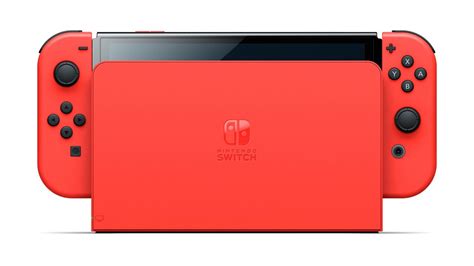
The Nintendo Switch, a versatile hybrid console, boasts an impressive library of digital games. However, its internal storage of 32GB (or 64GB for the OLED model) quickly fills up, especially with large AAA titles and numerous indie gems. This is where a reliable microSD card becomes an indispensable accessory, allowing you to expand your game collection without constantly deleting and re-downloading titles.
Why Your Nintendo Switch Needs a MicroSD Card
Modern video games are larger than ever. Titles like The Legend of Zelda: Tears of the Kingdom can consume over 18GB, and even many indie games hover around the 1-5GB mark. With just a handful of these, your Switch’s built-in memory will be maxed out. A microSD card provides the necessary headroom, letting you download and keep dozens, or even hundreds, of games readily accessible. It also makes your console more convenient, avoiding the need to archive games when you want to try something new.
Key Factors When Choosing a MicroSD Card for Switch
Not all microSD cards are created equal, and choosing the right one can significantly impact your gaming experience. Here’s what to prioritize:
1. Capacity: How Much Space Do You Really Need?
Capacity is often the first consideration. MicroSD cards for the Switch range from 64GB to a massive 1TB (and even 1.5TB is now available, though pricey). Your ideal capacity depends on your gaming habits:
- 64GB-128GB: Good for casual players with a mix of physical and a few digital games.
- 256GB-512GB: A sweet spot for most digital-first gamers, offering ample space for many large titles and indies.
- 1TB: For hardcore digital collectors who want almost every game available at their fingertips without ever worrying about space.
Remember that some space will be reserved for system files, so the usable capacity will be slightly less than advertised.
2. Speed: UHS-I is Key for Optimal Performance
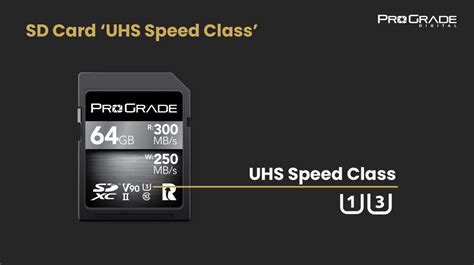
While capacity gets the most attention, speed is arguably more crucial for smooth gameplay. Nintendo officially recommends using UHS-I (Ultra High Speed Phase I) compatible microSD cards with a read speed of 60-95 MB/s. Cards exceeding these speeds, like UHS-II, offer no practical benefit for the Switch as the console’s card reader is limited to UHS-I speeds.
- UHS-I (Speed Class 10): Look for cards marked with a “1” inside a U-shaped symbol and a “10” inside a circle. This indicates a minimum write speed of 10 MB/s, which is sufficient.
- Application Performance Class (A1 or A2): These ratings are important for app performance on Android devices, but for the Switch, A1 is perfectly fine. A2 offers higher random read/write speeds but won’t noticeably improve game loading on the Switch.
- Video Speed Class (V30): A V30 rating indicates a minimum sequential write speed of 30 MB/s, often found on high-quality UHS-I cards and is a good sign of overall performance.
Using a slower, non-UHS-I card can lead to longer load times, stuttering, and an overall degraded gaming experience. Always prioritize reputable brands known for consistent performance.
Recommended MicroSD Card Brands and Models
To ensure reliability and performance, stick with trusted brands. Here are some top contenders:
- SanDisk: Widely regarded as the industry standard, SanDisk offers excellent options. Their official Nintendo-licensed microSD cards are popular, often featuring iconic Switch characters, and are guaranteed to meet Nintendo’s specifications. The SanDisk Ultra and Extreme series are also fantastic choices, offering great speeds and reliability at competitive prices.
- Samsung: Samsung’s EVO Select, EVO Plus, and PRO Plus series are highly recommended. They provide robust performance, excellent durability, and are known for their longevity.
- Lexar: Another strong contender, Lexar’s Play and Professional series microSD cards offer solid speeds and good value, making them a reliable option for Switch owners.
Always purchase from reputable retailers to avoid counterfeit cards, which can lead to data loss and poor performance.
Balancing Price and Performance
While a 1TB card might seem ideal, a 256GB or 512GB card often provides the best balance of price per gigabyte and sufficient storage for most users. Higher capacity cards are becoming more affordable, but there’s a point of diminishing returns if you don’t anticipate filling it up. Focus on a UHS-I card from a reputable brand within your budget, and you’ll be well-equipped.
Installation and Management Tips
Installing a microSD card in your Switch is straightforward: simply insert it into the slot under the kickstand. The console will prompt you to format it if needed. Any games you download will automatically save to the microSD card if one is present. You can also move existing data between the console’s internal storage and the microSD card via the system settings.

Conclusion
Investing in a good quality microSD card is perhaps the most important upgrade you can make for your Nintendo Switch. By prioritizing UHS-I speed and choosing a capacity that suits your gaming habits from a trusted brand like SanDisk, Samsung, or Lexar, you’ll ensure a seamless and enjoyable digital gaming experience, free from the constant struggle of managing limited storage space. Happy gaming!



