





Running out of Switch storage? What’s the best microSD card for games?
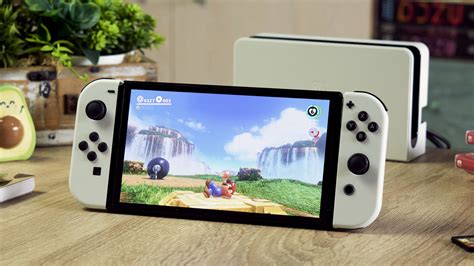
The Nintendo Switch, with its incredible library of games, has a notorious Achilles’ heel: its limited internal storage. Whether you own the original Switch, the Lite, or the OLED model, the built-in 32GB (or 64GB for the OLED) fills up alarmingly fast once you start downloading digital titles, game updates, and DLC. If you’re tired of constantly deleting games to make space for new adventures, it’s time to invest in a quality microSD card.
The Inevitable Storage Crunch
Many popular Switch games, even physical cartridge titles, require significant downloads for updates and additional content. Digital-only games, of course, consume even more. Breath of the Wild’s base game is around 14GB, but add in updates and DLC, and you’re looking at a substantial chunk of your internal drive. Games like Pokémon Scarlet/Violet, The Witcher 3, and various indie darlings can quickly push you over the edge. A microSD card isn’t just an accessory; it’s practically a necessity for any avid Switch gamer.
What to Look for in a Switch microSD Card
Choosing the right microSD card isn’t just about finding the cheapest option. Several factors influence performance and reliability:
Capacity: How Much Space Do You Really Need?
- 128GB: A good starting point for casual gamers or those who mostly buy physical.
- 256GB: The sweet spot for many, offering ample room for a decent digital library without breaking the bank.
- 512GB: Ideal for serious digital collectors or those who want to future-proof their storage.
- 1TB: For the ultimate collector. While more expensive, it means rarely having to worry about space again.
Remember, bigger is often better, especially with game sizes continually growing.
Speed: Fast Loading Times Matter
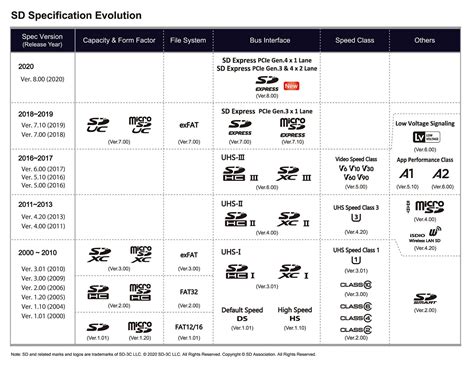
The Nintendo Switch supports UHS-I microSD cards, with a maximum data transfer rate of up to 100MB/s. You’ll want a card that meets or exceeds the following:
- UHS Speed Class 1 (U1) or 3 (U3): U3 offers faster minimum write speeds, which is beneficial for large game installs.
- Video Speed Class 10 (V10) or higher: Indicates good sustained write speeds.
- Application Performance Class A1 or A2: These ratings are crucial. A1 (and especially A2) cards are optimized for running applications directly from the card, which is exactly what your Switch does with games. An A2 card will provide slightly better overall performance.
While some cards boast speeds up to 170MB/s or more, the Switch itself is limited to around 100MB/s, so don’t overspend on cards with higher theoretical maximums if the price difference is significant.
Brand Reliability: Trustworthy Choices
Stick with reputable brands like SanDisk, Samsung, Lexar, and PNY. These brands are known for their quality control, reliability, and warranties. Avoid unbranded or suspiciously cheap cards, as they often underperform or fail prematurely.
Top microSD Card Picks for Your Switch
Based on performance, reliability, and value, here are some of the best microSD cards for your Nintendo Switch:
1. SanDisk microSDXC for Nintendo Switch
Specifically licensed by Nintendo, these cards are often branded with popular game characters (like Mario or Zelda). They offer consistent A1 performance (up to 100MB/s read, 90MB/s write) and come in all popular capacities (64GB to 1TB). They are a safe, reliable, and officially endorsed choice.
2. SanDisk Ultra microSDXC UHS-I
A perennial favorite, the SanDisk Ultra series offers excellent value. With A1 rating and speeds up to 120MB/s (though capped at 100MB/s by the Switch), it provides fantastic performance for its price point. It’s widely available and comes in capacities up to 1.5TB.
3. Samsung EVO Select / EVO Plus microSDXC
Samsung’s EVO Select and EVO Plus lines are strong competitors, offering similar A2-rated performance (up to 130MB/s read) and great reliability. They are often competitively priced and a solid alternative to SanDisk, available in a wide range of capacities.
4. Lexar PLAY microSDXC UHS-I
Lexar has re-emerged as a strong player in the memory card market. Their PLAY series is designed for devices like the Switch, offering A1 (or A2 in some capacities) performance and reliable speeds up to 150MB/s. They’re a dependable option, often found at good price points.
Installing and Managing Your New Storage
Installing a microSD card in your Switch is incredibly easy:
- Power off your Nintendo Switch completely (hold the power button, then select Power Options > Turn Off).
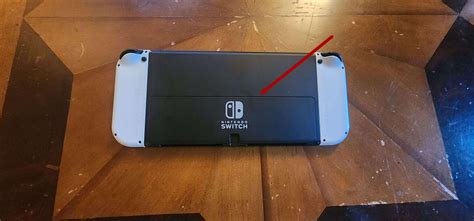
- Open the kickstand on the back of the console to reveal the microSD card slot.
- Insert the microSD card with the label facing the back of the Switch until it clicks into place.
- Close the kickstand and power on your Switch.
Your Switch will automatically detect and format the card. You can then navigate to System Settings > Data Management to see your expanded storage and manage where new downloads are saved. You can also manually move games between internal storage and the microSD card if needed.
Conclusion
Don’t let limited storage hinder your gaming experience. Investing in a high-quality microSD card for your Nintendo Switch is one of the best upgrades you can make. By choosing a reputable brand with adequate capacity and A1/A2 speed ratings, you’ll ensure smooth performance, quick loading times, and enough room for all the fantastic games the Switch has to offer. Happy gaming!


