Optimize mobile settings for smoother gameplay & less battery drain?
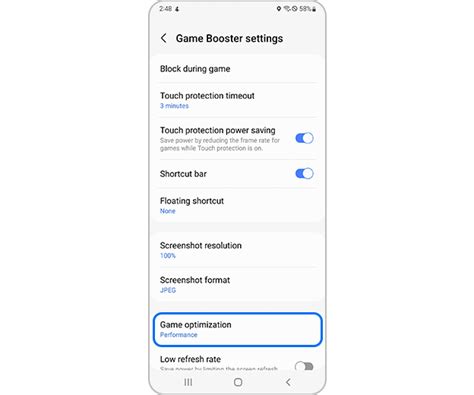
Unlocking Peak Performance: Why Optimize Your Mobile for Gaming?
Mobile gaming has evolved into a powerhouse industry, offering console-quality experiences on the go. However, the thrill of intense gameplay can quickly be dampened by frustrating lag, dropped frames, and a rapidly depleting battery. Optimizing your smartphone’s settings isn’t just about squeezing out extra frames; it’s about creating a sustainable and enjoyable gaming environment that keeps you immersed longer. Understanding which levers to pull, both within your games and across your device’s system, is key to transforming a mediocre session into a magnificent one.
This guide will walk you through critical adjustments that can dramatically improve your mobile gaming performance while simultaneously extending your device’s battery life. Get ready to bid farewell to stuttering graphics and unexpected shutdowns, and hello to seamless, extended play.
In-Game Graphics Settings: Your First Line of Defense
Most modern mobile games offer a plethora of graphics options. These are your most direct controls for balancing visual fidelity with performance and battery consumption.
- Resolution: Lowering the in-game resolution can significantly reduce the GPU’s workload, leading to higher frame rates and less heat generation. While visuals might be slightly less crisp, the performance boost is often worth it.
- Frame Rate (FPS): Aim for a stable frame rate. While 60 FPS is ideal, a consistent 30 FPS is often smoother than an unstable 60 FPS. If your device struggles, capping the FPS at a lower, stable rate can prevent stuttering and save battery.
- Texture Quality: High-resolution textures consume more VRAM and processing power. Reduce this setting for a noticeable performance uplift.
- Shadows and Effects: Shadows, anti-aliasing, reflections, and complex particle effects are often the biggest performance hogs. Turning them down or off can free up substantial resources.
Experiment with these settings. Start by lowering everything, then gradually increase until you find the perfect balance between visual quality and smooth, lag-free gameplay on your specific device.
System-Wide Settings for Gaming Dominance
Beyond in-game options, your phone’s operating system offers powerful tools to enhance gaming performance and conserve power.
- Disable Power Saving Modes: While great for general use, power saving modes often throttle CPU and GPU performance. Turn them off when gaming to unleash your phone’s full potential.
- Close Background Apps: Apps running in the background consume RAM, CPU cycles, and battery. Before launching a game, close all unnecessary applications.
- Silence Notifications: Pop-up notifications can disrupt gameplay, cause lag spikes, and drain battery. Utilize ‘Do Not Disturb’ modes or game modes offered by your phone’s OS to silence them.
- Adjust Screen Brightness: Your display is a major battery consumer. Lowering the brightness to a comfortable level, especially indoors, can significantly extend play time.
- Developer Options (Advanced Users): On Android, enabling Developer Options can unlock settings like ‘Force 4x MSAA’ (for improved graphics in some OpenGL ES 2.0 apps, though often a battery drain) or ‘Background process limit’ to restrict background app activity even further. Use these with caution.
Network & Connectivity: Lag-Free or Battery Drain?
Your network connection plays a vital role in online multiplayer games, but it also impacts battery life.
- Wi-Fi vs. Mobile Data: For online gaming, a stable Wi-Fi connection is almost always preferable to mobile data. Wi-Fi generally offers lower latency and is more power-efficient than constantly searching for and maintaining a cellular signal. If you must use mobile data, ensure you have a strong signal.
- Turn Off Unused Connectivity: If you’re not using Bluetooth or GPS, turn them off. These radios constantly scan for connections, consuming precious battery power.
Device Maintenance: Keeping Your Phone in Top Shape
A well-maintained device performs better and lasts longer.
- Clear Cache: Regularly clear the cache for your games and frequently used apps. Accumulated cache can slow down your device.
- Keep Software Updated: OS updates often include performance improvements and bug fixes. Game updates frequently optimize performance and efficiency.
- Restart Your Device: A simple restart can often clear temporary glitches and free up RAM, giving your phone a fresh start before a gaming session.

Cooling & Peripherals: External Factors
Heat is the enemy of performance and battery life. When your phone gets too hot, it ‘throttles’ performance to prevent damage, leading to lag and stuttering.
- Remove Phone Case: If your phone starts to heat up during extended sessions, remove its case to allow for better heat dissipation.
- Avoid Direct Sunlight: Playing in direct sunlight or a hot environment will quickly overheat your device.
- Consider a Cooling Accessory: For serious mobile gamers, external phone coolers can make a significant difference in sustained performance.
- Charging While Playing: While sometimes necessary, charging your phone during intensive gaming can generate additional heat and potentially accelerate battery degradation over time. If possible, charge fully before playing.
Conclusion: Master Your Mobile Gaming Experience
Optimizing your mobile settings for smoother gameplay and less battery drain is a journey of small, impactful adjustments. By systematically tackling in-game graphics, system-wide settings, network considerations, and device maintenance, you can transform your mobile gaming experience. You’ll enjoy higher frame rates, more responsive controls, and significantly longer playtime without constantly searching for a charger.
Remember, the goal isn’t necessarily to max out every setting, but to find the optimal balance for your specific device and game. Experiment, observe, and fine-tune. With these strategies, you’re not just playing a game; you’re mastering your mobile gaming environment, ensuring every session is as immersive and enjoyable as possible.