





Best Switch SD card for optimal game loading & storage?

Why an SD Card is Essential for Your Nintendo Switch
The Nintendo Switch, a marvel of portable gaming, comes with a rather modest 32GB (or 64GB for the OLED model) of internal storage. While sufficient for a few indie titles or digital purchases, avid gamers quickly find themselves running out of space. Many popular games can easily consume 10-20GB, with some, like The Legend of Zelda: Tears of the Kingdom, requiring over 18GB. This is where an SD card becomes not just an accessory, but a necessity.
An SD card not only expands your storage capacity, allowing you to download more games, DLC, and software updates, but it can also influence game loading times. Choosing the right card ensures a seamless gaming experience, preventing frustrating delays and storage woes.

Understanding SD Card Types for Nintendo Switch
The Nintendo Switch exclusively uses microSD cards. However, there are different classifications within microSD cards that are important to understand:
- microSDHC (High Capacity): Cards ranging from 4GB to 32GB.
- microSDXC (Extended Capacity): Cards ranging from 64GB up to 2TB.
For the vast majority of Switch users, a microSDXC card is the recommended choice due to its larger storage potential. The Switch supports up to 2TB microSDXC cards, although cards of that size are not yet widely available or affordable. Most users opt for 128GB, 256GB, or 512GB cards.
Key Factors When Choosing Your Switch SD Card
1. Capacity: How Much Storage Do You Really Need?
This is arguably the most critical decision. Consider your gaming habits:
- 64GB-128GB: Suitable for casual gamers or those who primarily buy physical game cartridges and only download a few digital titles or DLC.
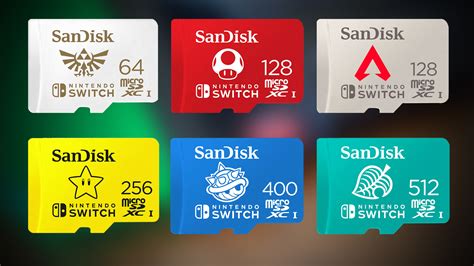
- 256GB-512GB: The sweet spot for most digital-first gamers. This allows for a significant library of downloaded games and updates without constant management.
- 1TB: For hardcore digital collectors who want virtually unlimited space for years to come. While expensive, it offers peace of mind.
2. Speed: Don’t Compromise on Performance
While the Switch itself has limitations on read/write speeds, choosing a fast SD card is still beneficial. Look for these indicators:
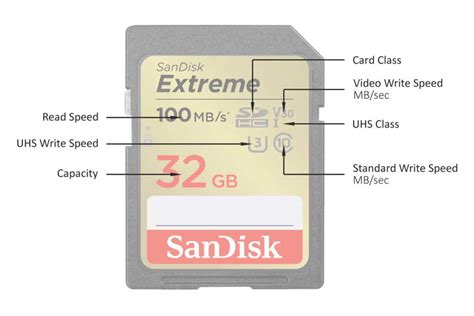
- UHS-I (Ultra High Speed-I): The Switch supports UHS-I cards. Look for the Roman numeral “I” symbol.
- Speed Class (C10): Indicates a minimum write speed of 10MB/s. Most modern cards exceed this.
- UHS Speed Class (U1 or U3): U1 guarantees a minimum write speed of 10MB/s, while U3 guarantees 30MB/s. U3 cards are generally preferred for slightly faster game loading, though the difference might be subtle on the Switch.
- Video Speed Class (V10, V30): V10 (10MB/s) and V30 (30MB/s) are also common. V30 is often synonymous with U3.
- Application Performance Class (A1 or A2): A1 and A2 ratings indicate optimized performance for running applications, which includes games. A1 guarantees a minimum random read speed of 1500 IOPS and random write speed of 500 IOPS, plus a sequential performance of 10MB/s. A2 offers even better random performance but the Switch doesn’t fully leverage A2’s advantages over A1. An A1-rated card is an excellent choice.
In summary, aim for a microSDXC card with at least a UHS-I U1 or U3 rating, and ideally an A1 rating, for optimal performance.
3. Reputable Brands: Quality and Reliability
Sticking to well-known brands helps ensure reliability, data integrity, and often comes with better warranties. Some of the most recommended brands include:
- SanDisk: Widely regarded and even produces officially licensed Nintendo Switch SD cards.
- Samsung: Known for their EVO Select and EVO Plus lines, offering great value and performance.
- PNY: A reliable alternative, often at competitive prices.
- Lexar: Another strong contender in the storage market.
Beware of unusually cheap, unbranded cards, as they often have slower speeds or false capacities.

Top Picks for Your Nintendo Switch SD Card
Considering capacity, speed, and brand reliability, here are some general recommendations:
- Best Overall (Value & Performance): SanDisk Ultra or Samsung EVO Select (256GB/512GB)
These cards offer an excellent balance of speed (UHS-I U1/U3, A1 rated) and generous storage at competitive prices. They are readily available and highly reliable. - Best for Max Storage: SanDisk Ultra or Samsung EVO Select (1TB)
If budget isn’t a primary concern and you want to download every game imaginable, a 1TB card from these reputable brands is your best bet. - Officially Licensed Option: SanDisk Nintendo-Licensed MicroSDXC Card
These cards are often branded with popular Nintendo characters (Mario, Zelda, Animal Crossing) and are essentially SanDisk’s standard cards but with a slightly higher price tag for the branding. They are guaranteed to work perfectly.
Installation and Formatting
Installing an SD card in your Switch is straightforward:
- Power off your Switch completely (hold the power button, then select “Power Options” > “Turn Off”).
- Open the kickstand on the back of the console to reveal the microSD card slot.
- Insert the microSD card with the label facing down until it clicks into place.
- Close the kickstand and power on your Switch.
The Switch will automatically detect and format the card if it’s new. If you’re using an older card, you might be prompted to format it, which will erase all existing data.
Conclusion
Upgrading your Nintendo Switch storage with a high-quality microSDXC card is one of the best investments you can make for an enhanced gaming experience. By prioritizing sufficient capacity, a reliable brand, and an appropriate speed class (UHS-I U1/U3 with A1 rating), you’ll ensure your digital adventures are seamless, fast, and unhindered by storage limitations. Happy gaming!



