





How to navigate in-game purchases and microtransactions with kids?
Understanding the Digital Playground: Why In-Game Purchases Matter
The world of video games has evolved dramatically, moving beyond simple one-time purchases to an intricate ecosystem of in-game purchases and microtransactions. For many children, gaming is a central part of their social life and entertainment. However, for parents, navigating this landscape can feel like a minefield, fraught with potential for unexpected spending, digital peer pressure, and a lack of understanding about digital value. This guide aims to equip you with the knowledge and strategies needed to manage in-game purchases effectively, ensuring your children enjoy their gaming safely and responsibly.

Demystifying Microtransactions: What Are We Talking About?
Microtransactions are small purchases made within a video game. These can range from purely cosmetic items like character skins or outfits, to practical advantages like extra lives, special weapons, or time-saving boosts. Some games feature “loot boxes” or “gacha mechanics,” where players pay for a random chance to win desirable items, mimicking gambling-like mechanics. Understanding these different forms is the first step in managing them. Many games are “free-to-play,” meaning they cost nothing to download but rely heavily on microtransactions for revenue, making them particularly tempting for kids.
The Hidden Risks: From Accidental Spending to Digital Pressure
Without proper oversight, in-game purchases can lead to several challenges. Accidental or unauthorized spending is a common issue, often due to kids having access to linked payment methods. Children may not fully grasp the concept of digital money, seeing it as an endless resource rather than real-world currency. Furthermore, social pressures can play a significant role; if all their friends have the latest skin or character, a child might feel compelled to make purchases to keep up. In extreme cases, the allure of loot boxes or the constant drive for new items can even lead to addictive behaviors.
Proactive Parenting: Essential Strategies for Control
1. Open Communication and Financial Literacy
Start by having honest conversations with your children about money, both real and digital. Explain that in-game items cost real money and discuss the value of saving. Teach them about budgeting and opportunity cost – choosing to spend money on one item means not having it for another.
2. Establish Clear Rules and Boundaries
Before any game is played, set clear expectations. Will there be a strict “no purchase” rule, or will purchases be allowed under specific conditions (e.g., earning money through chores, a pre-approved budget)? Make sure these rules are understood and consistently enforced.
3. Leverage Parental Controls and Device Settings
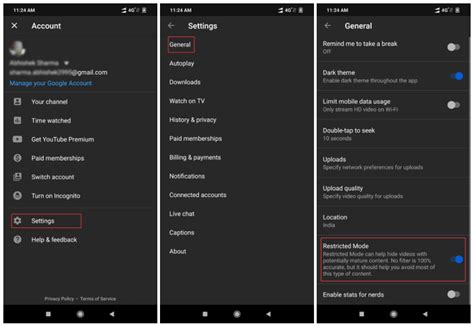
Most gaming platforms (PlayStation, Xbox, Nintendo Switch, Steam) and mobile app stores (Apple App Store, Google Play Store) offer robust parental control settings. These allow you to:
- Require a password for every purchase.
- Disable in-game purchases entirely.
- Set spending limits.
- Review purchase history.
Take the time to explore and configure these settings on all devices your child uses for gaming.
4. Keep Payment Methods Secure
Ensure that your credit card or PayPal account details are not directly accessible from your child’s gaming device or profile without a password. Remove saved payment information if necessary, or use gift cards for specific, pre-approved purchases.
5. Encourage Earning for Purchases
If you decide to allow purchases, consider having your child earn the money through chores or by saving their allowance. This teaches them the value of work and deferred gratification, making them more thoughtful about their spending choices.

When Unauthorized Purchases Happen: What to Do Next
Despite all precautions, sometimes unauthorized purchases still occur. In such cases, remain calm. First, discuss with your child what happened to understand the situation. Then, check the platform’s refund policy. Many platforms offer a grace period for refunds, especially for unauthorized transactions. Immediately update your parental control settings and secure your payment methods to prevent future incidents.

Empowering Parents for a Safer Digital Future
Navigating in-game purchases and microtransactions with kids requires a combination of vigilance, education, and open communication. By understanding the mechanics of these systems, setting clear boundaries, utilizing parental controls, and teaching valuable financial lessons, you can empower your children to make responsible choices in their digital lives. This approach not only protects your wallet but also fosters a healthier relationship with gaming and money for your child.



