





Best Switch MicroSD for big game libraries?

For many Nintendo Switch owners, the console’s meager 32GB (or 64GB for OLED models) of internal storage quickly proves insufficient. With the increasing size of digital games, DLC, and updates, a robust microSD card is no longer an optional upgrade but a necessity, especially for those with big game libraries.
Why Your Switch Needs More Storage
Many flagship Switch titles can consume several gigabytes, with some even exceeding 15-20GB. Factor in several such games, plus indies, updates, and screenshots, and you’ll hit the storage ceiling surprisingly fast. A high-capacity microSD card allows you to download and keep dozens, if not hundreds, of games ready to play without the constant hassle of archiving and redownloading.

Key Factors for Choosing a Switch MicroSD
Not all microSD cards are created equal. When selecting one for your Nintendo Switch, several factors come into play:
Capacity: How Much is Enough?
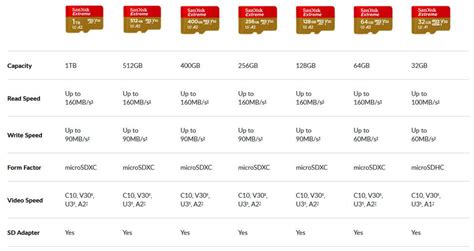
For large game libraries, we recommend starting at 256GB, but 512GB or even 1TB cards offer far greater peace of mind. A 256GB card can hold a substantial number of games, while a 512GB card offers enough space for even the most avid digital collector. If you plan to truly go all-digital and never worry about space again, a 1TB card is the ultimate choice.
Speed: Don’t Compromise on Performance
The Nintendo Switch supports UHS-I (Ultra High Speed Phase I) microSD cards, with read speeds up to 100MB/s. While faster UHS-II cards exist, the Switch doesn’t utilize their full potential, so you’d be paying for speed you can’t use. Look for cards rated U3 (UHS Speed Class 3) for optimal performance, ensuring quick game loading and smoother gameplay. An A1 or A2 rating also indicates good performance for app loading, which translates well to game performance.

Top MicroSD Card Recommendations for Switch
Based on capacity, speed, and reliability, here are some of the best options:
- SanDisk Ultra/Extreme microSDXC: SanDisk is an official partner with Nintendo for Switch-branded cards, making them a top, trusted choice. The Ultra line offers great value, while the Extreme series provides slightly better speeds. Both are excellent for the Switch.
- Samsung EVO Select/Plus microSDXC: Samsung’s EVO line is renowned for its reliability and strong performance. The EVO Select (often Amazon exclusive) and EVO Plus cards offer competitive speeds and come in a wide range of capacities, perfect for the Switch.
- Lexar PLAY/Professional microSDXC: Lexar offers reliable and high-performance cards. The PLAY series is designed for gaming and mobile devices, providing excellent read speeds and a good balance of price and performance.
All these brands offer U3 and A1/A2 ratings, ensuring your games load quickly and efficiently.
Installation and Best Practices
Installing a microSD card is straightforward: simply insert it into the slot under the kickstand on the back of your Switch. The console will typically format it automatically. Once installed, go to System Settings > Data Management to see your expanded storage. You can also transfer existing game data from your internal memory to the microSD card from this menu.
Conclusion
Investing in a high-quality, high-capacity microSD card is one of the best upgrades you can make for your Nintendo Switch, especially if you have a growing digital game collection. Cards from SanDisk, Samsung, or Lexar, with capacities of 256GB or more and U3/A1 ratings, will provide the storage and speed you need to enjoy your extensive game library without limits.


