





Best MicroSD card for Nintendo Switch? Maximize game storage.

The Nintendo Switch, with its incredible library of games, offers endless entertainment on the go or at home. However, its built-in internal storage of just 32GB (or 64GB for the OLED model) quickly fills up, especially if you prefer digital downloads. This is where a MicroSD card becomes an absolute essential, transforming your console into a digital game haven.
Why You Absolutely Need a MicroSD Card for Your Switch
While some games are small, many modern titles, especially AAA releases, can easily consume 5-15GB or even more of storage. Digital-only purchases can quickly max out your internal memory, leaving you no room for updates, DLC, or new games. A MicroSD card is the most straightforward and cost-effective way to drastically expand your Switch’s storage, ensuring you never have to delete a beloved game to make space for another.

Key Factors to Consider When Choosing a MicroSD Card
Not all MicroSD cards are created equal. To get the best performance and value for your Switch, keep these crucial factors in mind:
1. Capacity: How Much Storage Do You Really Need?
- 128GB: A good starting point for casual gamers with a mix of physical and digital titles.
- 256GB: Our recommended minimum for most digital-first gamers, offering ample space for several large titles and many smaller ones.
- 512GB: An excellent sweet spot for avid digital collectors, providing vast storage for a substantial game library without breaking the bank.
- 1TB: For the ultimate digital hoarders or those who want to download everything, a 1TB card virtually eliminates storage concerns.
The Nintendo Switch officially supports MicroSDXC cards up to 2TB, though 1TB is currently the largest widely available capacity.
2. Speed: Don’t Compromise on Load Times
Speed is critical for smooth game loading and performance. Look for these specifications:
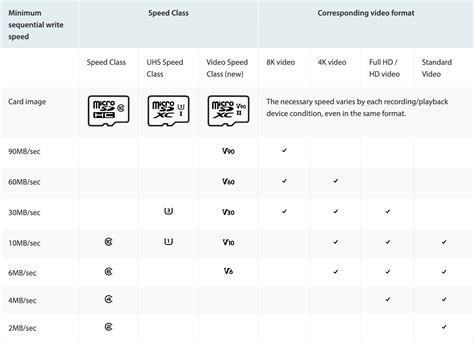
- UHS-I (Ultra High Speed Phase I): The Switch supports UHS-I. Don’t worry about UHS-II cards; they are more expensive and offer no performance benefit on the Switch.
- Speed Class U3 (or V30): This indicates a minimum sequential write speed of 30MB/s. This is the optimal speed class for the Switch, ensuring fast game loading and smooth performance. Avoid U1 (V10) if possible.
- A1 or A2 App Performance Class: These ratings denote optimized performance for running applications, which translates well to game loading. While A2 is technically faster for random read/write, the Switch’s architecture doesn’t fully utilize A2’s advantages over A1, so either is excellent.
In short: Prioritize cards with a U3 and at least an A1 rating.
3. Brand Reliability: Stick with Trusted Names
While cheaper, unbranded cards might seem tempting, they often come with reliability issues, slower actual speeds, and a higher risk of data corruption. Invest in reputable brands for peace of mind:
- SanDisk: Widely regarded as the industry leader, especially their ‘SanDisk for Nintendo Switch’ licensed cards, Extreme, and Ultra lines.
- Samsung: Their EVO Select and PRO Plus series offer excellent performance and reliability.
- Lexar: Another strong contender, known for quality and value.
Top MicroSD Card Recommendations for Nintendo Switch
Based on performance, reliability, and value, here are our top picks:
Best Overall & Officially Licensed: SanDisk MicroSDXC Card for Nintendo Switch
SanDisk offers officially licensed cards featuring iconic Nintendo characters. These are essentially re-skinned SanDisk Ultra cards, guaranteed to meet Nintendo’s specifications. Available in capacities from 64GB up to 512GB (and sometimes 1TB), they offer reliable U3, A1 performance.
Best Performance & Value: SanDisk Extreme or Samsung EVO Select
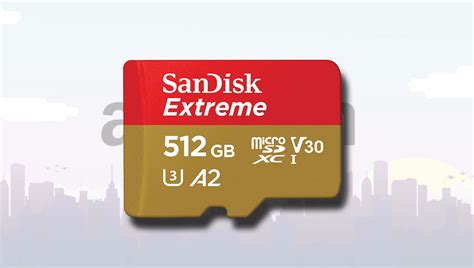
Both the SanDisk Extreme and Samsung EVO Select lines consistently deliver top-tier U3, A2 performance at competitive prices. They are slightly faster than the standard Ultra/licensed cards, though the real-world difference on a Switch might be minimal. These are excellent choices if you find them on sale.
Installing Your MicroSD Card and Managing Storage
Installation is a Breeze:
- Turn off your Nintendo Switch completely.
- Open the kickstand on the back of the console to reveal the MicroSD card slot.
- Insert the MicroSD card with the label facing down until it clicks into place.
- Close the kickstand and power on your Switch.
Your Switch will automatically detect and format the card if needed. You can check the available space in System Settings > Data Management.
Tips for Managing Game Storage:
- Archive Software: If you run out of space, consider archiving games you aren’t currently playing. This deletes the game data but keeps the save data, allowing you to re-download it later.
- Physical vs. Digital: While physical game cartridges don’t use internal storage for the base game, many still require significant downloads for updates and DLC.
- Move Data: You can transfer data between your internal storage and the MicroSD card (though save data is always stored internally and cannot be moved).

Conclusion
Investing in a high-quality MicroSD card is one of the best upgrades you can make for your Nintendo Switch. It frees you from the constant worry of storage limitations, allowing you to download more games, updates, and DLC without compromise. By choosing a reputable brand with adequate capacity and the right speed ratings (U3, A1/A2), you’ll ensure a seamless and enjoyable gaming experience for years to come.



